One app that runs the whole company, and keeps score
A small company runs on a dozen half-systems: a to-do app, an inbox, a spreadsheet of invoices, a folder of quotes, a thread of text messages that is secretly the help desk. We had all of them. So we built one application to hold the lot, put it behind our own admin sign-in, and gave it a scoreboard, because work that is counted gets done. This is the system we open every morning.
6modules under one sidebar
8kinds of XP in one ledger
3×3impact × urgency matrix
In-housebuilt & run by us
Built by Stone Age Software for Stone Age Software: the system the company's own operations, client work and billing run on, written on the same stack we deliver to clients.
Six modules on one page, every one of them writing to the same XP ledger, and three doors the client walks through: a share link, a pay page and a support portal, each served by the same application. The kinds listed in the ledger are the real ones.
Scroll sideways to see the whole diagram
The problem
Nothing was broken, which is the dangerous version. Tasks lived in whichever app was open, client details in email signatures, quotes and signed agreements in a downloads folder, and invoices in a spreadsheet that was right as long as one person remembered to update it. Support requests arrived as text messages and were answered from memory. Each piece worked. None of it knew about the rest.
The cost shows up as questions that should be instant and are not. Which agreements renew this month. Which invoice is overdue. Whether the thing a client asked about on Tuesday ever got done. And because nothing was counted, a good week and a bad week felt the same from the inside.
What we built
One page at /admin/do with six modules down its sidebar: Tasks, Desk, Nexus, Invoices, Vault and Mail. Each module has its own URL, so a reload, the back button and a pasted link all land where they were, and moving between them is a routed transition rather than a new page. A command menu reaches every task, ticket, client, document and action from one box, and each module's main act sits on a single key.
The page is a React application compiled into one file and committed to the repository, because the server installs nothing by hand: the deploy runs no Node, and a build stamped with a hash of its sources fails verification if the two ever disagree. The server half is plain Python on SQLite, split into modules that run without the web framework, so every rule below is held by a harness that never boots the site.
Keeping score without cheating
The gamification is the part people notice first and the part that had to be designed most carefully, because a score that can be gamed is a score nobody trusts. XP is not a column on a task. Finishing a task writes a row in a ledger, and moving the task back out of Done deletes that row. Toggling a card earns nothing. Deleting a finished task keeps what it earned, because the work was done.
Every module writes to the same ledger under its own kinds: winning a client, delivering a project, renewing a service, issuing and collecting an invoice, resolving a ticket, and a requester confirming the fix. A milestone carries a unique reference, so dragging a client back and forth across the pipeline scores once, and stepping back withdraws it. A renewal is never taken back by a stage change: it happened. Only a finished task or a resolved ticket counts as work done, so a milestone can raise the level but never keep a streak alive on its own.
Progress the people doing the work can see
Most work tracking measures presence: hours logged, screens watched, messages answered within minutes. The ledger measures finishes. A task counts when it is done, a ticket when it is resolved, an invoice when it is collected, and nothing about how the day looked in between is recorded, because nothing about it matters to the score. That is what makes the number a positive one to be measured by: it can only go up, and only by finishing something.
The weights say what the company values. A critical finish is worth six times a low one, finishing before the due time pays a bonus, and a ticket pays more when the first reply came inside its target and again when the requester closes it themselves. That last rule is the point of the whole design: the highest-paying thing an agent can do is fix the problem so well that the person who asked says so.
Nothing is ever deducted. A missed due date earns the base and not the bonus; a late ticket still pays its priority. The streak is the one thing that can lapse, and it survives until midnight on the business clock, so a quiet morning does not break it. The daily goal is the person's own, picked from a short list, and the sounds and the confetti switch off with one key. Every rule is a few lines of code and the ledger is a table anyone can read, so a number is never a mystery and never an argument.
Every rule the ledger scores by, in one place. The weights are the ones in the code: a critical finish is worth six times a low one, timeliness and a client confirming the fix pay extra, and nothing is ever deducted.
Scroll sideways to see the whole diagram
The modules, with the pictures
Six modules, each described beside its own screen. Every name, figure and file in these pictures is placeholder data from a throwaway database, seeded to show the system working: nothing here is a client of ours.
Tasks
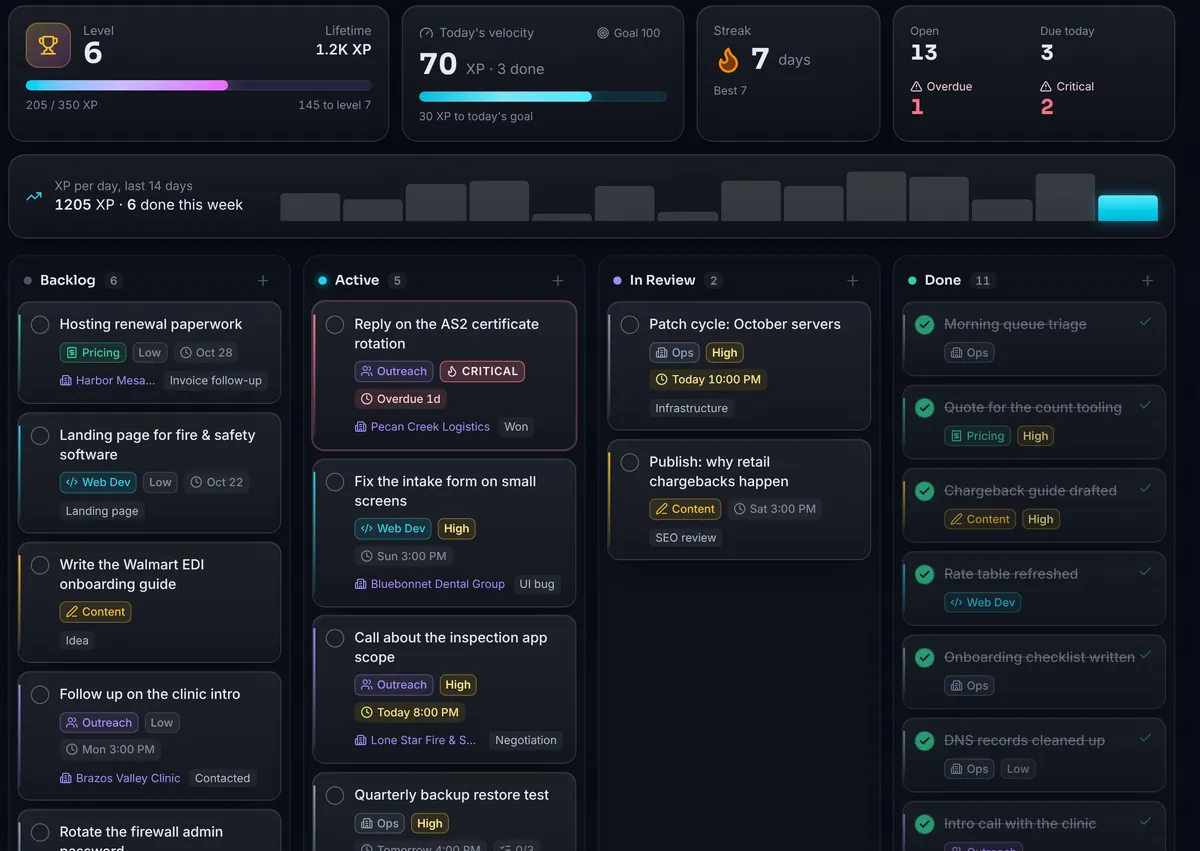
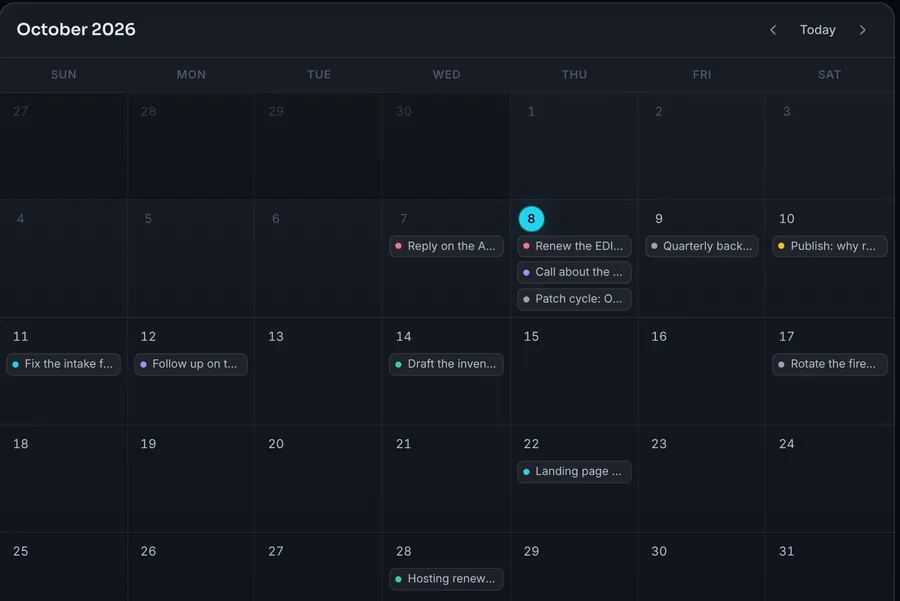
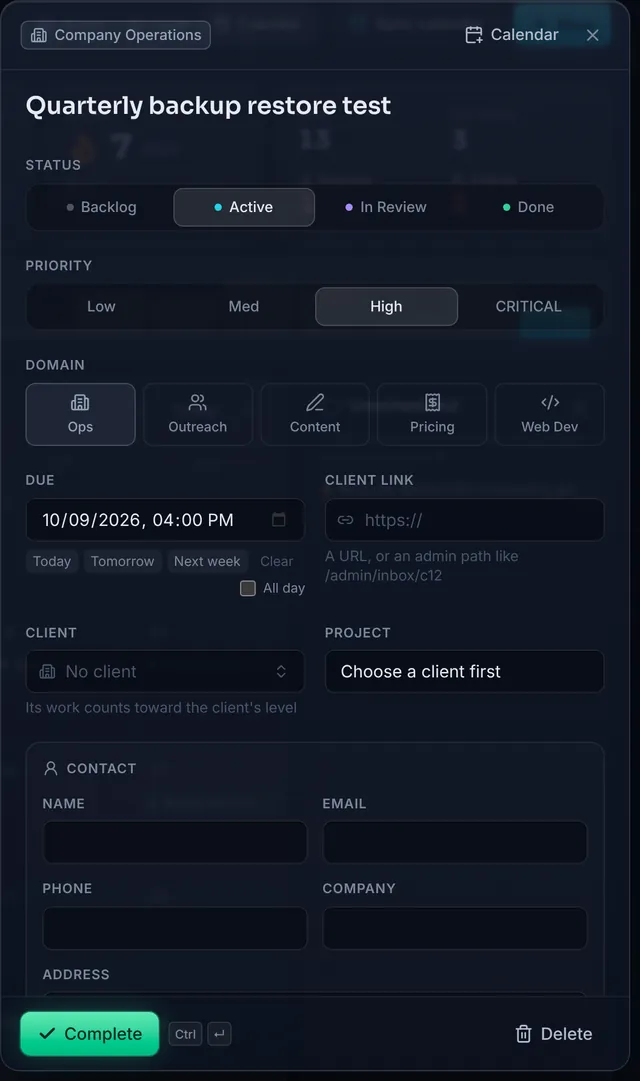
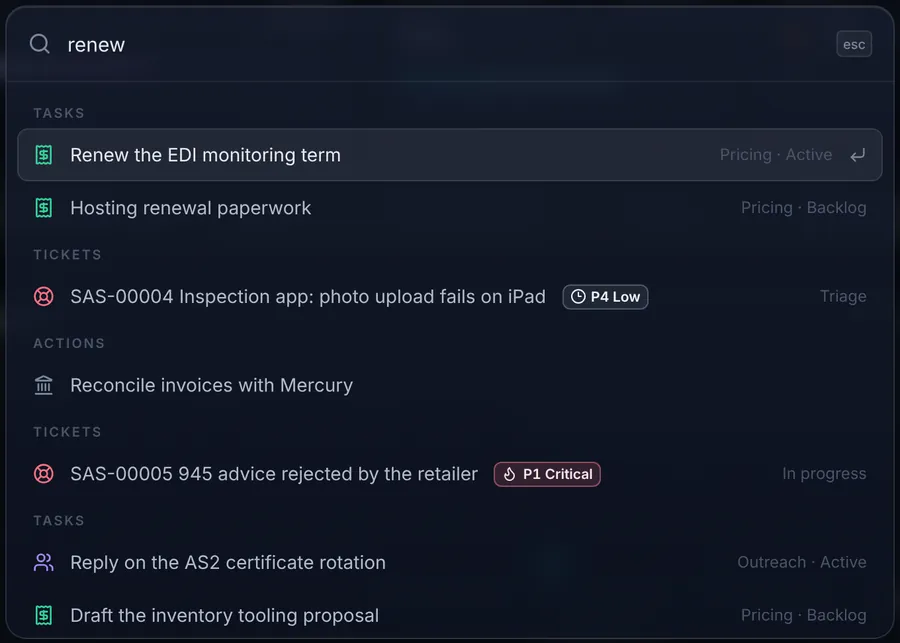
A board, a table and a calendar over one filtered list, with five domains that each add their own fields to a card. An email becomes a task once and only once, keyed on its thread. Calendar sync needs no OAuth: the Google link opens Calendar's own add-event screen prefilled, and every .ics keeps a stable identifier per task so importing again updates instead of duplicating. The command menu reaches every task, ticket, client, document and action from one box.
The board. Every card carries its domain, priority and due time; the strip above it keeps the level, today's XP against a goal, the streak and what is overdue.
The same tasks on a month. Drag a card onto a day to schedule it, or into the tray to clear the date.A task's panel. Picking a client fills the contact block from the client book; what you type over it stays on the task.The command menu finds tasks, tickets, clients, documents and actions from one box.
Nexus, the client book
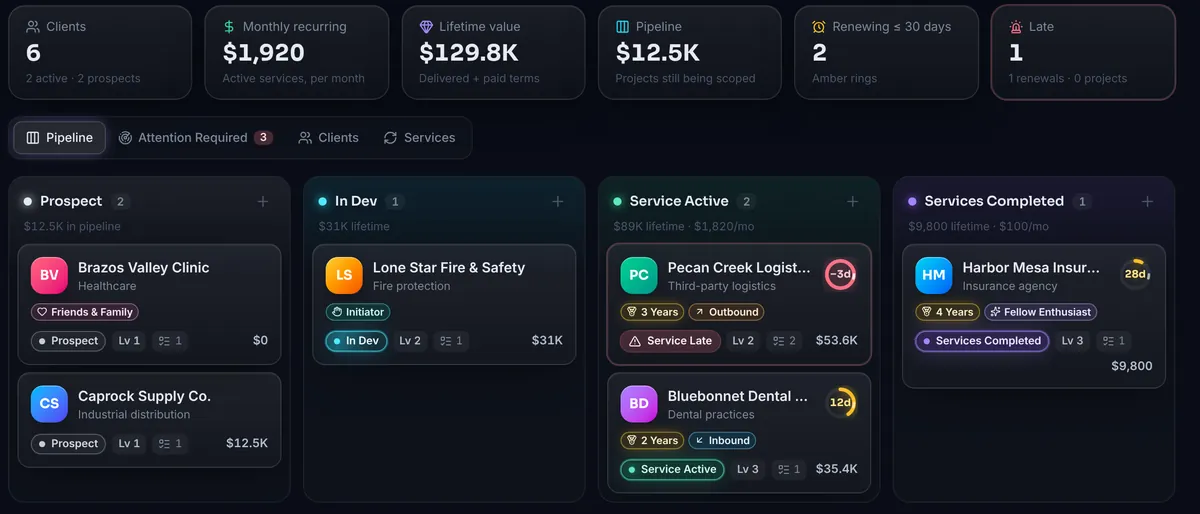
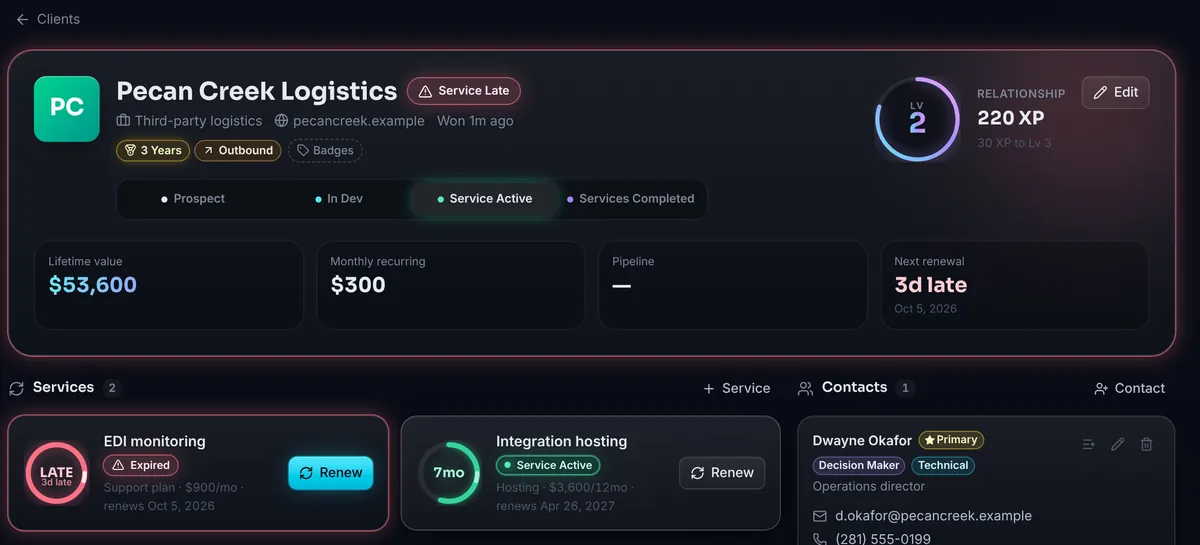
Clients at the top, the projects built for them and the services they pay for underneath, every one linkable to tasks and documents. Badges tell clients apart at a glance, a client has any number of contacts with exactly one primary, and a new task fills its contact block from the client picked. Late is never stored: it is read from the dates every time a row is shown, so nothing has to run at midnight for a ring to turn red, and renewing clears it the moment it saves.
The client book as a pipeline. A renewal ring turns amber as its date nears and red once it is late, read from the dates every time the page draws.
One client's profile: services, projects, tasks, people and documents in one place, with a relationship level earned from the work done for them.
Vault, the documents
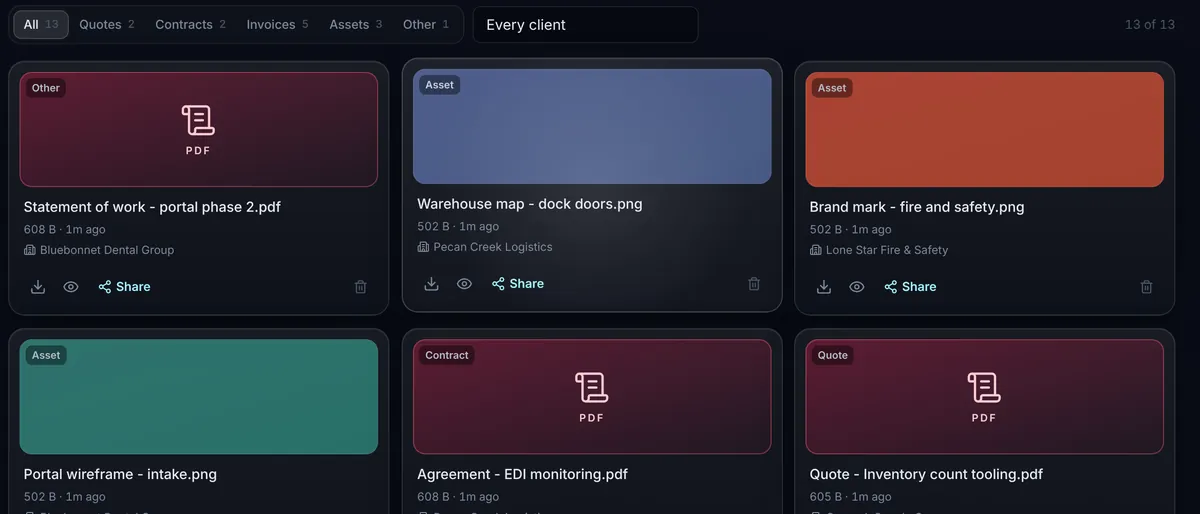
Quotes, contracts, invoices and assets, stored once under the hash of their bytes. Only bytes that prove what they are may open in the browser; everything else is a download, whatever its name says. A share link expires in one, seven or thirty days, only its hash is stored, and the public page it opens carries no analytics tag, because the secret is in the address. A presentation viewer draws PDFs and images itself and hands Word and PowerPoint files to Microsoft's viewer through a short-lived ticket, never a share token.
The Vault files a dropped file by its name, stores it once by content, and shares it through a link that expires.
Desk, the help desk
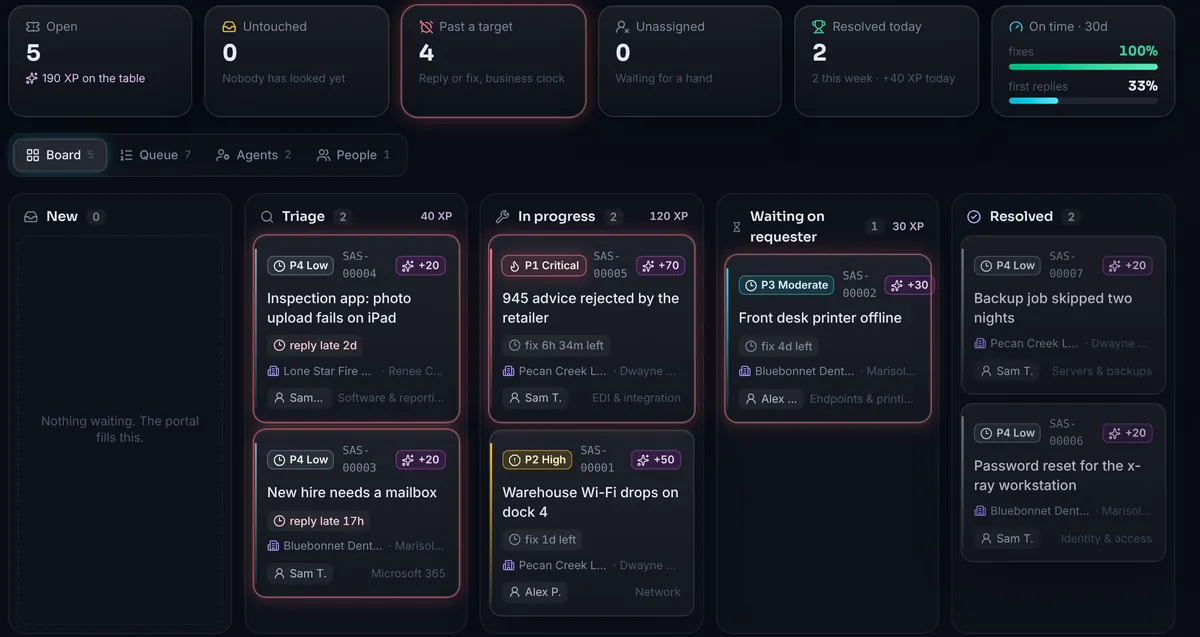
An incident desk with the bones of the big ones: a priority read off a three-by-three impact and urgency matrix, response and fix targets measured in business hours, one state machine, routing by category to the least-loaded agent, public replies beside private notes, and an audit trail. Clients sign up to the portal only with a company code or an invite link the Nexus issued, and resolving a ticket scores the same ledger as finishing a task.
The help desk. Each ticket shows its priority, how long is left on its response or fix target, who holds it, and the XP it pays when resolved.
Invoices
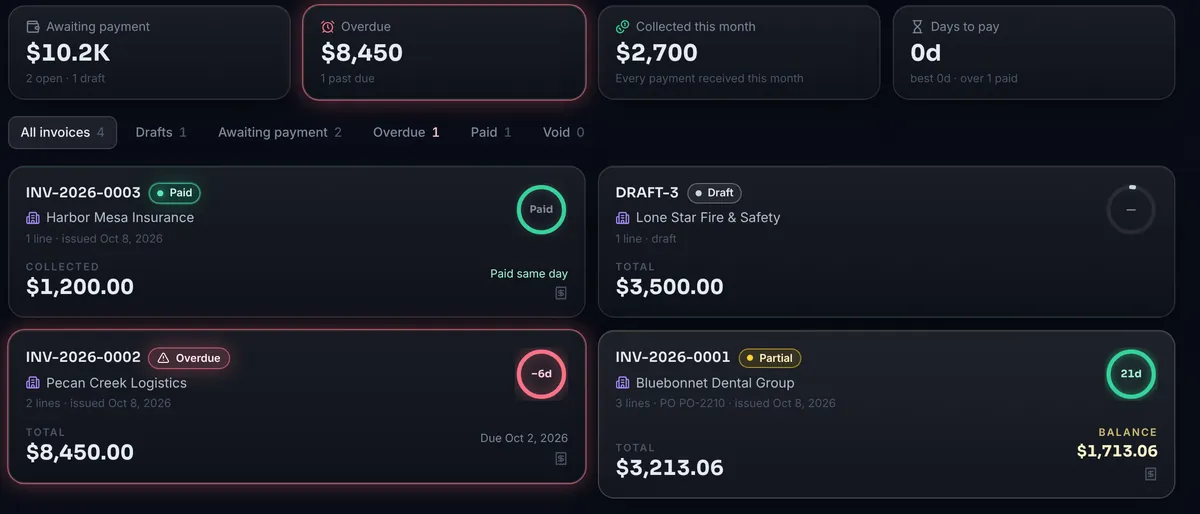
From draft to issued to paid. Issuing one assigns its number, freezes the theme and bank details, renders a PDF with nothing but the standard library, files it in the Vault under the client, and scores the ledger. The client's pay page is its own shell, offers a card link when the processor is set up and bank details otherwise, and a payment can land by hand, by webhook, or by reconciling the bank feed.
Invoices from draft to paid. Issuing one numbers it, renders the PDF, files it in the Vault and scores the ledger.
Mail
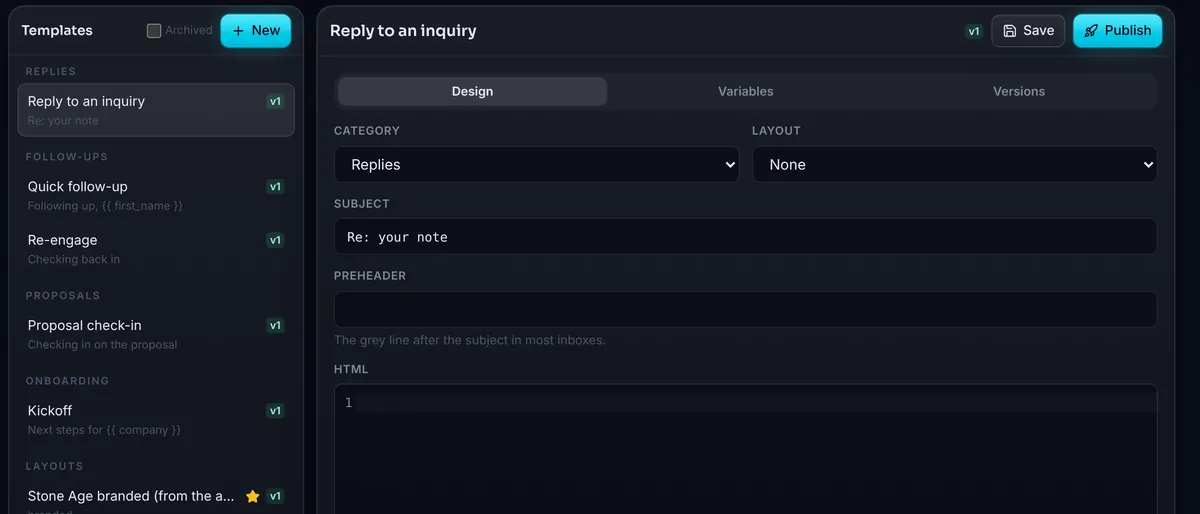
Every linked mailbox in one inbox with a composer and a template library that fills itself from the client book. Provider traffic never runs in a web request; a separate worker does it, holding a lock so one sync runs per shard. Credentials are sealed under the server's own key, every message is sanitised before it reaches the screen and framed without scripts, and pictures travel through a proxy that checks each hop, so a tracking pixel reports nothing.
Mail's template library. A published template appears in the composer and fills itself from the client book for whoever is being written to.
What it brings
The practical return is that the questions are instant now. The Nexus's attention tab lists every renewal inside thirty days and every project past its date, most urgent first. The invoices strip says what is awaiting payment and what is overdue. The desk says what is past a target. The board says what is due today. None of it is a report somebody runs; it is the state of the tables, drawn.
The second return is the one the scoreboard was built for. A day with a number on it gets compared to yesterday, a streak gets protected, and a client whose level has not moved in a month is a client about to be forgotten. The sound effects and the confetti are optional, and the ledger underneath them is not.
From one board to a team
Today the board has one sign-in, and the help desk has named agents with a leaderboard: resolved in the last thirty days, on-time rate, open now. That is the shape a team version grows from. Each person gets a ledger of their own, team velocity is the sum of them, a client's level is still earned by whoever did the work, and a manager's view is a list of what got finished this week rather than who looked busy. The rules do not change with the headcount: rows not columns, one reference per milestone, nothing deducted, every rule readable.
We are building toward offering it hosted. A company signs up, invites its people and its clients, and gets the board, the desk, the client book, the vault, invoicing and mail with the scoring already in place. Multi-tenant storage, per-person sign-ins and roles are the work in front of us; the scoring, the help desk, the share links and the pay page are built and in daily use. If you would like to run your team on it early, the form at the foot of this page reaches the people building it.
The left half is the system as it runs today: one board, one ledger, named agents on the desk. The right half is the plan for the hosted team version, drawn dashed because it is not built yet: a ledger per person, rolling up to the team and to the clients.
Scroll sideways to see the whole diagram
The result
We run on it. The task board replaced the to-do app, the client book replaced the signatures and the spreadsheet, the Vault replaced the downloads folder, invoices go out of the same page that tracks the work, and support requests arrive as tickets with a target instead of as texts. The owner's own setup work lands on the same board: when a change ships that needs a key pasted or a console setting flipped, the deploy files it as a task, once, with the steps as a checklist.
The honest measure is that the system is used on the days when nothing is wrong, which is the test most internal tools fail. It is also a working example of how we build: server-rendered where it can be, one bundle where it cannot, stdlib-only modules with a harness each, and a deploy that needs nobody at a keyboard. The same approach is what a client gets.
Built with
Python
Flask
SQLite
React
TypeScript
Tailwind
Framer Motion
PDF.js
IMAP & SMTP
Stripe & Mercury APIs
On the pictures
The screenshots come from a seeded demo database, so every client, contact,
amount and file in them is invented. The code, the rules and the figures about
the software are real. Happy to walk through it on a call.
Services this draws on
Custom Software & Web Development
Websites, internal tools, APIs, and automation for teams without a dev department.
One application that replaced a decade of spreadsheets
A warehouse ran its floor on shared spreadsheets, emailed reports, and tribal knowledge. We replaced all of it with a single internal platform — and kept it running while people worked.
A damage or count discrepancy is a claim, and a claim is worth whatever evidence is attached to it. We built the casework — photo capture at the point of discovery, a case that assigns and escalates itself, and a PDF report that goes out with the pictures already in it.
A request queue where the approvals set the status
Internal software requests arrived by email and were approved in conversation. We built an intake form, a board and a three-role approval gate where the votes move the card — and gave requesters a private link so they can follow and edit their own request without an account.
A free assessment gives you a clear picture and a prioritized plan — no commitment.
Prefer to talk?
Call 832-598-8234
or email msco@stoneagesoftware.com.
Houston, Texas — serving Houston, The Woodlands, Conroe, Sugar Land, Katy, Pearland, and the Greater Houston metro.
What happens next
We read your message, an engineer replies with questions or a straight answer, and
if a call would help, we book one. From the first reply on, you're talking to the
people who'd do the work.