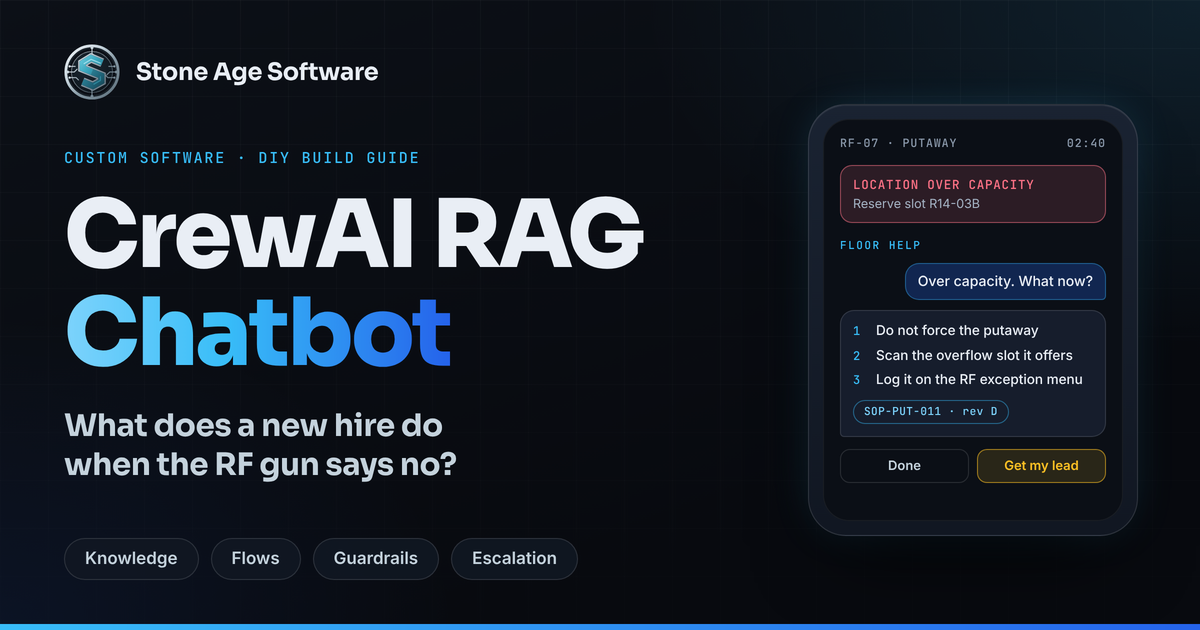
It is 2:40 a.m. on a peak-season night shift. A seasonal hire scans a pallet into a reserve slot. The RF gun answers with "LOCATION OVER CAPACITY." The SOP binder is in the office. The lead is three aisles over, sorting out a short pick. So the new hire waits, or guesses.
A CrewAI RAG chatbot closes that gap. It answers from your own SOPs, cites the document it used, and pulls in a person when the answer needs judgment. This guide walks through building one, with the features that keep it fast and honest.
The timing matters. UPS alone plans to hire 100,000 seasonal workers for the 2026 holidays, as daily parcel volume tends to double. Those first shifts will be full of forgotten steps and strange errors.
Why the answer is never where the question happens
Most warehouses have plenty of documentation. What they lack is documentation at the point of work. SOPs live on a shared drive. Client rules live in a statement of work. The fix for an odd RF error lives in one lead's head.
The question happens somewhere else: at the RF gun, mid-task, with a pallet on the forks. That distance is a structural gap, not a people problem. Nobody ever built the handoff between the written process and the moment of need.
The gap shows up in three moments:
- The forgotten step. A cross-dock receipt has nine steps, and step six only matters twice a week.
- The exception. The screen throws an error the trainee has never seen.
- Day one. A new hire needs a patient guide, not a binder.
New people arrive all year, not only at peak. In August 2026, hires equaled 3.4 percent of employment in transportation, warehousing, and utilities, according to BLS. That is a steady stream of first days, every month.
How a CrewAI RAG chatbot fits together
RAG stands for retrieval-augmented generation. The model answers from documents you supply, not from whatever it absorbed in training. CrewAI adds the orchestration: agents with roles, guardrails with teeth, and Flows that route work between them.
The build has four layers:
- Knowledge. SOPs, exception playbooks, and client rules, indexed for search.
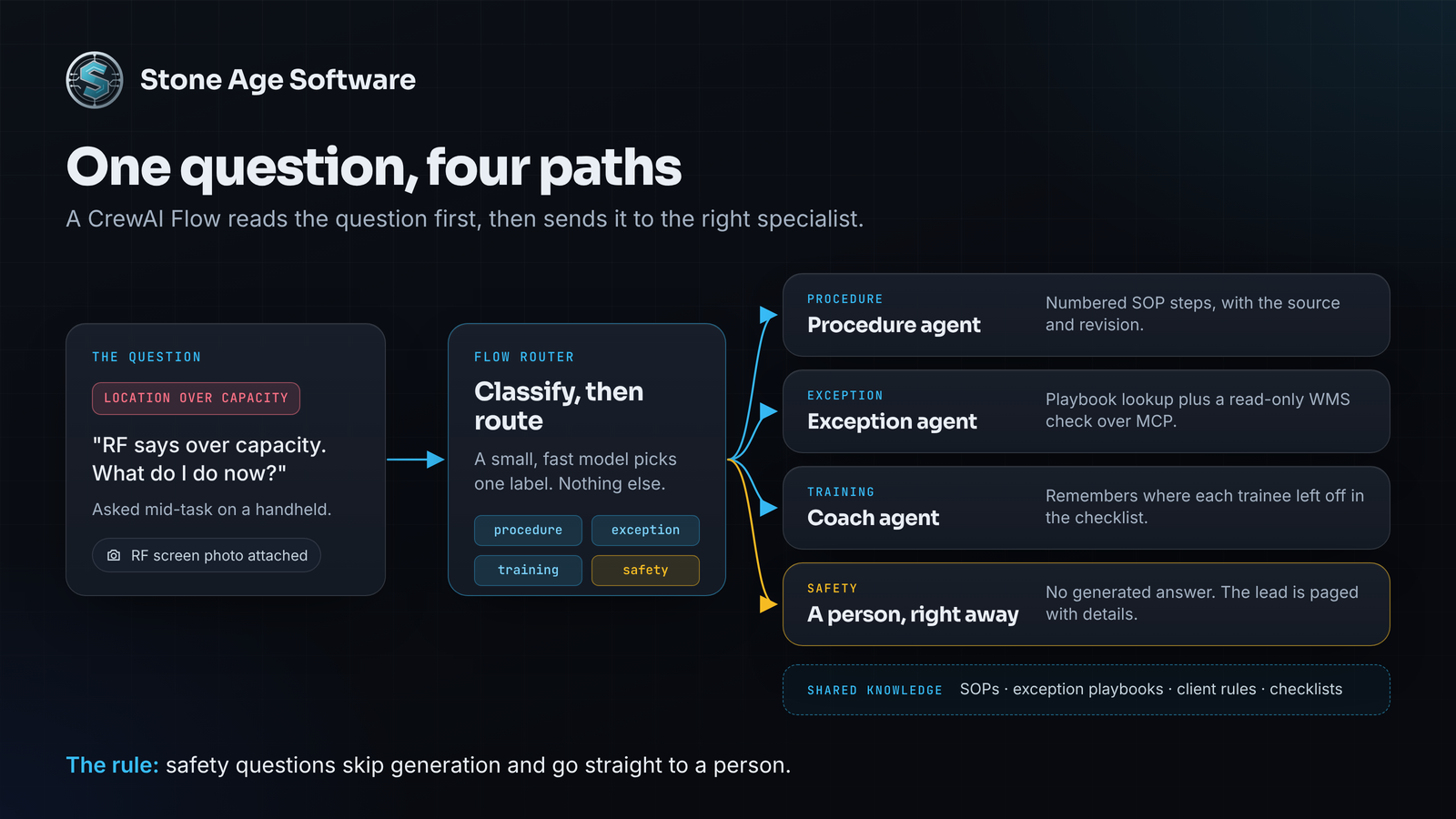
- A Flow router. It reads each question and picks a path.
- Specialist agents. One answers procedure questions, one triages exceptions, and one coaches trainees.
- Guardrails and escalation. No answer ships without a cited source. Safety questions go straight to a person.
Step 1: Load SOPs as knowledge, not a giant prompt
CrewAI's Knowledge feature chunks and indexes your files. It then retrieves only the passages a question needs. Files go in a knowledge/ folder at the project root. The Excel source also needs pandas and openpyxl installed.
from crewai import Agent
from crewai.knowledge.knowledge_config import KnowledgeConfig
from crewai.knowledge.source.excel_knowledge_source import ExcelKnowledgeSource
from crewai.knowledge.source.pdf_knowledge_source import PDFKnowledgeSource

sops = PDFKnowledgeSource(
    file_paths=["SOP-RCV-014_revC.pdf", "SOP-PUT-011_revD.pdf"],
    chunk_size=800, chunk_overlap=120,
)
playbook = ExcelKnowledgeSource(file_paths=["rf_error_playbook.xlsx"])

procedure_agent = Agent(
    role="Floor procedure guide",
    goal="Give the exact SOP steps and cite document and revision",
    backstory="You answer only from this building's SOPs.",
    knowledge_sources=[sops, playbook],
    knowledge_config=KnowledgeConfig(results_limit=4, score_threshold=0.7),
    embedder={"provider": "ollama",
              "config": {"model_name": "nomic-embed-text"}},
)
A few habits make retrieval far more accurate:
- One SOP per file, revision in the name. The citation then tells the worker exactly what to trust.
- One action per numbered step. A chunk that splits mid-step produces a muddy answer.
- Error text as a lookup table. Paste the exact RF message in one column and the fix in the next.
- A raised score threshold. Weak matches get dropped instead of stretched into an answer.
- A local embedder. With Ollama, your documents are indexed without leaving the building.
Step 2: Route every question with a Flow
Not every question deserves the same path. A CrewAI Flow classifies first, then dispatches. FloorAnswer is the answer schema from Step 3, and notify_lead is your own paging hook.
from typing import Literal
from pydantic import BaseModel
from crewai.flow import Flow, listen, router, start

class Intent(BaseModel):
    label: Literal["procedure", "exception", "training", "safety"]

class HelpState(BaseModel):
    question: str = ""
    intent: str = ""

class FloorHelp(Flow[HelpState]):
    @start()
    def classify(self):
        q = self.state.question
        out = classifier.kickoff(q, response_format=Intent)
        self.state.intent = out.pydantic.label

    @router(classify)
    def route(self):
        return self.state.intent

    @listen("safety")
    def page_lead(self):
        notify_lead(self.state)  # a person answers; nothing is generated

    @listen("procedure")
    def answer(self):
        q = self.state.question
        return procedure_agent.kickoff(q, response_format=FloorAnswer)
The exception and training paths follow the same pattern, each with its own agent. Three choices keep it fast:
- A small model for the classifier. It only picks a label, so it does not need your most capable model. Our guide to reducing LLM API costs covers that routing pattern.
- One agent per lookup.
Agent.kickoff()answers directly, without assembling a whole crew. - No generation on safety. A question about a spill, an injury, or a blocked exit pages a person at once.
Step 3: Make every answer cite its source
On a warehouse floor, an uncited answer is a guess. CrewAI lets you demand a structure and check it before anything reaches the screen.
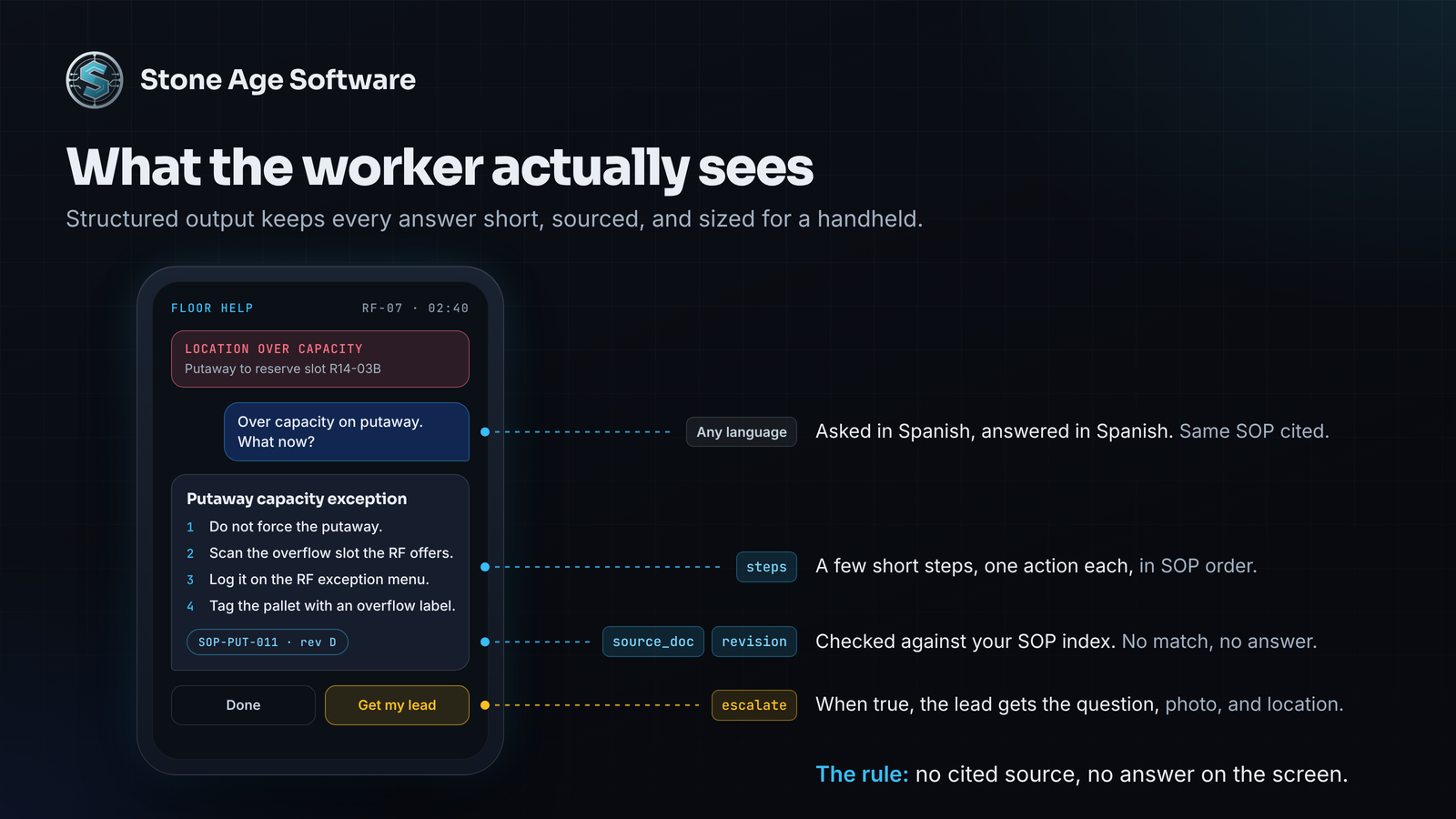
class FloorAnswer(BaseModel):
    steps: list[str]
    source_doc: str
    revision: str
    escalate: bool

def cites_real_sop(output):
    ans = output.pydantic
    if ans and (ans.escalate or ans.source_doc in SOP_INDEX):
        return (True, ans)
    return (False, "Cite an SOP from the index, or set escalate to true.")

procedure_agent.guardrail = cites_real_sop
procedure_agent.guardrail_max_retries = 2
SOP_INDEX is the set of document IDs in your knowledge folder. The guardrail rejects any answer that cites something outside it. The agent gets the reason and tries again. If it still fails, catch the error and escalate to a lead.
The structured output also fits a small screen. Short steps, one source line, and an amber banner when escalate is true.
Six creative jobs for the same crew
Once the core works, the same plumbing handles far more than lookups.
- Snap the problem. With the
file-processingextra installed, CrewAI accepts files natively. A photo of the error screen or a torn label rides along with the question. - Answer in the worker's language. A question asked in Spanish gets a Spanish answer that still cites the English SOP.
- Client rules without cross-talk. In a multi-client building, give each client's agent its own knowledge sources. One client's labeling rules never leak into another's answer.
- The day-one coach. CrewAI's memory can be scoped per trainee, so the coach remembers where each person left off. A human feedback step lets the trainer sign off a module before the next one opens.
- Live context, read-only. Through an MCP server, the exception agent can check an LPN's status or a location's capacity. Give it read tools only, using a tool filter.
- The question log. CrewAI's event listeners can record each question, the passages retrieved, and the answer. The top 20 questions show which SOP to rewrite and which screen label confuses people.
One boundary matters for the coach. It supports formal training; it does not replace it. OSHA requires powered industrial truck training that combines instruction, hands-on practice, and evaluation in the workplace. Have the coach decline equipment operating questions from anyone not yet certified, and point them to their trainer.
When an exception needs a decision, the handoff should carry the evidence. We built that pattern for a contract-logistics site: exceptions that open their own case file, with photos attached and escalation built in. The chatbot's escalate path can feed the same kind of case.
Test it before the first seasonal shift
Quality comes from testing against real questions, not demo prompts.
- Build a question set. Collect 50 real questions from your leads, each with its correct answer.
- Score it. Wrap each path in a small crew.
crewai testrepeats the run and scores the results. - Fold in corrections.
crewai trainasks a person for feedback on each run, and the agents reuse it. - Trace everything. Log retrieval, latency, and guardrail retries, so a slow or wrong answer has a cause.
After launch, watch two numbers: the escalation rate and the no-answer rate. A rising no-answer rate usually means a missing or outdated document, not a broken model.
None of this replaces your leads. It gives them back the hours spent answering the same five questions. That time goes to the calls that genuinely need a person.
A check you can run this week
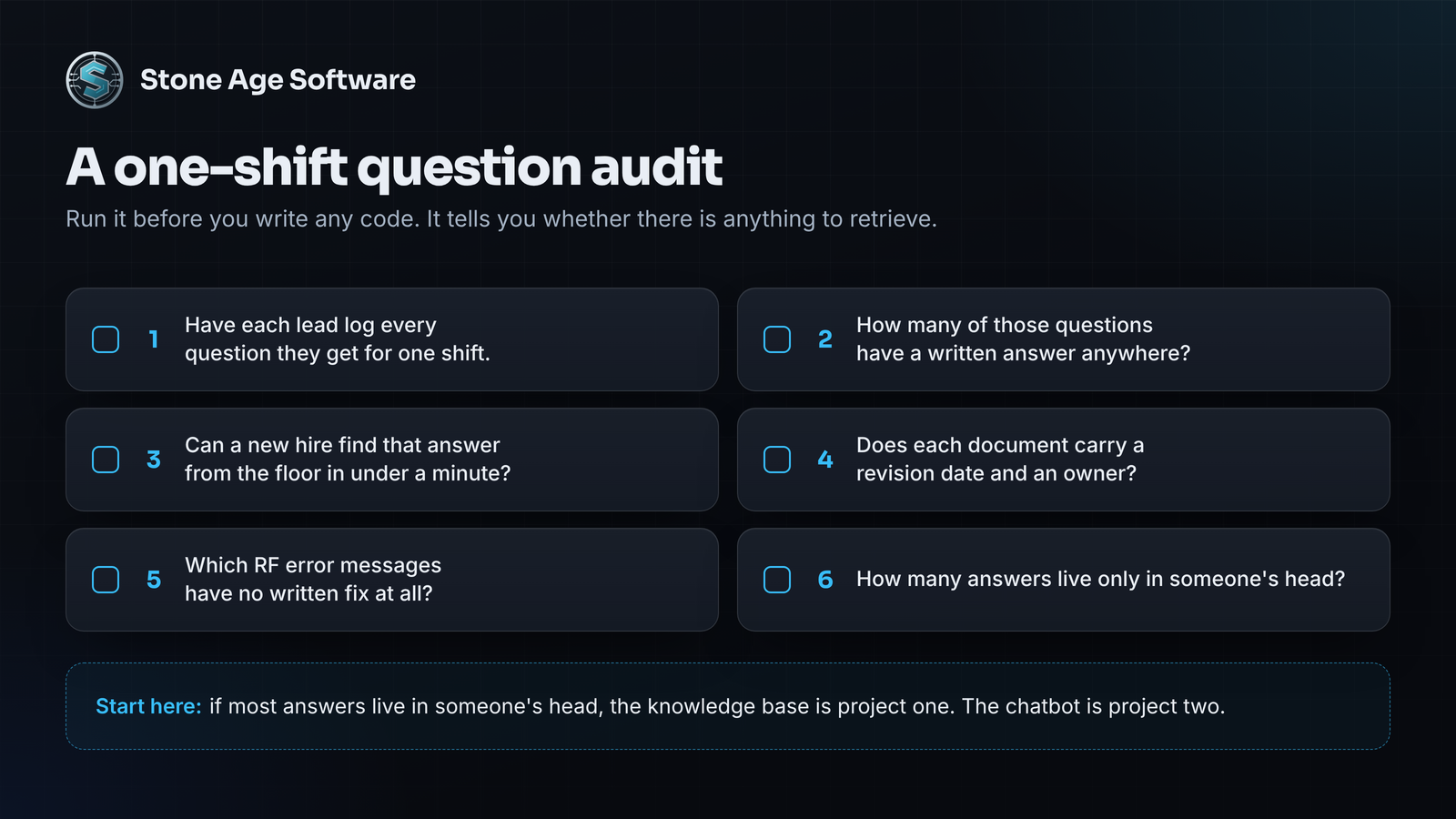
Before writing any code, find out whether your answers exist in writing. Ask each lead to log every question they get for one shift. Then sort the list:
- How many questions have a written answer anywhere?
- Can a new hire find that answer from the floor in under a minute?
- Does each document carry a revision date and an owner?
- Which RF error messages have no written fix at all?
- How many answers live only in someone's head?
If most answers live in someone's head, the knowledge base is your first project. The chatbot is the second. That order is what makes the answers trustworthy.
Want a hand with the knowledge base or the assistant itself? That is the kind of custom software we build, at a fixed price, quoted up front.