
It is 6 a.m., and a receiving clerk pulls a handheld off the charging cradle. The app that checks lot numbers wants an update. Somebody built that app for your floor. Somebody else loaded it onto every device by copying a file.
That is how a lot of custom software applications reach a warehouse. On September 30, Google began checking the developer behind apps from major app stores in four countries. In 2027, it plans to check every app on certified Android devices worldwide.
This is not really a story about phones. Every custom application runs somewhere, and that somewhere sets rules you did not write. Here is how to see where yours run, which rules come with each place, and whose name each one carries.
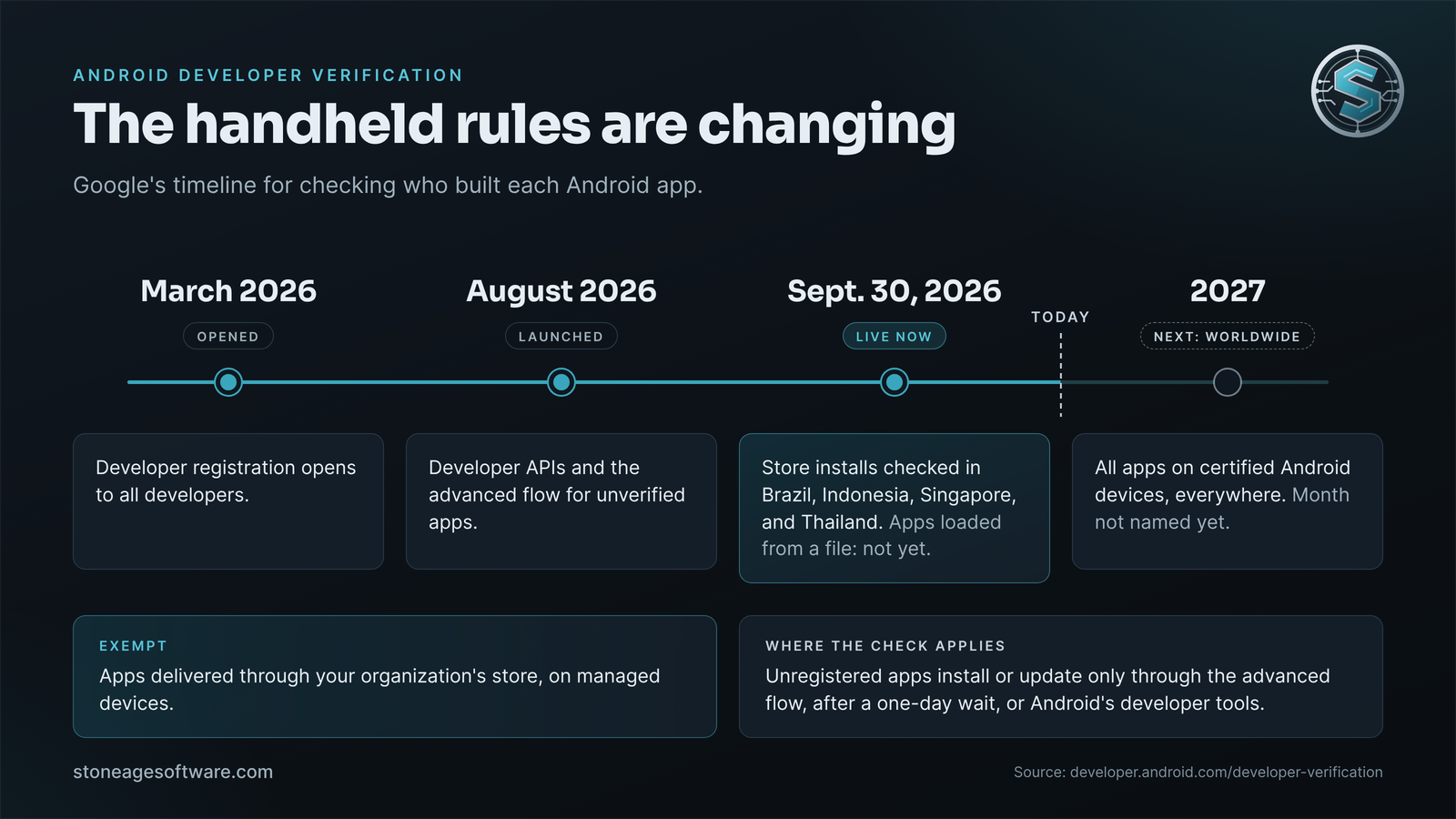
What Google changed on September 30
Google calls the program Android developer verification. Each app must be registered to a developer whose identity Google has confirmed. In Google's words, it is "confirming who the developer is, not reviewing the content of their app or where it came from."
Enforcement started in Brazil, Indonesia, Singapore, and Thailand. For now, it covers apps installed from seven participating app stores, including Google Play and Samsung's Galaxy Store. Google's FAQ says apps loaded straight from a file are not covered yet.
The check applies to certified devices running Android 7 or later. A certified device ships with Google's apps and has passed Android compatibility testing. Google says the check expands to all apps on certified Android devices worldwide in 2027. It has not named a month.
Registered apps see no change. "As long as your apps are registered, your users' install experience will stay the same," Google's verification FAQ says.
Where the check applies, unregistered apps take a longer road. They can be installed or updated only two ways:
- Through an "advanced flow" each device turns on once, after a one-day wait
- With Android's developer tools, usually over a cable
The one-day wait is a sensible guard against phone scams. It is a poor fit for a cradle full of scanners at shift start.
Managed fleets get an important exemption. Google says apps distributed through your organization's store, on managed devices, won't need verification. Its reason is that your IT admin has already vetted them. Google still recommends registering them, in case one is ever installed from another source or on an unmanaged device.
Custom software applications live in four places
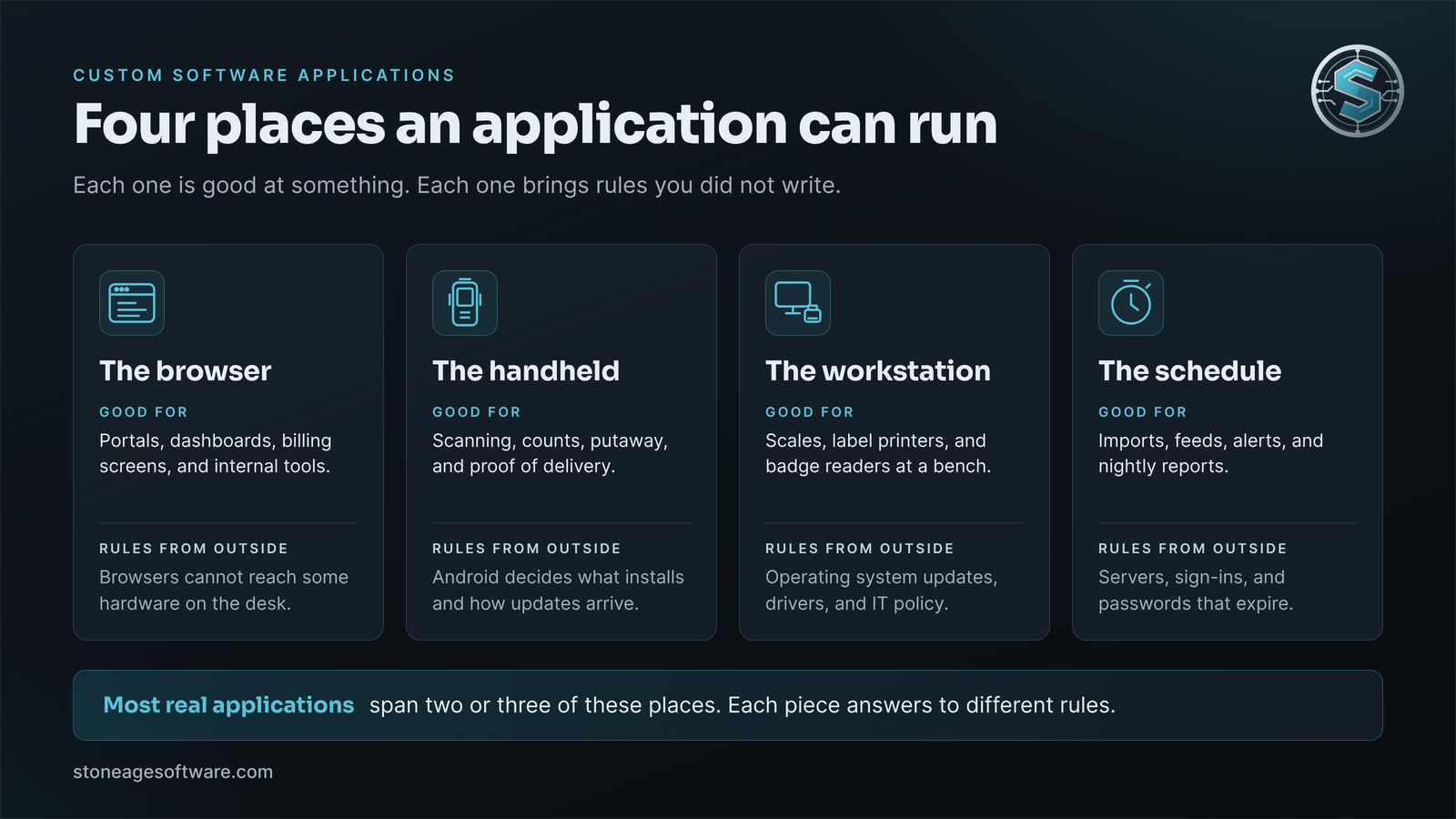
Strip away the labels, and a warehouse's custom software applications run in one of four places. Each place is good at something. Each one also comes with rules written by someone else.
- The browser. Customer portals, dashboards, billing screens, and internal tools. There is nothing to install and one place to fix a bug. The rule: a browser cannot reach some hardware on the desk.
- The handheld. Scanning, counts, putaway, and proof of delivery. It goes where the work is. The rule: the phone platform decides what installs and how updates arrive. That rule just changed.
- The workstation. The packing bench with a scale, a label printer, or a badge reader. The rule: operating system updates, drivers, and whatever your IT policy locks down.
- The schedule. Jobs that run with nobody watching, like imports, feeds, alerts, and nightly reports. The rule: the server and the accounts it signs in with. When a password expires, the job fails quietly.
Most real applications span two or three of these places. A receiving app might be a handheld screen for the clerk and a browser view for the supervisor. Add a nightly job that sends receipts to the customer. Each piece answers to a different set of rules.
We ran into the browser rule on a kiosk project. Floor screens needed a badge number from a USB reader, and browsers do not get to talk to that hardware. The answer was a small local service that reads the card and hands the number to the page. Here is how we built a badge reader bridge for a browser that can't see it. It then shipped to every kiosk through the site's central device management.
Where should a new application run?
Start from the person doing the work, not from the technology. Five questions settle most cases.
- Where are they standing? At a desk, a browser app is usually enough. On the floor, the device in their hand decides.
- Is a hand free? A clerk holding a carton needs a scan trigger, not a keyboard.
- Does it need hardware? A scale, a printer, or a badge reader can push the job to a workstation.
- Does it need to work without signal? Dead spots near the dock favor a handheld app that saves work and syncs later.
- Does anyone need to be there at all? If not, it is a scheduled job. It needs alerts more than screens.
When none of these forces a choice, the browser wins. It is the easiest place to change and the easiest to train on. Wherever the application lands, the goal stays the same. Software takes the lookups and the re-keying. People keep the judgment calls and the exceptions.
There is a second question, and it outlasts the first. At IMTS in Chicago last month, Sven Diedrich of Pinaxis laid out four pillars for automation, Supply Chain Dive reported. His people pillar asks, "Who owns the process? Who operates the solution? Who supports it? Who responds when something goes wrong?" Good custom software development writes down those answers for every application it ships.
Whose name is on your handheld app?
Under Google's new rule, a handheld app's path onto a device runs through an identity. That identity has three parts: a developer account, a signing key, and now a verified registration.
In many warehouses, those parts are scattered. Accounts were opened by whoever was building at the time. A contractor published under a personal developer account. A vendor signed the app with its own key. The device console sits under a login nobody has used in a year. None of that was a mistake when it happened. The platform rule changed underneath it.
A handheld app built today should leave you holding four things:
- A developer account in your company's name. Google asks organizations for a D-U-N-S number. It is free, but Google warns it can take up to 28 days.
- The signing key, stored where your company controls it. Android uses that key to tell a real update from an impostor.
- A registration for the app under that account. Installs and updates then go through with no waiting period.
- Managed devices fed by your organization's store. That pairing is the route Google exempts. A file copied onto a managed device does not count.
iPhones follow the same logic. Apple ties every app to a developer account, and private apps for staff can go out through Apple Business.
That is how we hand over mobile app development work: Apple and Google developer accounts in your business's name, signing keys handed over, and the source in your repository.
Run the cradle check
Here is a check you can finish before lunch. Walk to the charging cradle and pick up three handhelds. Answer four questions for each one.
- Is it certified? Open the Play Store app, tap the profile icon, then Settings, then About. Look under Play Protect certification. Google's help page walks through it.
- Is it managed? Most managed devices say so in Settings, though the wording varies by maker. Or ask whoever sets up new devices.
- How did your custom app get there? If the answer is "we copy a file onto it," write that down.
- Whose name is on the app? Ask the builder which developer account and signing key it uses. If nobody knows, write that down too.
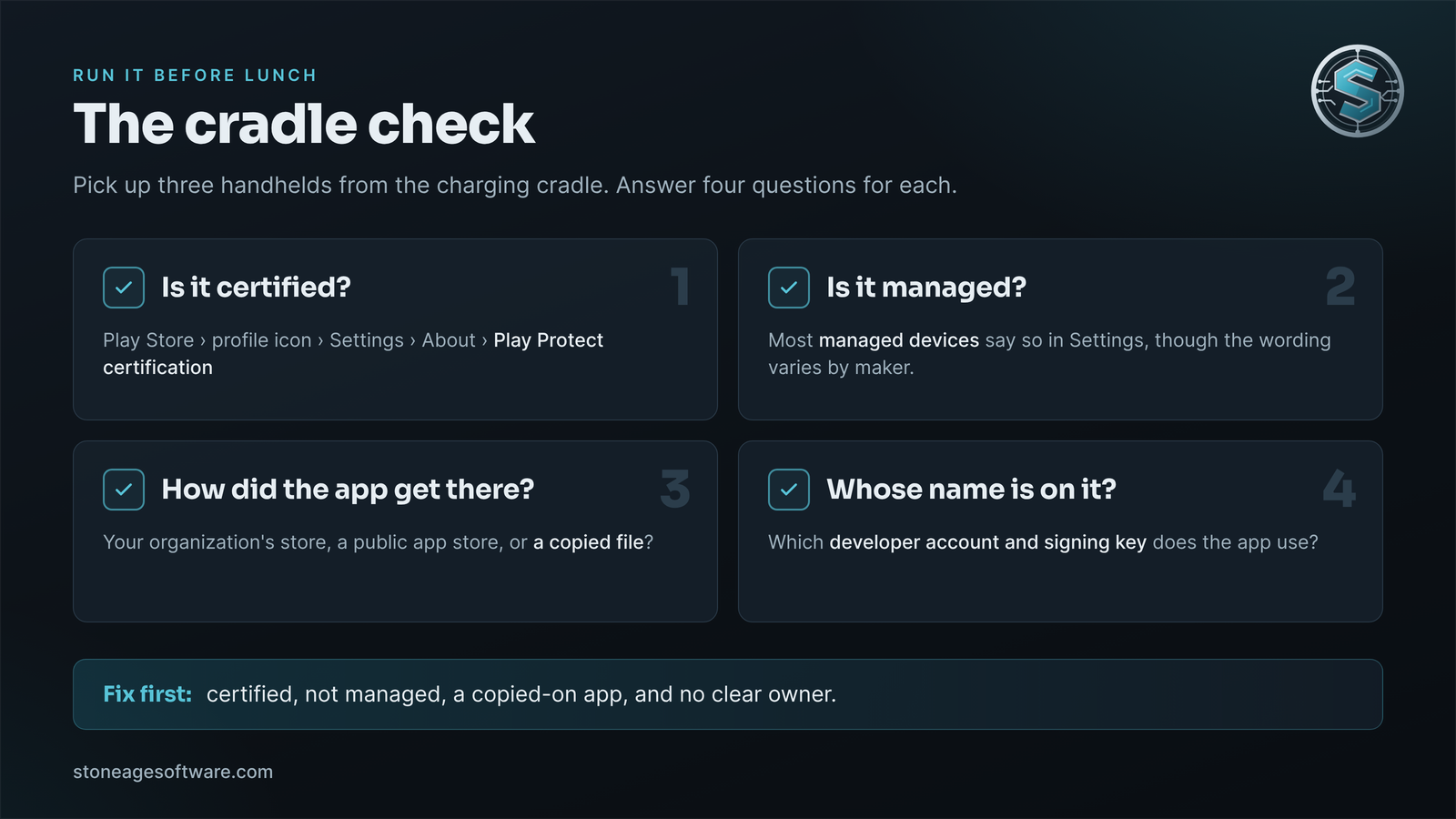
Then sort the results. A certified device that is not managed, running a copied-on app with no clear owner, goes to the top. That is the combination the worldwide check will slow down. A managed device helps only if the app actually comes through your organization's store.
The fix rarely means a new app. Usually it means registering the app you have, or moving it to your organization's store. If nobody can find the original signing key, Google says the app cannot be registered. It gets re-signed under a new key and reinstalled on each device. Android will not accept an update signed with a different key. That is plumbing and paperwork, and it belongs in a slow month, not in November.
While you are at it, ask the same ownership question about one browser app and one scheduled job. Whose account does each one sign in with?
If the check turns up apps nobody can trace, that is a normal finding. Our custom software development practice in Houston builds web, Android, iPhone, and Windows applications, and puts each one in your company's name. A defined project is fixed price, quoted up front.