
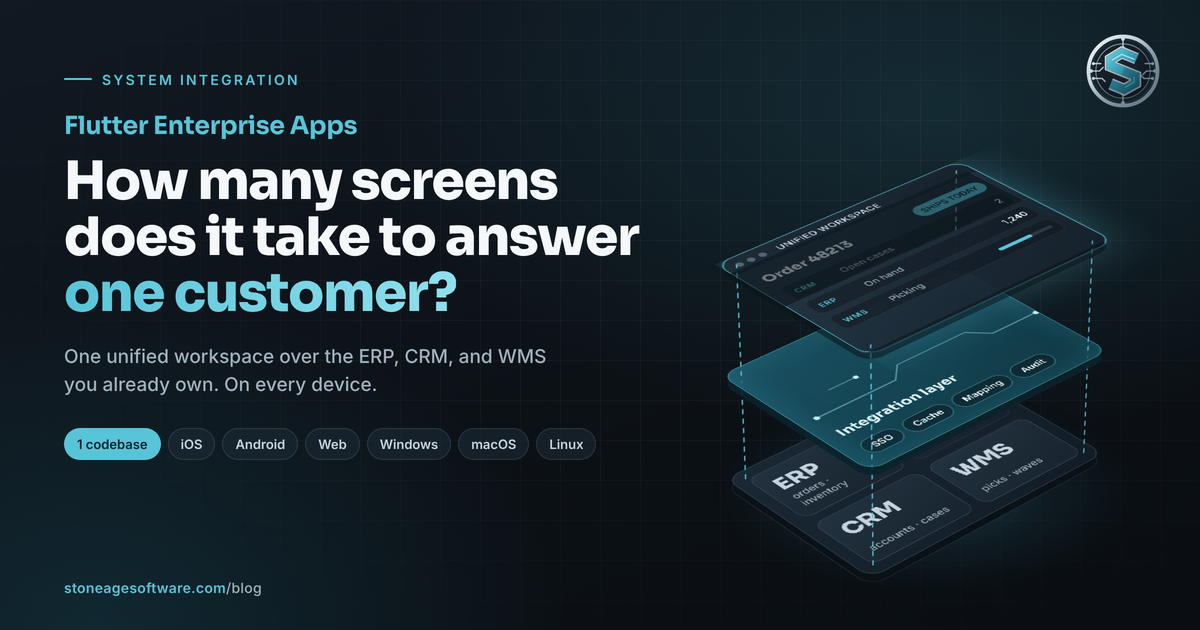
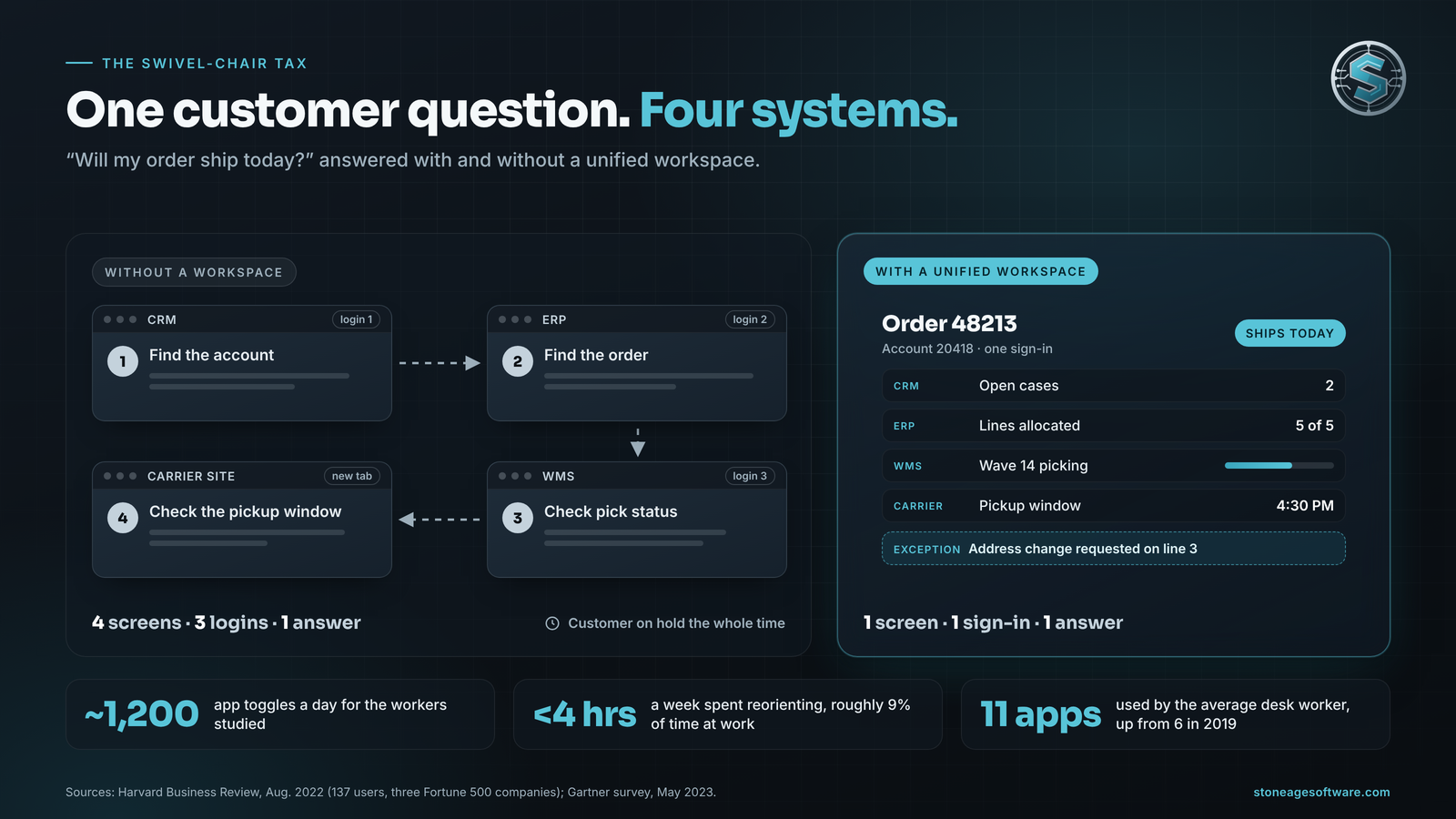
It is 2 p.m., and a customer calls with a simple question. Will my order ship today? The rep opens the CRM to find the account. Then the ERP for the order. Then the warehouse system for pick status. Then a carrier site for the pickup window. Four screens and three logins for one answer, while the customer waits on hold.
Flutter enterprise apps are a practical way to close that gap. They don't replace any of those systems. They put one modern screen over all of them, on every device your people carry. We call that screen a unified workspace.
The timing matters. On October 7, UPS said it will hire 100,000 seasonal workers for the holidays, when daily parcel volumes tend to double, the American Journal of Transportation reported. Every one of those new hires has to get up to speed in weeks. Many warehouses feeding those networks add seasonal staff of their own. Each extra system is one more lesson before a new hire is up to speed.
The swivel chair is a software seam
Operations people have a name for this: swivel-chair integration. Data moves between systems because a person reads it off one screen and types it into another. The person is the integration layer.
The load keeps growing. In a Gartner survey of 4,861 employees, the average desk worker used 11 applications, up from six in 2019. Nearly half said they struggle to find the information they need.
The cost hides in the switching. Researchers writing in Harvard Business Review tracked 137 users at three Fortune 500 companies. They toggled between apps roughly 1,200 times a day. Reorienting after those switches added up to just under four hours a week. That is roughly 9% of their time at work.
None of that is a people problem. Each system was bought to be the center of its own world. The ERP owns the order. The CRM owns the account. The WMS owns the pick. Nobody bought the seam between them, so a person covers it, all day.
What a unified workspace actually is
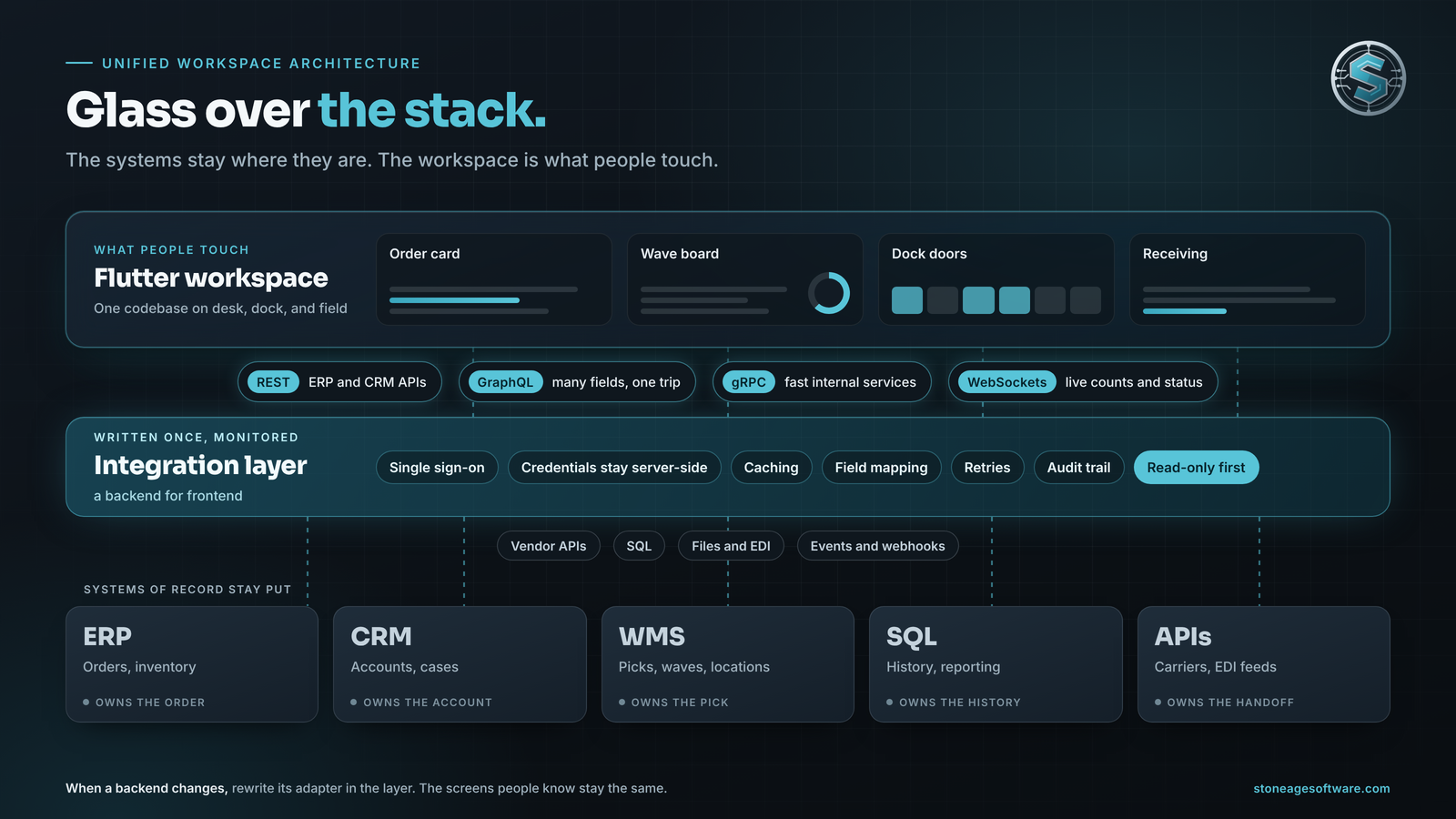
A unified workspace is one front end, built around a task, that reads from and writes to the systems you already run. It is a layer, not a replacement. Four traits define it:
- Task-first screens. Each screen follows a job: answer a customer, release a wave, receive a trailer. It does not mirror a database table.
- Systems of record stay put. The ERP still owns the order. The CRM still owns the account. The workspace reads and writes through them.
- One sign-in, one look. Single sign-on, one search box, and one way to navigate, on every device.
- An integration layer underneath. A thin service handles credentials, caching, field mapping, retries, and the audit trail. Architects call it a backend for frontend. The app never holds an ERP password.
Picture glass laid over the stack. The stack stays where it is. The glass is what people touch.
Here is the 2 p.m. call again. Open cases come from the CRM. Available inventory comes live from the ERP. Pick progress streams from the WMS. The pickup window comes from the carrier feed. All four land on one order card. The rep answers in seconds and spends the call on the exception: the short line, the address change, the rush request. Software handles the lookups. People keep the judgment calls.
Start read-only. Let the workspace show answers for a few weeks before it can change anything. Trust comes first, then write-back.
Why Flutter enterprise apps fit the overlay
A unified workspace has three hard requirements. It must run wherever the work happens. It must render dense, live data smoothly. And it must talk to everything. Flutter covers all three from one codebase.
One codebase, every place work happens
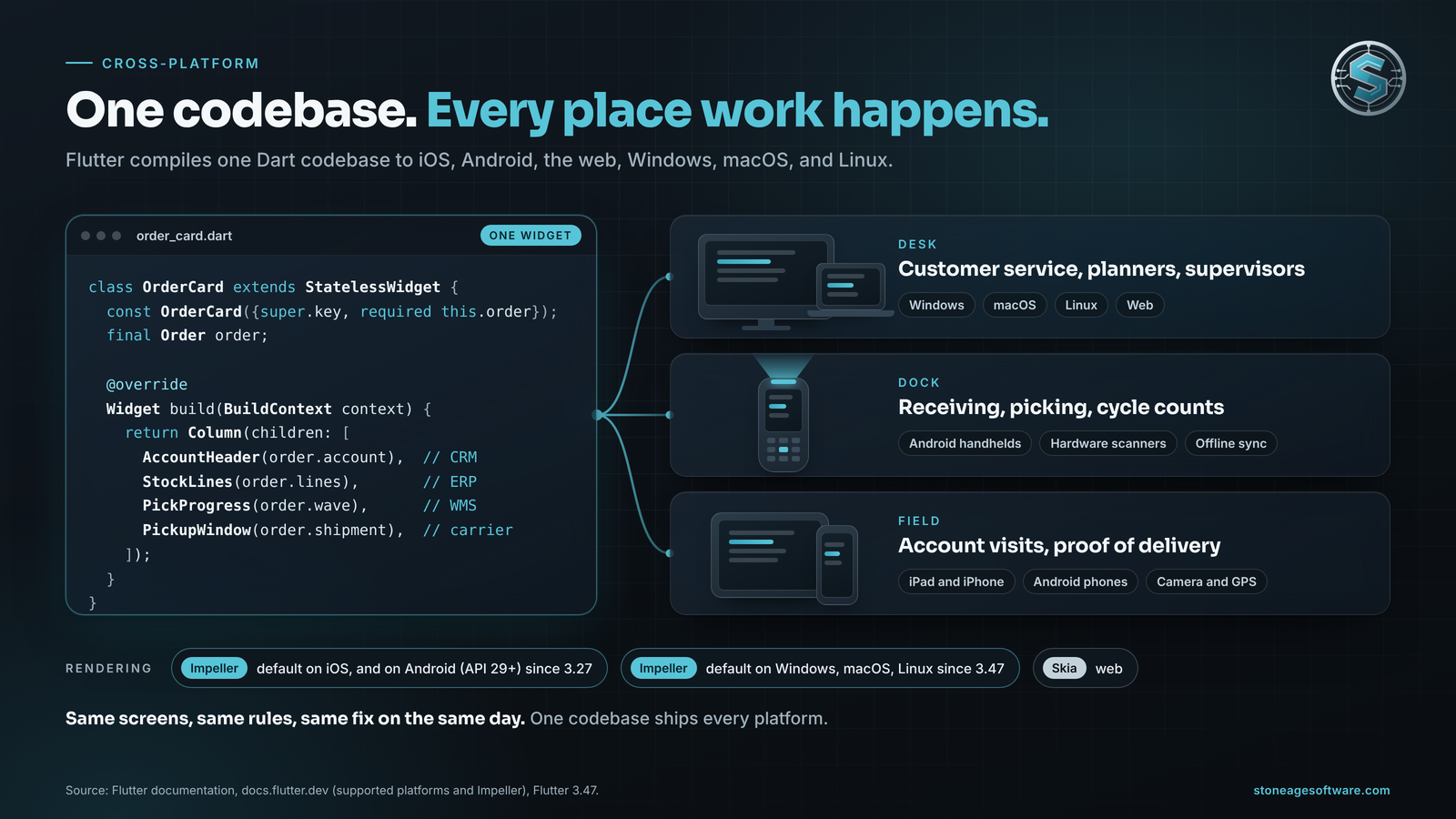
Flutter compiles one Dart codebase to iOS, Android, the web, Windows, macOS, and Linux. Flutter's supported platforms list spells out the supported versions of each, plus Chrome, Firefox, Safari, and Edge.
That means one workspace for the supervisor's desktop, the rugged Android handheld on the dock, and the account manager's iPad at a customer's site. Same screens, same rules, same fix on the same day. It is why Flutter is our default for mobile app development for iPhone and Android. A desktop build is often the same project.
A rendering engine built for dense screens
Flutter draws every pixel itself instead of borrowing each platform's native controls. Its Impeller engine is the default on iOS, and since Flutter 3.27 on newer Android devices too. As of Flutter 3.47, it is the default on Windows, macOS, and Linux too, per the Impeller documentation. The web still renders through Skia.
Impeller precompiles its shaders when the engine is built, so they don't compile at runtime while a user waits. That matters because a workspace is dense by nature. Think live counts, sortable tables, wave progress, and dock maps. Many older screens were built for data entry, not for reading at a glance.
Flutter gives designers pixel-level control on every platform. A chart renders the same on a 27-inch monitor and a 5-inch handheld; only the layout adapts. The result feels like the apps people already use on their phones. Familiar patterns shorten training on their own.
It speaks every protocol your systems do
Enterprise backends don't share one language. Flutter apps handle all the common ones:
- REST for most ERP and CRM APIs, through Dart packages such as http or dio.
- GraphQL when one screen needs fields from several objects in one round trip.
- gRPC for fast internal services. The official Dart gRPC package supports Flutter, and gRPC-Web for browser builds.
- WebSockets for live data the moment it changes: pick counts, door status, new exceptions.
The protocols are the easy half. The hard half is what happens when the ERP is slow, a token expires, or a write fails halfway. That logic belongs in the integration layer, written once and monitored. It does not belong on a handheld that loses signal behind the racking.
What changes for the business
The case for a unified workspace is mostly about time. Here is where it shows up:
- Shorter training. New hires learn one workspace instead of five systems. That counts most in peak, when the seasonal ramp lands in weeks.
- Faster answers. Every screen you remove from a routine task gives back part of that 9%. It also removes a chance to retype a value wrong.
- One codebase, not three. One Flutter codebase ships desktop, mobile, and web. That is less to build, test, and maintain. Features land everywhere at once, and a shared bug gets fixed once.
- Legacy systems keep earning. In many organizations, keeping existing systems running already takes most of the IT budget. The GAO reports that federal agencies typically spend about 80% on operations and maintenance of existing IT. A workspace puts a better front on that investment instead of starting over.
- Backend changes get quieter. Mainstream maintenance for SAP's older Business Suite 7 core ends at the end of 2027, per SAP's announcement. When a backend changes, you rewrite its adapter in the integration layer. The screens people know stay the same.
We have used the same layered approach at a contract-logistics site. One application replaced dozens of spreadsheets and emailed reports that had grown up around the warehouse system. It grew past 50 operational screens on a shared services layer. There was never a cutover day. Each workaround retired the day its module shipped.
That build was a web application, and the lesson carries straight over to Flutter. The layer under the screens decides how much work the next screen takes. Read how one application replaced a decade of spreadsheets.
A workspace is not always the answer. If a workflow lives in one system, a better report may be enough. If an app leans hard on one platform's hardware, native code can earn its keep. The overlay pays off when one task crosses three or more systems.
Run a one-question swivel-chair audit
You can run this check in an afternoon. Pick the question your team answers most often. For many warehouses, it is "where is my order?"
- Sit with the person who answers it. Count the screens and the logins.
- Write down every retyped value. Each one marks a seam.
- Time five answers, start to finish. Include the hold time.
- Name the system of record for each field. Inventory, order, and customer may each live somewhere different.
- Circle the lookup-only screens. A workspace replaces those first.
If one answer takes more than three screens, or any value gets retyped, that question is your first workspace. Start read-only, on the device that person already holds. Before the next platform replacement reaches the roadmap, ask whether the problem is the system or the seam.
Keep the systems you own, and retire the swivel chair. That one question is the right size for a first build. We design the integration layer and the Flutter front end together, over the systems you already own. Every build is a fixed price, quoted up front. See how our system integration work connects ERP, WMS, and CRM without a rip-and-replace.