On October 30, Fortune reported that Cisco president Jeetu Patel gave a 27-year-old engineer unlimited AI tokens and one target: refactor 98% of Cisco's legacy code within 24 months. Patel told him to "go nuts." The engineer reportedly thinks two people can do it. He has four weeks to prove the approach.
In a boardroom, that sounds like the future. Before the quarter closes, plenty of boards will ask their CTO to modernize 20-year-old code with AI the same way, on the same clock.
If you own a monolith that books revenue every hour, you probably felt something else. Call it dread. You know what lives in those files: the hotfix from a 2003 outage, the branch for one customer's odd file format, the timing hack nobody dares to touch.
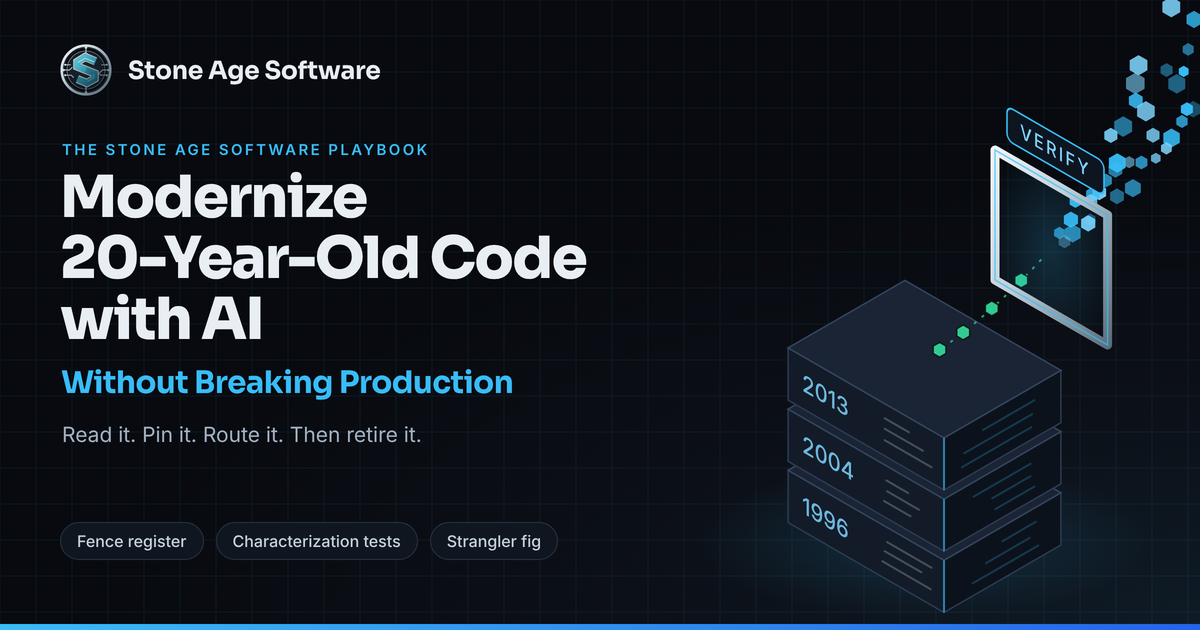
Here is the short answer. Yes, the tools are good enough to help. But the safe order runs backward from the headline. Read first. Pin today's behavior second. Replace last, one routed slice at a time. Generation is the cheap part. Verification is the whole project.
The Reality Check: Why 20-Year-Old Code Survives
Old code is rarely old because nobody cared. It is old because it works, and because every attempt to touch it uncovered something nobody had written down.
Chesterton's Fence, Written in C and COBOL
G.K. Chesterton told a parable about a fence across a road. One reformer sees no use for it and wants it gone. A wiser one says: first find out why it was built. Then we can talk about tearing it down.
A legacy codebase is a field of those fences. Most of them look like mistakes:
- A 40-millisecond sleep that keeps an aging label printer from dropping jobs.
- A branch that pads one trading partner's EDI segment, because their 2009 map expects it.
- A two-digit year window that still reads records written before 2000.
- A parser that forgives one telecom carrier's off-spec timestamps.
- A rounding rule that matches a tariff a customer signed in 1997.
Each fence marks a real incident. Each was fixed under pressure, often at night, by someone who knew the system cold. That knowledge moved on with promotions and retirements. The code stayed, and the commit message says "fix."
This is not a niche problem. In July 2025, the GAO reviewed critical federal legacy systems and named 11 most in need of modernization. They range from 23 to 60 years old. Eight run on outdated languages. Two Treasury systems still run on COBOL and assembly, supported by a dwindling pool of specialists. Agencies typically report spending about 80% of IT budgets operating what they already run.
Those systems survive for the same reason yours does. The weird parts are load-bearing.
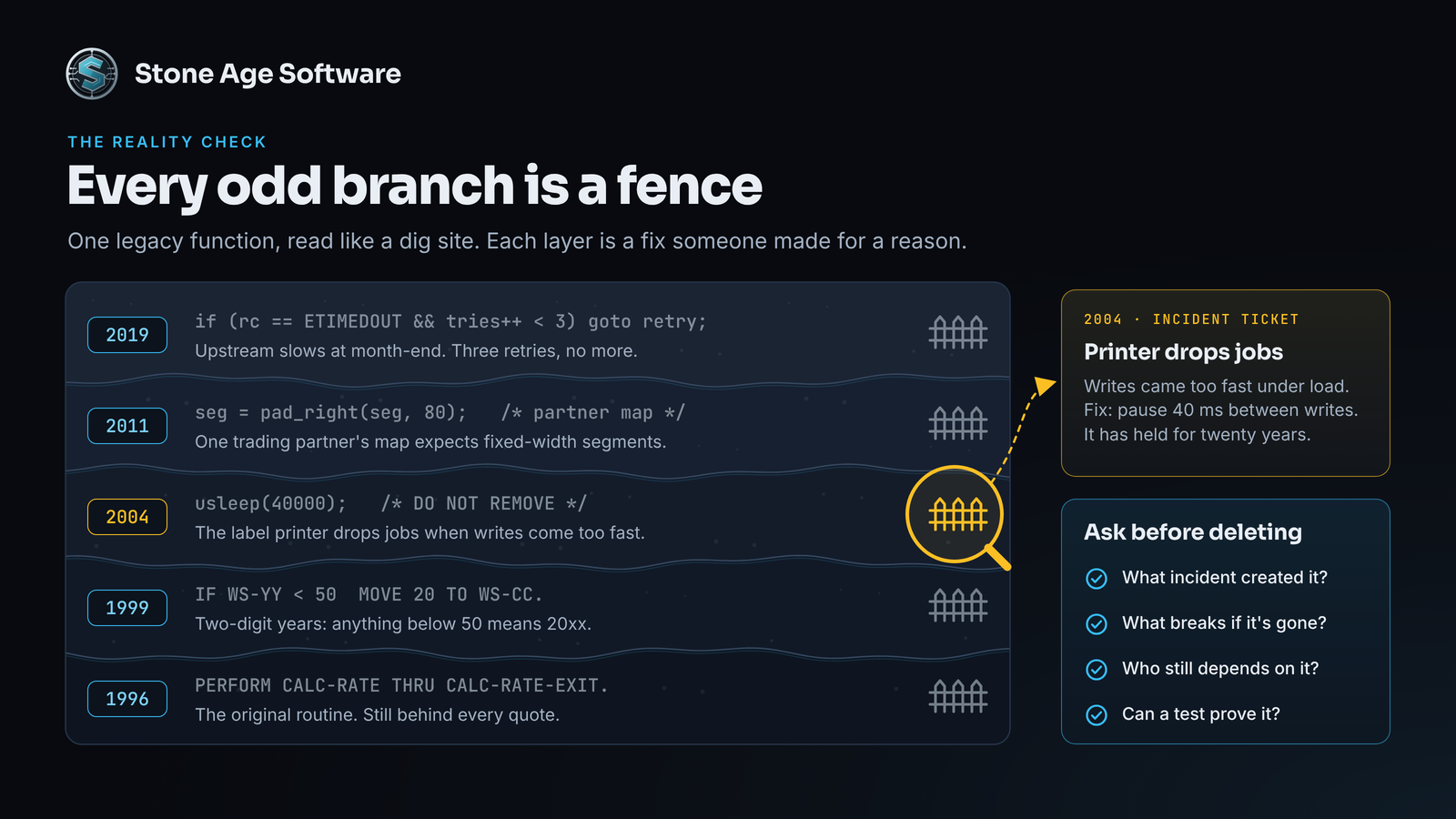
Every odd branch in old code is a fence someone built for a reason.
Synthetic Debt: Clean Code With No Memory
Here is the trap in the unlimited-token story. Point a model at 30-year-old spaghetti and it will hand back clean code. It compiles. It passes lint. It reads like a textbook.
It may also have deleted half your fences, because the fences looked like noise.
Call this synthetic debt. You trade code that is ugly but proven for code that is clean but unproven. You do it at a volume no team can review line by line. We have argued that generated code is legacy the day it lands. At modernization scale, that means millions of lines landing at once.
Synthetic debt hides until conditions get specific: month-end batch volume, a slow upstream that sets off a retry storm, one partner's character encoding, two writers on one record at peak, a leap day. And when the same model writes the code and its tests, it is grading its own homework.
Readable spaghetti vs. synthetic debt
- How it reads. Spaghetti: tangled, but each branch traces to an incident. Synthetic: tidy, but the incidents are gone.
- Production record. Spaghetti: years of real traffic. Synthetic: none yet.
- Tests. Spaghetti: thin, but production has tested it daily. Synthetic: often written by the same model as the code.
- How it fails. Spaghetti: loudly, in ways your team has seen. Synthetic: quietly, under load nobody tested.
- At 2 a.m. Spaghetti: someone recognizes the stack trace. Synthetic: nobody has seen this code before.
Field rule: Ugly code with a production record beats clean code without one. Prove the replacement first. Retire the original second.
The 3-Phase Playbook to Modernize 20-Year-Old Code with AI
The playbook flips the headline's order. Models start as readers, then become test writers, and only then write production code. Every phase produces something your team can check.
Phase 1: AI as Archaeologist, Not Architect
Do not generate code first. Point the model at your oldest, scariest module and ask it to explain. It reads faster than any person, and a 4,000-line function does not wear it down.
Give it four jobs:
- Translate. Explain each function in plain English, including what it does with bad input.
- Extract rules. Turn nested if/else ladders into business rules a product owner can read.
- Map dependencies. List every file drop, cron job, shared table, stored procedure, and environment variable it touches.
- Flag fences. List each branch that looks like a workaround, with the condition that triggers it.
A prompt that keeps it honest:
You are documenting this code, not changing it.
For the function below:
1. Explain what it does in plain English.
2. List every input, output, side effect, and external system.
3. List each branch that looks like a workaround, and what triggers it.
4. Mark anything you cannot confirm from the code as UNKNOWN.
Do not suggest improvements.
The UNKNOWN markers are the point. Collect them into a fence register: a list of questions for your senior maintainers. Their answers become the most valuable artifact in the project. The model does the digging. Your people do the judging.
Expect confident wrong answers. Models will narrate code they misread. So every summary gets reviewed by someone who has been paged for that module.
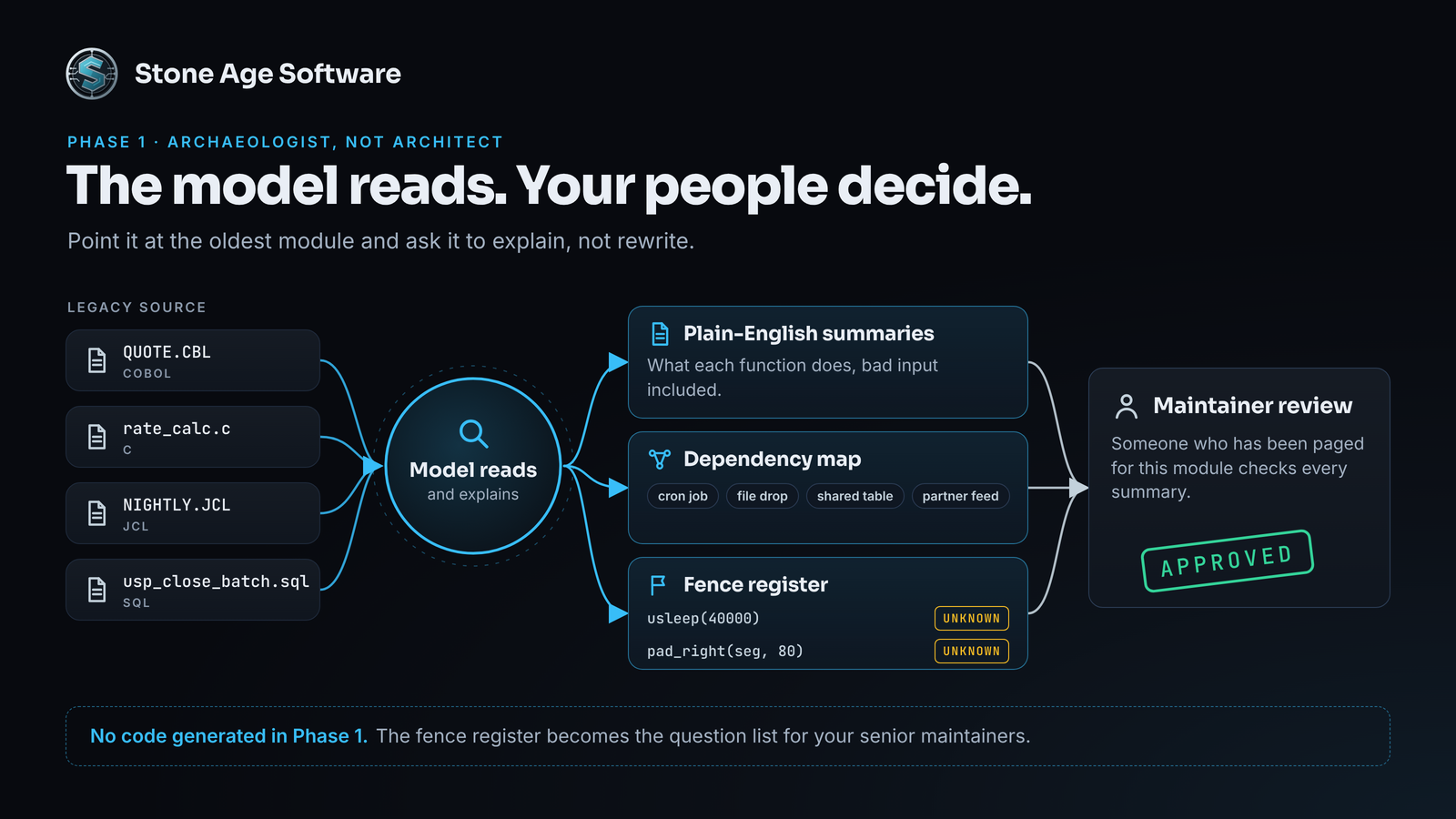
In Phase 1, the model reads and your maintainers decide.
Phase 2: Automated Characterization Testing
Michael Feathers coined the term characterization test in Working Effectively with Legacy Code. It pins what the code does today, not what the spec says it should do. A golden master applies the same idea at system scale. Record real inputs, save the real outputs, and compare every future run against them.
This is where models earn their keep. Writing hundreds of tedious tests is exactly the work that gets skipped. Feed the model three things: the function, its Phase 1 summary, and a sample of scrubbed production inputs. Then constrain it hard:
Write characterization tests for this function.
Assert the outputs it produces today, even if they look wrong.
Never change an expected value to match a spec.
Cover every branch in the fence register.
Add edge cases: nulls, max lengths, leap days, partner codes.
Tag any test that pins a suspected bug as KNOWN-QUIRK.
Next, capture runtime behavior at the seams. Record what crosses file drops, queues, API calls, and database writes during a real business cycle. Mask volatile fields like timestamps and generated IDs. Version the golden files beside the code.
Three rules keep the net honest:
- Break it on purpose. Run mutation testing: flip a condition, change a constant, rerun the suite. If nothing fails, the net has a hole.
- Do not fix quirks mid-flight. When a test pins a bug, log it and keep the behavior. Something downstream may depend on it. Fix it later, as its own change.
- Lock the answers. The model that drafts the replacement never gets write access to the golden files. Otherwise it can pass by quietly rewriting them.
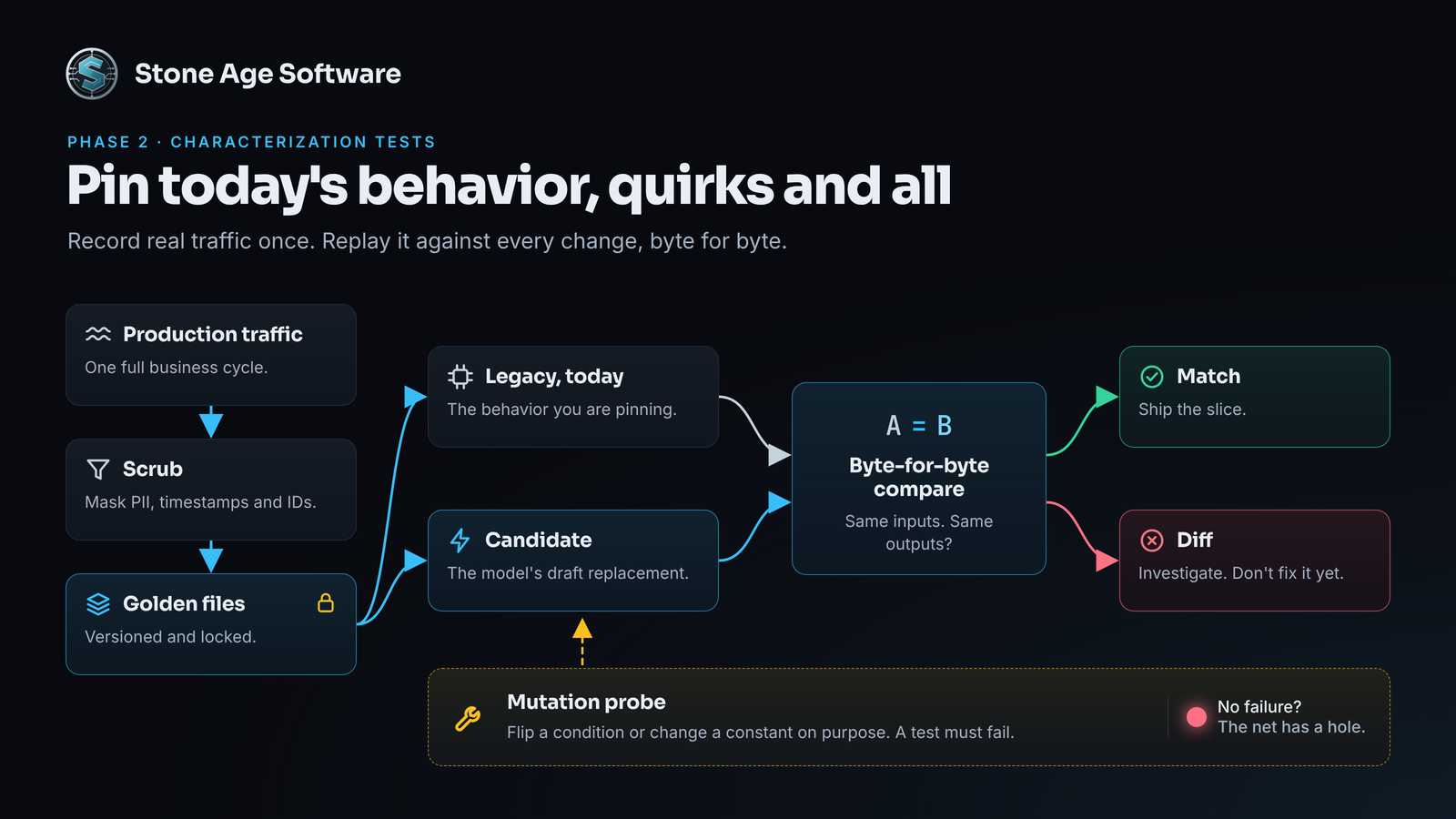
Characterization tests pin what the system does today, quirks and all.
Phase 3: The AI-Assisted Strangler Fig
Martin Fowler named the pattern after strangler figs he saw in Queensland's rain forests. The fig grows around a host tree until it can stand on its own. Your new system does the same to the old one: at the edges first, one seam at a time.
Skip the big-bang rewrite. It bets the business on one weekend. Instead:
- Pick a perimeter seam. Look for low blast radius and frequent change: a rate lookup, a report, an inbound file parser.
- Put a router in front. A facade or proxy decides which system answers. Callers never know.
- Let the model draft the glue. Adapters, mappers, contract tests, and API stubs are repetitive code. Models write it well, and your Phase 2 suite checks it.
- Shadow first. Send real traffic down both paths. Serve the legacy answer. Diff the new one.
- Route by percentage. Move 1%, then 5%, 25%, and 100%, with a kill switch at every step.
- Retire only after a full cycle. Keep the legacy path warm through month-end, quarter-end, and peak.
When a diff shows up, treat it like a fence. Find out why before you decide which side is right.
Big-bang rewrite vs. strangler fig
- Cutover. Big bang: one weekend, everything at once. Strangler fig: one route at a time.
- Rollback. Big bang: restore from backup and hope. Strangler fig: flip the route back.
- Feedback. Big bang: after launch. Strangler fig: every week.
- Risk per step. Big bang: the whole business. Strangler fig: one seam.
- Feature work. Big bang: frozen until launch. Strangler fig: keeps shipping.
We run the same principle at deploy scale. On a platform nobody could stop using, a new process has 20 seconds to prove itself before the old one stops. If it fails, the old version keeps serving. Seams work the same way, just slower.
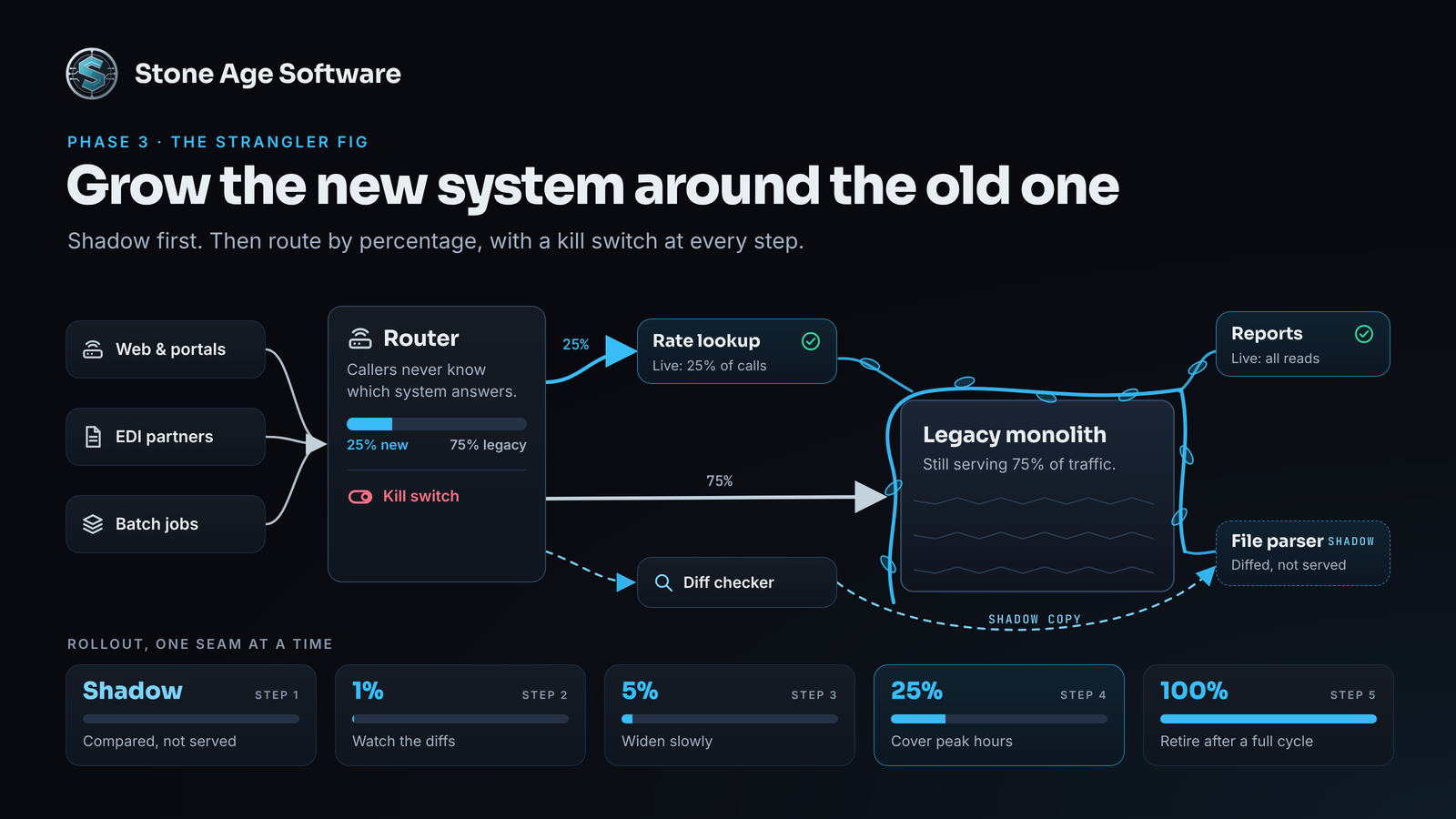
Grow the new system around the old one, one routed seam at a time.
The Verification Bottleneck: Generation Is Cheap, Proof Is Not
Here is the uncomfortable math. The token bill to draft a replacement module is often smaller than the lunch order for the meeting where you review it. Generation is cheap and getting cheaper.
Proof is not. Serious modernization budgets go here:
- Regression suites that run on every change, not every release.
- Traffic replay of a full business cycle, with every diff explained.
- Fuzz testing at input boundaries, where old parsers hide their sharpest edges.
- Hardware and protocol emulation for printers, scanners, terminals, and switches that will never fit in CI.
- Load tests at peak volume, plus margin.
- Parallel runs with a rehearsed rollback.
Google's 2025 DORA report backs this up. About 90% of respondents now use these tools at work. Adoption now tracks with higher throughput, but it still tracks with lower delivery stability. DORA's headline finding is that the technology "amplifies what's already there." Strong automated testing and fast feedback turn speed into progress. Without them, more change means more breakage.
So the interesting number in the Cisco story is not the token budget. It is the verification capacity behind it. Fortune's piece is mostly about hiring, and it does not describe a test plan. That may sit outside the story. It does not sit outside yours.
Planning rule: Budget the proof before the prompts. If verification cannot keep pace with generation, slow generation down.
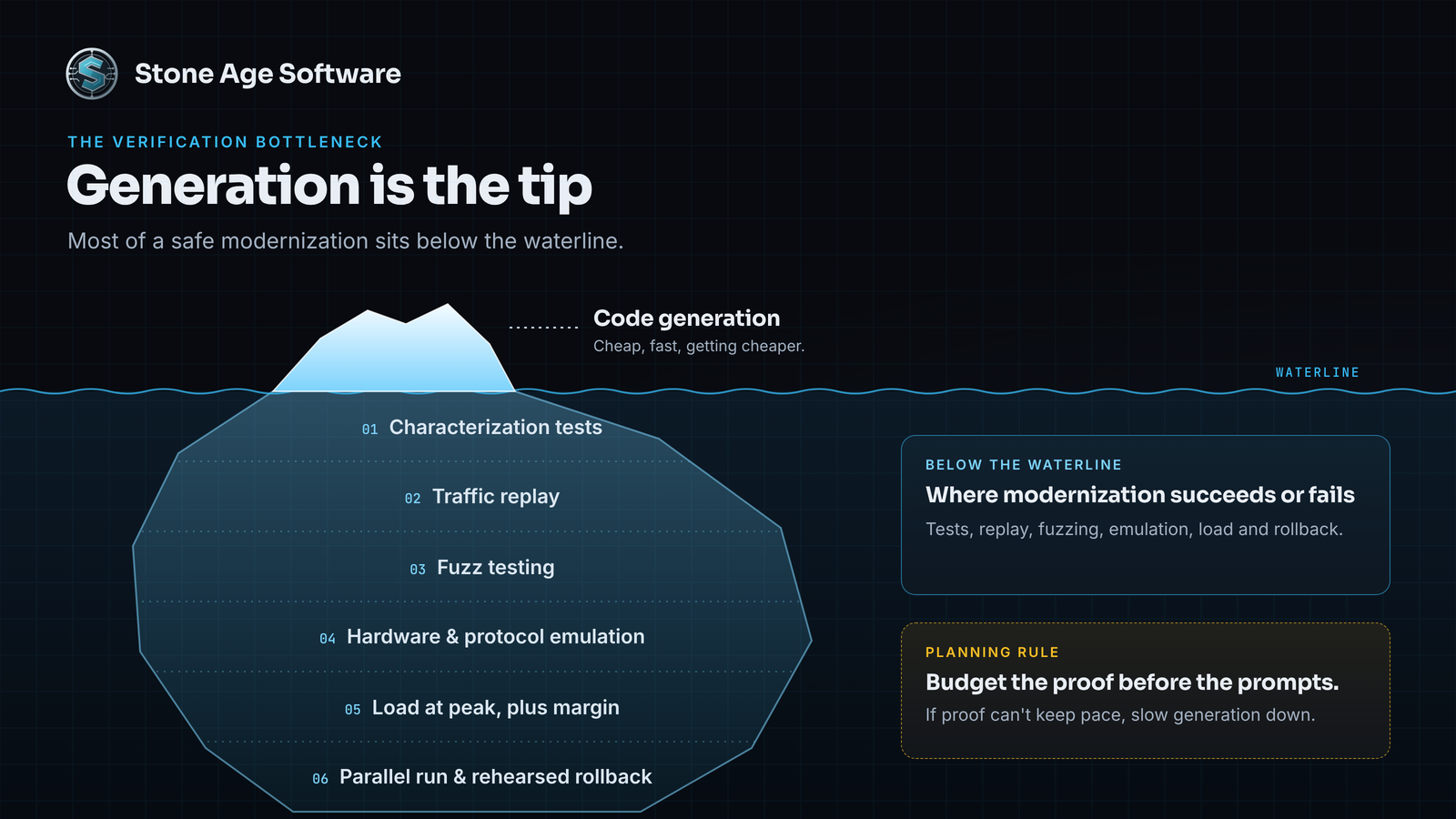
Generation is the tip. Verification is the mass that keeps you afloat.
Run This Check Before Your Next Board Meeting
Pick one revenue-critical module. Answer five questions in writing, with a name next to each answer:
- Can someone explain every branch in plain English, including the weird ones?
- Do tests pin today's behavior, quirks included?
- Can you replay a full business cycle of real traffic against a candidate?
- Is there a seam where a router could split traffic?
- Can you roll back in minutes, without a restore?
Three or more "no" answers mean you are not ready to generate. You are ready to excavate. That is normal for a system this old, and it is fixable.
When the board asks for Cisco speed, give them a plan with proof built in. That is a story a board can fund, and one your on-call rotation can live with.
Under pressure to "just use AI" on the system that pays the bills? Book a Legacy Codebase AI-Readiness Assessment. We put our feet on the floor with your maintainers, read the code alongside them, and map the fences before anyone generates a line. You leave with your Modernization Blueprint: the fence register, a characterization-test plan, and your first strangler seam, ranked by risk. Fixed price, quoted up front. Schedule your assessment → No obligation. We reply within one business day.
This is the sequence our legacy modernization and migrations practice runs on every system: read it, pin it, route it, retire it. Boring on purpose, so nobody's Monday gets ruined.