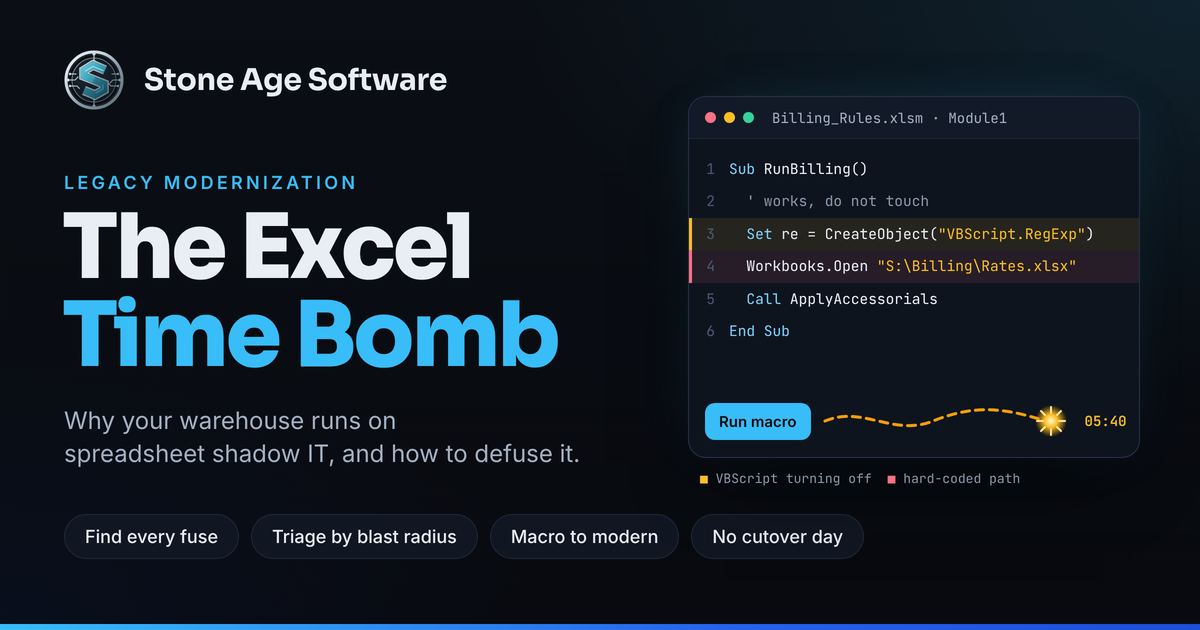
It is 5:40 on a Monday in November. The billing workbook opens with a security banner, and the macro button does nothing. The analyst who wrote it took a new job in September. Nobody else has opened the code editor in three years.
That workbook is spreadsheet shadow IT: software the business runs on that no system of record knows about. It was rarely a bad call. Usually it was the fastest good answer to a real gap. Then it kept working until everyone forgot it was software.
Two things changed this fall. First, the people. The September 2026 JOLTS release from the Bureau of Labor Statistics came out November 3. It shows the job openings rate in transportation, warehousing, and utilities rising to 4.8 percent, up from 4.4 percent in August. And 2.2 percent of the sector's workers quit in September alone. The people who understand your macros have options.
Second, the platform. Office 2021 reached end of support on October 13, so it gets no more security fixes. Microsoft also plans to turn VBScript off by default in Windows around 2026 or 2027. Older VBA that leans on it can stop working.
Here is why warehouses run on workbooks, how the bomb goes off, and how to defuse it without a cutover day.
Why spreadsheet shadow IT takes root in a 3PL
A WMS is built to run the floor, and most run it well. The trouble lives at the seams. Each client contract brings billing rules, accessorial charges, and report formats nobody configured at go-live. Carriers add rate exceptions. Labor planning needs numbers from three systems at once.
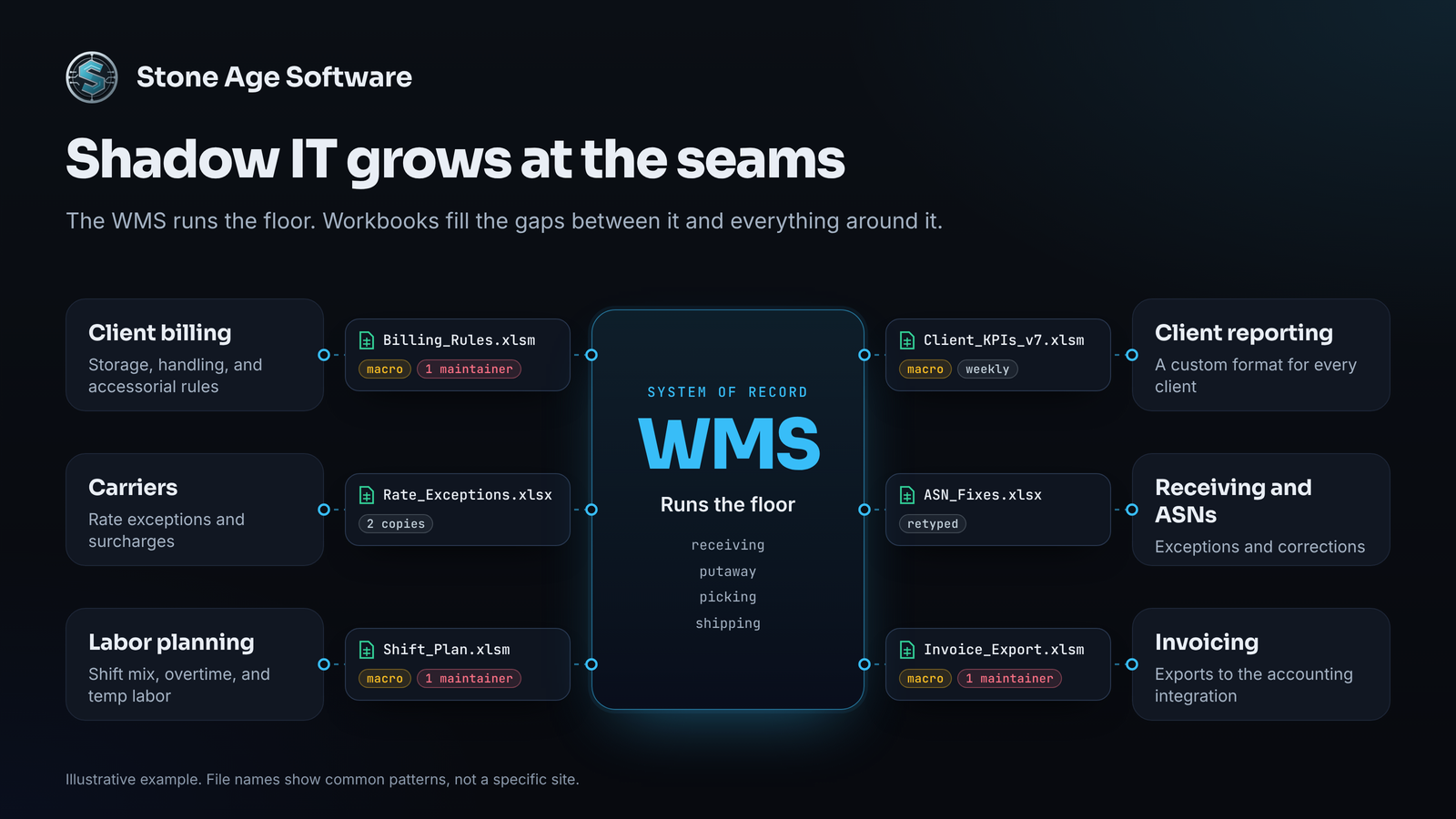
The fastest fix for a seam is a workbook. It ships the same afternoon and needs no ticket. The person who builds it understands the problem better than anyone. That is why it wins, and the trouble starts when it keeps winning.
Trade data shows how common this is. Modern Materials Handling's 2026 Warehouse/DC Operations Survey found overall WMS use slipped from 87 percent to 84 percent. Among sites with a WMS, 42 percent run a legacy system. And 48 percent still collect productivity data by hand. Data collected by hand has to land somewhere, and it usually lands in Excel.
Over a few years, a helper sheet tends to follow the same path:
- A helper tab that saves twenty minutes a day.
- A macro that saves an hour, written by the one person who knows VBA.
- A daily routine the shift cannot start without.
- The system of record for something that moves money or inventory.
At step four it is production software. It just has one maintainer, no change log, and no tests.
Five ways the Excel time bomb goes off
These failures rarely announce themselves. Software vendor DOSS surveyed 1,003 U.S. operations professionals about spreadsheet errors in 2026. About 2 in 5 spreadsheet incidents were fixed without ever reaching leadership. So the risk is usually bigger than it looks from the office.
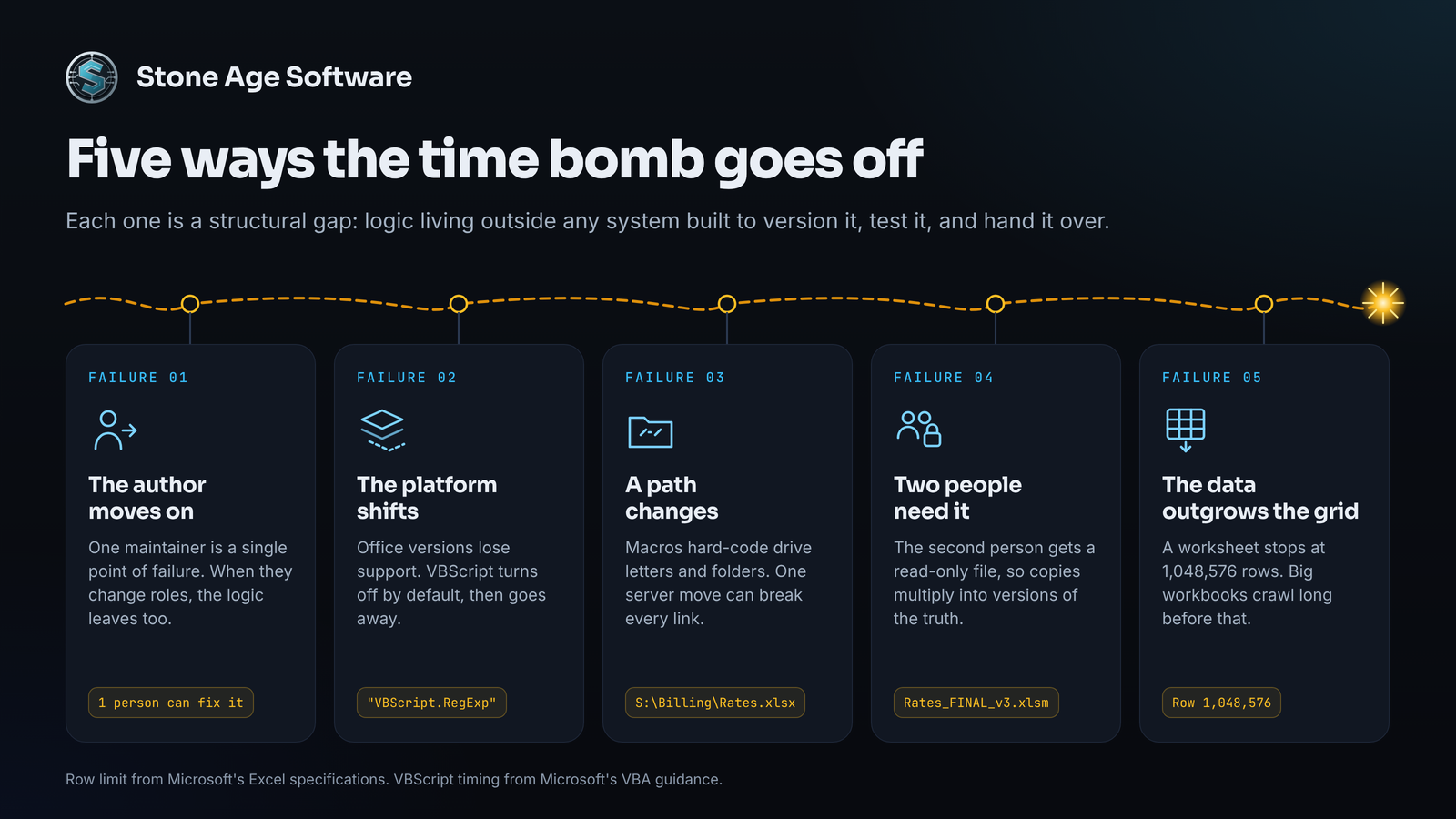
- The author moves on. One maintainer is a single point of failure. When that person changes roles, the logic leaves too.
- The platform shifts. Office already blocks macros in files from the internet by default. Once VBScript is removed, VBA that calls .vbs files stops working. Code that uses the VBScript regular expression library breaks too, unless Office is on Microsoft 365 Version 2508 or later.
- A path changes. Macros often hard-code a drive letter or folder. One file server move can break every link at once.
- Two people need it at once. A workbook on a file share opens read-only for the second person, so people save copies. Soon there are three versions of the truth.
- The data outgrows the grid. A worksheet tops out at 1,048,576 rows. Long before that, big workbooks crawl, and people trim history to keep them open.
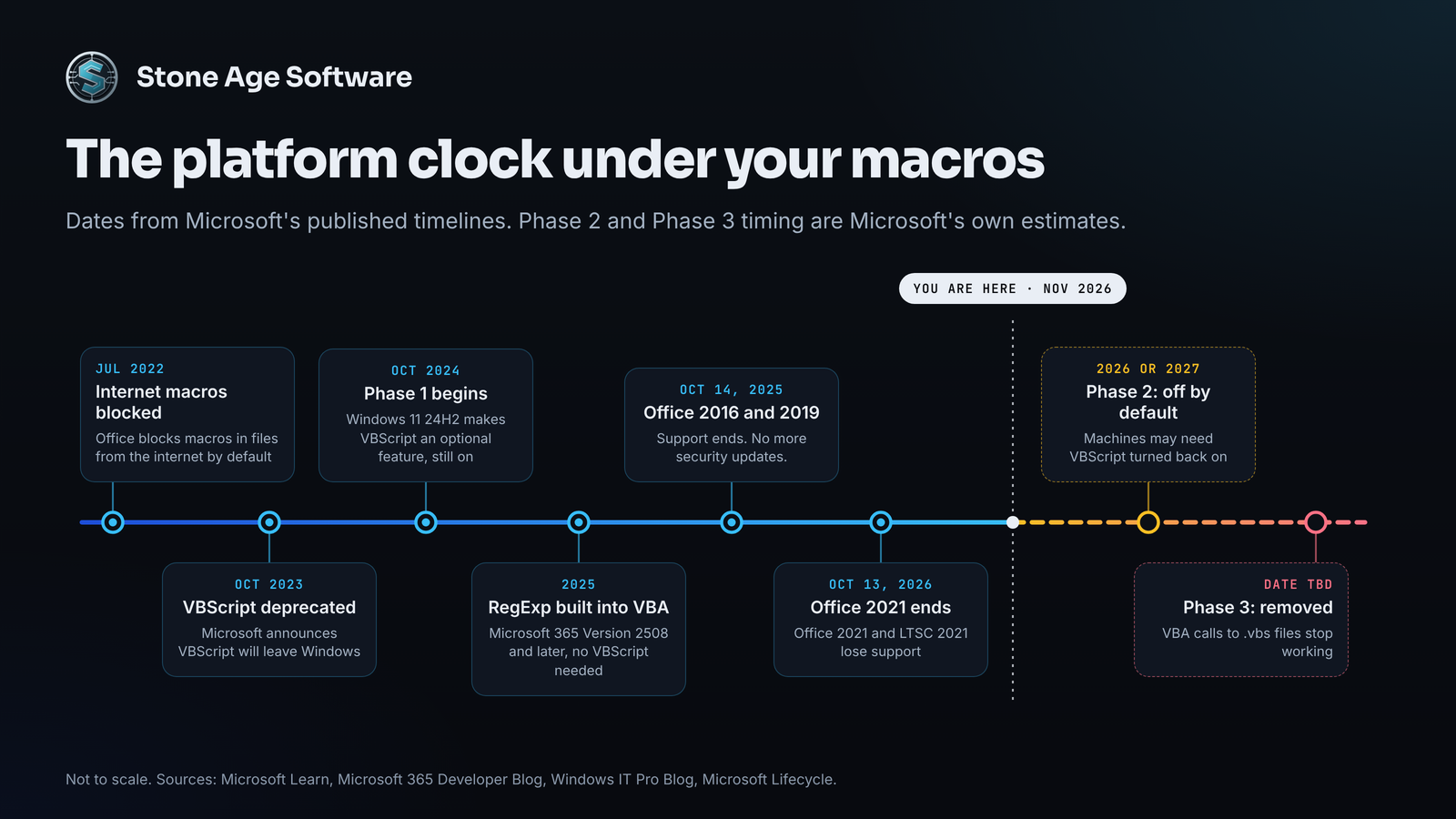
None of this is a people problem. Each failure is a structural gap. The logic lives outside any system built to version it, test it, schedule it, and hand it over.
Find every fuse before you cut one
Do not start by rebuilding. Start with a list. Most sites find more workbooks than they expect, and most of those should stay workbooks.
Look in four places. Shared drives hold the obvious workbooks. A Personal Macro Workbook (PERSONAL.XLSB) holds macros that follow one login from file to file. Windows Task Scheduler may be running .vbs files overnight. And mail rules quietly move messages into folders a macro reads every morning.
For each file that runs on a schedule or feeds another system, answer three questions:
- What breaks if it does not run tomorrow? Billing, a client report, a carrier tender, or nothing?
- How many people can fix it today? Count names, not departments.
- Does money or inventory move because of it? That raises the stakes on every error.
Then sort each workbook into one of four bins.
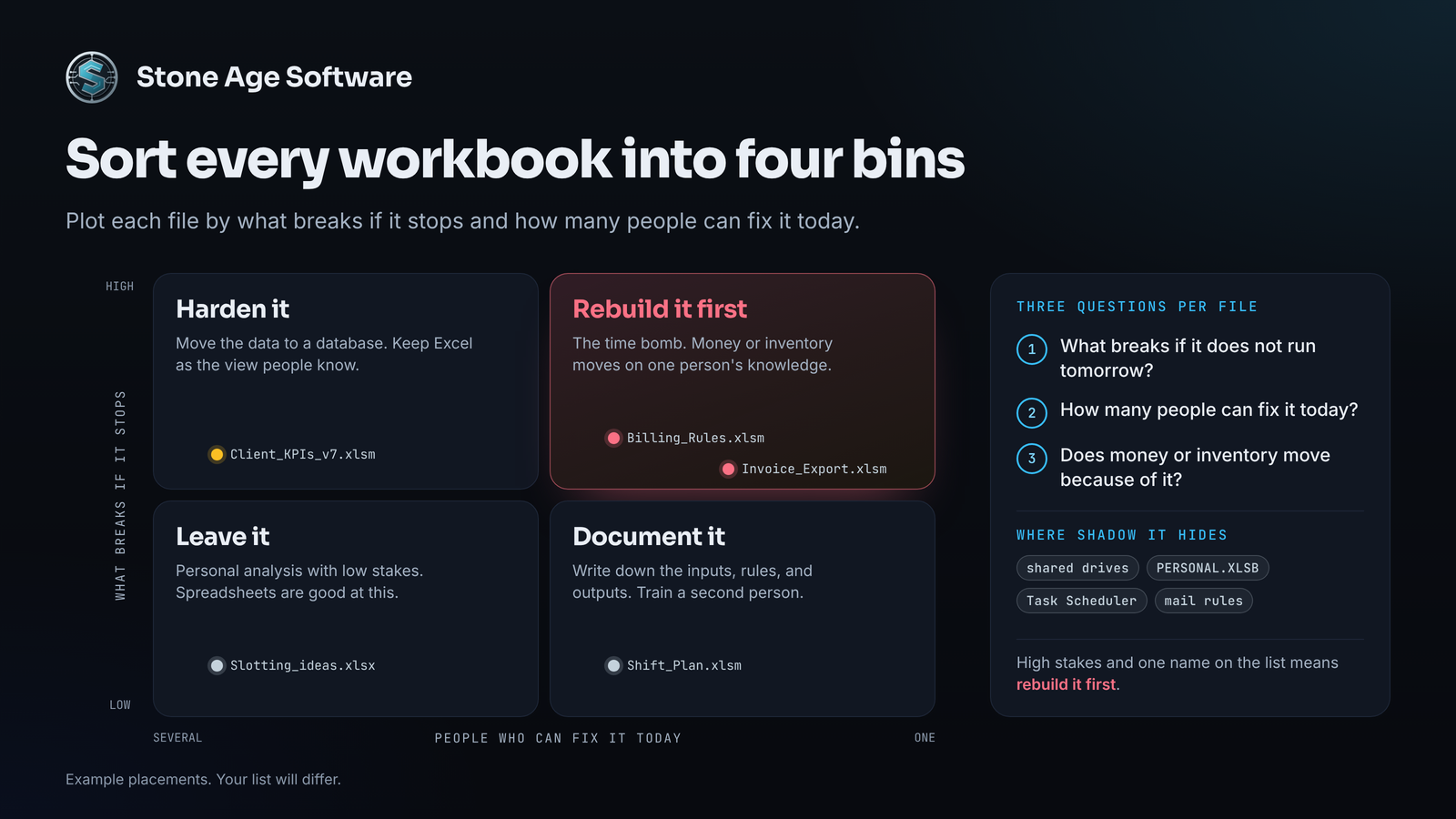
- Leave it. Low stakes, several people can fix it. Spreadsheets are great at this.
- Document it. Low stakes, one maintainer. Write down the inputs, rules, and outputs, then train a second person.
- Harden it. High stakes, several people can fix it. Move the data into a database and keep Excel as the view people already know.
- Rebuild it first. High stakes, one person can fix it. This is the time bomb.
From macro to modern: retiring the single-point-of-failure spreadsheet
Rebuilding a load-bearing workbook is a migration, not a rewrite. The goal is the same outputs on a sturdier foundation.
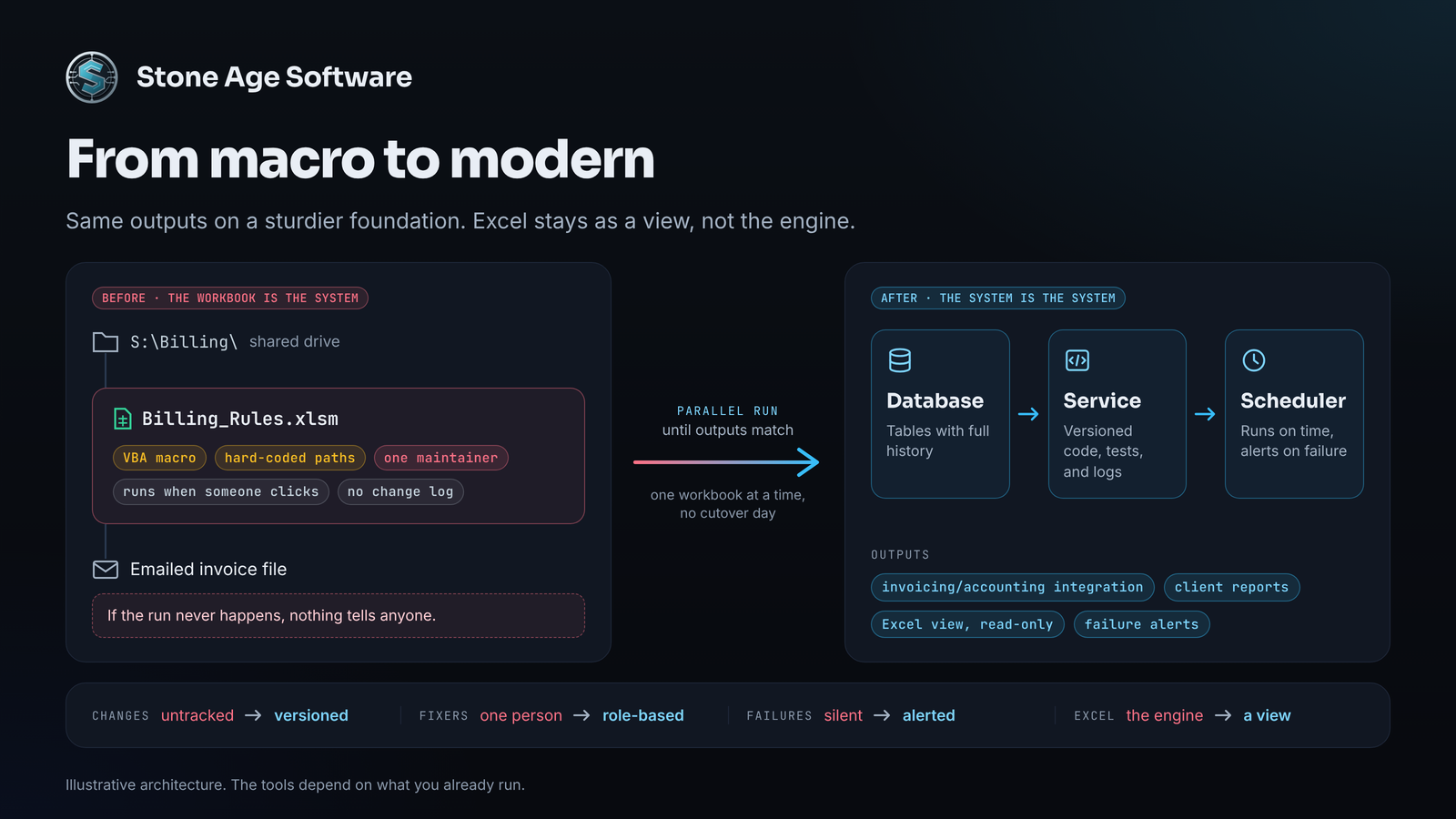
Read the code, not the memory. Open the VBA editor and list every input, rule, and output. Hidden steps live there: a column filter, a rounding rule, a client exception added in 2019.
Freeze the rules with real data. Run last month's inputs through the old workbook and the new system. Compare outputs line by line. Explain every difference on purpose before you trust the new numbers.
Move the data before the logic. Put the tables in a real database first. Excel can still read them, so nobody loses the view they trust.
Rebuild the logic where it can be watched. A small service or web app brings version control, logs, scheduled runs, and access by role. When a run fails, it sends an alert instead of failing quietly. If the 5:40 run breaks, a supervisor hears about it at 5:41, not when a client calls at 9:00.
Retire one workbook at a time. Skip the cutover day. In our unified operations platform case study, a site replaced forty small systems one module at a time. Each old spreadsheet, inbox rule, and clipboard retired the day its module shipped.
Not every spreadsheet needs to go. Sometimes the workbook is the right input, and only the retyping is wrong. In our transfer request automation project, emailed request spreadsheets now become validated, reference-numbered orders on their own. If the workbook's main job is reporting, our guide to building a 3PL reporting layer covers that path.
The person who built the original workbook is your best requirements document. Bring them in early and give them credit. The new system takes over the repetitive steps. That frees them for exceptions and judgment calls.
A 20-minute shadow IT fuse hunt
You do not need a consultant to see how exposed you are. Pour a coffee and work through this list.
- Search the shared drives. Look for .xlsm, .xlsb, and .accdb files changed in the last 90 days.
- Name the fixer. Beside each file, write the one person who could fix it tomorrow. If nobody comes to mind, mark it red.
- Search the code. In the VBA editor, search for "VBScript", ".vbs", and "RegExp". Each hit needs a plan before VBScript turns off.
- Check the version. On machines that run those files, open File, then Account. Office 2021 or older means no more security updates.
- Pick the first fuse. Choose the one workbook that moves money or inventory and has a single fixer. Start there.
If that first fuse is a billing macro or an Access database only one person understands, you do not have to defuse it alone. Our legacy modernization and migration practice moves it to a supported system one piece at a time, while the floor keeps working. The work is a fixed price, quoted up front.