
Tuesday, October 13, 2026 is the last day of year one. On Wednesday morning, Windows 10 ESU year 2 begins, and coverage does not roll forward by itself.
Most 3PL buildings still have a few of these machines. The pack station PC that drives a label printer. The receiving desk that reads the floor scale. The office tower that hosts the one shared spreadsheet everybody trusts. They work, so nobody touches them.
That instinct is sound. The gap is not on the floor. It sits in the paperwork between a license bought last fall and the devices it was meant to protect. Here is what changes this month, which machines fall through, and a check you can run in an hour.
What changes on October 14, 2026
Windows 10 left standard support on October 14, 2025. Since then, security patches arrive only through Extended Security Updates, a paid program. Microsoft's Extended Security Updates program page for Windows 10 sets the terms.
The short version:
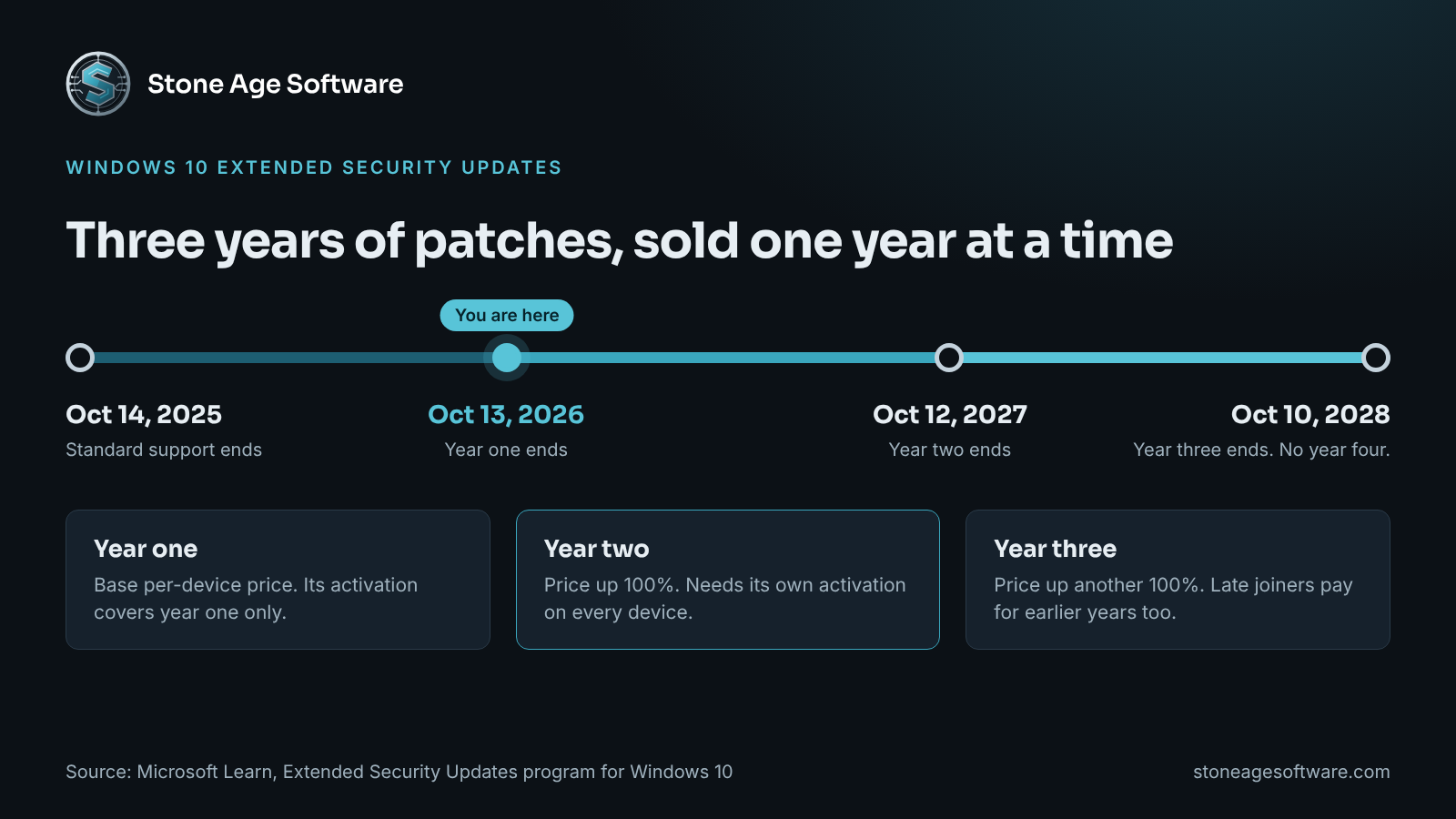
- Year one ends on October 13, 2026.
- Year two runs from October 14, 2026 through October 12, 2027.
- Year three is the last one. It ends on October 10, 2028.
- The per-device price doubles each consecutive year. That is a 100% increase for year two, and another 100% for year three.
- The program is cumulative. A device that joins in year two also pays for year one.
- Licenses are sold by the year. There are no partial periods.
What you get is narrow by design. ESU delivers critical and important security updates. It does not include new features, design changes, or general technical support.
So ESU buys time. It does not buy a plan.
Why Windows 10 ESU year 2 does not switch on by itself
Here is the seam. Buying year two and being covered by year two are separate events.
Microsoft's guide to enabling Extended Security Updates gives each year its own activation ID. A device activated for year one is licensed for year one. Year two needs its own activation on every device.
The prerequisites are specific too:
- The machine must run Windows 10 version 22H2.
- It needs a recent cumulative update.
- It needs the ESU licensing preparation package, installed after that update.
- Then the year two activation has to run with administrator rights.
Nothing on the screen tells an operator that a step was missed. The PC boots. The WMS client opens. Labels print. Windows Update can report that the device is up to date, because nothing more is offered to it.
Online activation also has to reach Microsoft's activation servers. Many floor PCs sit on a restricted network segment on purpose. That is good practice. It also means the activation call can fail quietly. Microsoft documents phone and proxy activation for those devices, but someone has to know the device needs it.
This is a structural gap, not anyone's mistake. The license lives in an admin portal. The device lives on a dock. No system connects the two.
The warehouse PCs most likely to be missed
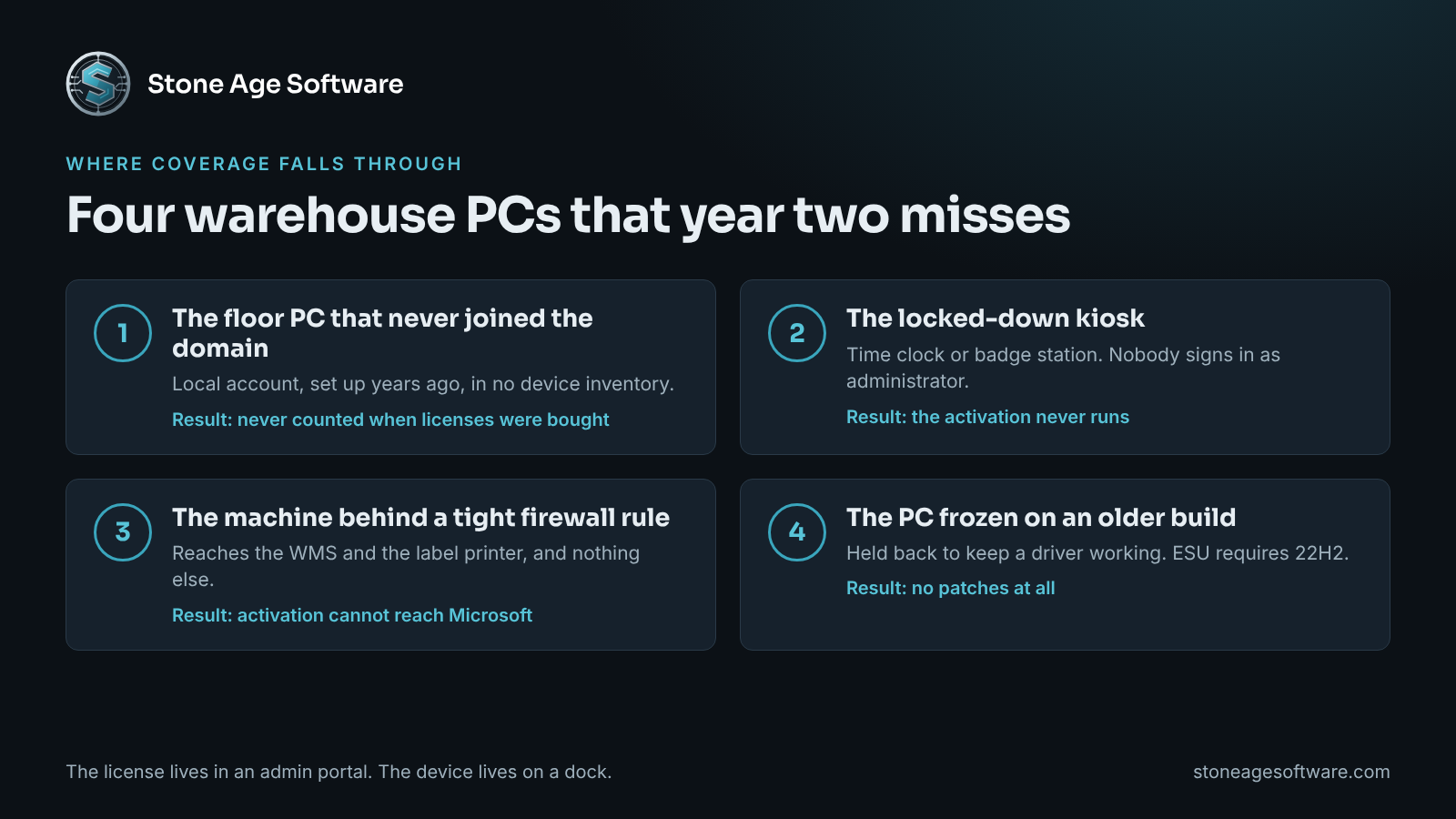
Four kinds of machine tend to fall off the Windows 10 ESU year 2 list.
- The floor PC that never joined the domain. It was set up with a local account years ago. It appears in no device inventory, so nobody counted it when licenses were bought.
- The kiosk. Time clock stations and badge readers run locked down. Nobody signs in with administrator rights, so nobody runs the activation.
- The machine behind a tight firewall rule. It can reach the WMS and the label printer and nothing else. Activation cannot phone home.
- The PC frozen on an older build. ESU requires version 22H2. A machine held back to keep a driver working receives no patches at all.
There is also a fifth trap, and it comes from good news. In June, Microsoft extended its consumer ESU program to October 12, 2027, as BleepingComputer reported. That headline travelled widely. The fine print matters more. The consumer program excludes devices joined to an Active Directory domain and devices under mobile device management. Business machines belong in the commercial program.
Two more items share the same date. Office 2021 retires on October 13, 2026. Windows 10 2016 LTSB reaches end of support that day as well. Both appear on Microsoft's list of products ending support in 2026. A PC can be covered for Windows and still run an office suite that gets no fixes.
Why these machines are still on Windows 10
The reasons are usually good ones.
Some machines fail the hardware check. Windows 11 needs TPM 2.0, Secure Boot, and a supported processor, per the Windows 11 specifications and system requirements. An older PC can miss that bar and still run a pack station perfectly well.
Others are tied to what is plugged into them. A label printer driver. A scale on a serial port. A badge reader. A dimensioner. Each was tested against one operating system. Swapping the PC means retesting everything attached to it, and that is hard to schedule in the fourth quarter.
Floor hardware has its own logic, and it rewards patience. In one of our projects, eight label printers kept locking up under load. The fix came from understanding what the printers actually do with the data they receive. Nothing was replaced. The same principle applies here. Understand the machine before you decide its fate.
There is a cost to waiting, though. Customer security questionnaires and cyber insurance applications often ask about unsupported operating systems. An honest answer needs a list behind it. And an unpatched PC on a flat network sits beside the scanners and the WMS.
Sort every machine into one of four lanes
You do not need to replace everything. You need to sort.
- Upgrade in place. The PC passes the Windows 11 check and nothing unusual is attached. Schedule it outside peak.
- Replace. The PC fails the check and its role is generic, such as email and office work. Budget it from a list, not a guess.
- Cover and isolate. The PC fails the check and drives a device that cannot move yet. License Windows 10 ESU year 2, confirm the activation, and keep the machine on its own network segment with only the connections it needs.
- Retire. Nobody can say what the machine does. Confirm with the shift lead, then take it off the network.
Lane three is the one that needs a date. Year three doubles the price again. After October 10, 2028 there is no year four. A machine in lane three should have a written exit: which peripheral, which replacement driver, which quarter.
Scripts can do the counting. Your people do the judging. They know which station can go dark on which shift. They know which client's labels cannot tolerate a week of testing. They know which old PC is quietly holding up month-end. A good inventory hands them those decisions with the facts attached.
A one-hour check you can run this week
No new software is needed. One person and a clipboard will do.
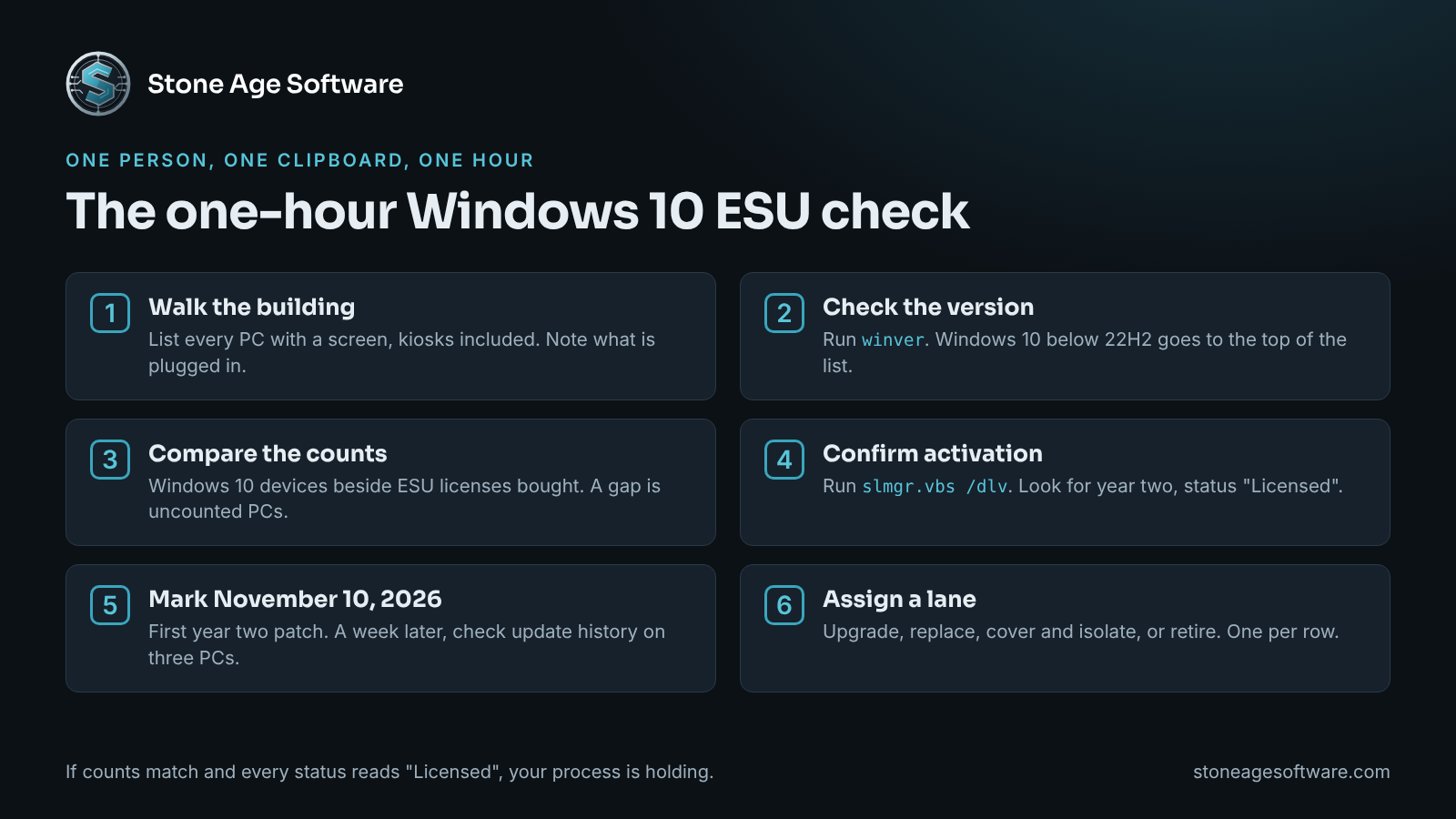
- Walk the building. Write down every PC with a screen, including kiosks and the ones under desks. Note what is plugged into each.
- Check the version. Press the Windows key and R, type
winver, and press Enter. Record the version. Any Windows 10 machine that is not on 22H2 goes to the top of the list. - Compare the counts. Put your Windows 10 count beside the number of ESU licenses bought. A difference means machines nobody counted.
- Confirm activation. On each Windows 10 machine, have your IT contact run
slmgr.vbs /dlvfrom an administrator prompt. Look for the Windows 10 ESU year 2 program with a license status of "Licensed". A year one entry does not cover you after October 13. - Mark the calendar. The first year two patch is due on November 10, 2026. A week later, open update history on three floor PCs. If no November security update is listed, that machine is not covered.
- Assign a lane. Put a lane number from the section above beside every row.
If every count matches and every status reads "Licensed", your process is holding. That is worth knowing before volume climbs. If the counts differ, you have found the seam, and you found it before the first missed patch.
That written list is where our enterprise IT services for Texas warehouses and businesses begin. We inventory what you have, what state it is in, and what it takes to keep it supported. The work is scoped from that list at a fixed price, quoted up front. Your WMS and your floor hardware stay in place, and the inventory is yours to keep.