
On Tuesday, October 13, 2026, the last security patch ships for Windows Server 2012 and 2012 R2. After that date, Windows Server 2012 end of support is final. There is no fourth year to buy, on your own hardware or in the cloud.
For most 3PLs, that server is not an abstract line on an asset list. It is the box in the back office that nobody has logged into since the last power outage. It still runs the warehouse database, the label service, or the job that pulls orders every night.
The date has been public for three years. The hard part was never the date. The hard part is that nobody has a drawing of what that server does.
What Windows Server 2012 end of support means on October 13
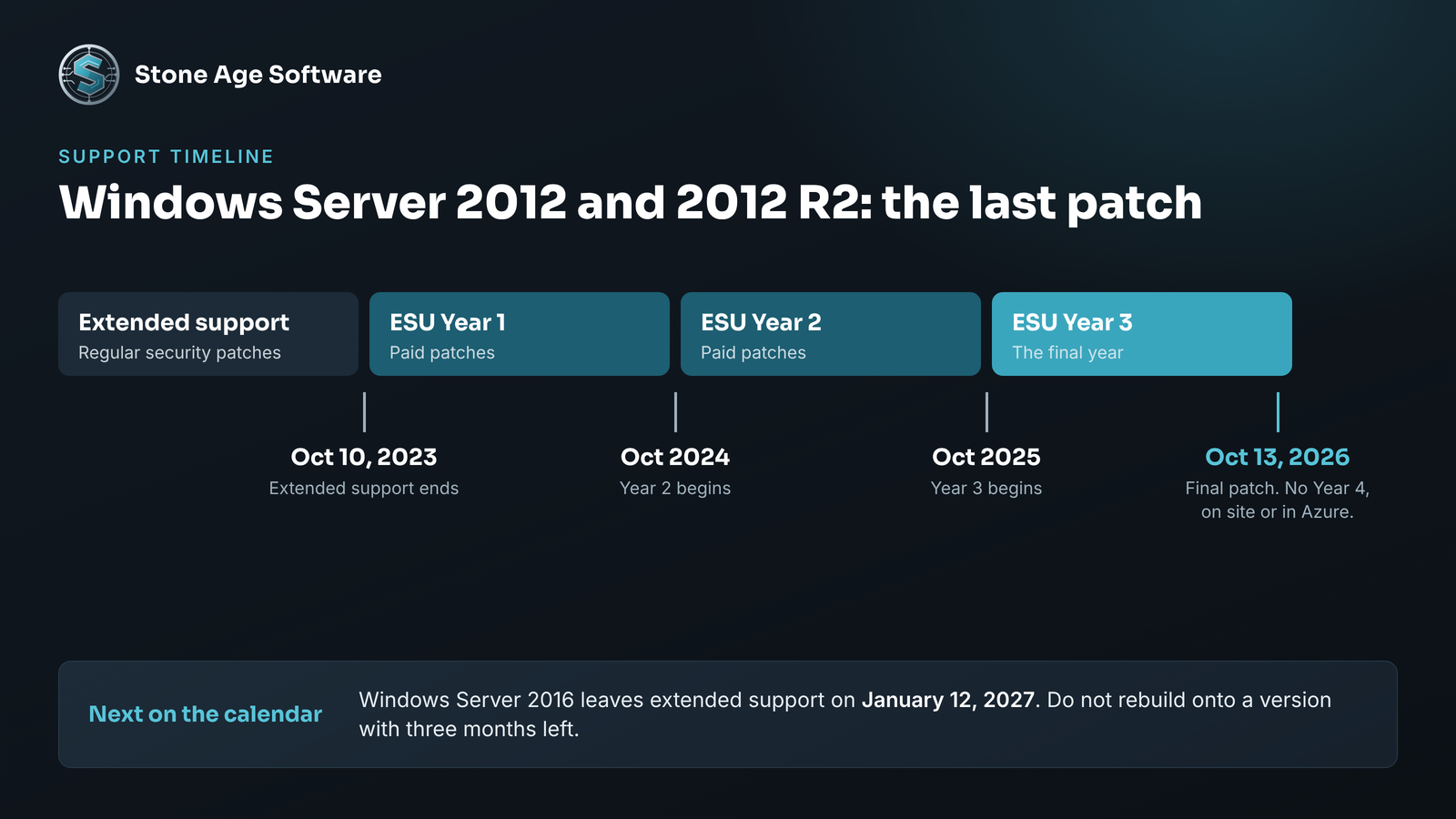
Microsoft ended regular support for both versions in October 2023. Since then, a paid program called Extended Security Updates has kept patches coming.
The Microsoft lifecycle page for Windows Server 2012 R2 lists three ESU years. Year 3 is the last one, and it closes on October 13, 2026.
Microsoft's Extended Security Updates overview is plain about what follows. Once the ESU period ends, the updates stop. The same end date applies to servers hosted in Azure.
Here is what that means in practice:
- The server keeps booting and keeps working on October 14.
- New security holes found after that day stay open on it for good.
- Software makers stop testing new releases against it.
- Insurers and customer security questionnaires start asking about it by name.
Nothing breaks on the day. That is exactly why this deadline slips. The risk grows quietly, one unpatched month at a time.
Why the oldest server in the building runs the most important jobs
Old servers survive for a reason. They work, and everything around them was built to find them.
In a warehouse, a ten-year-old server tends to collect jobs over time. Each one was added by a different person for a good reason. None of them was written down in one place.
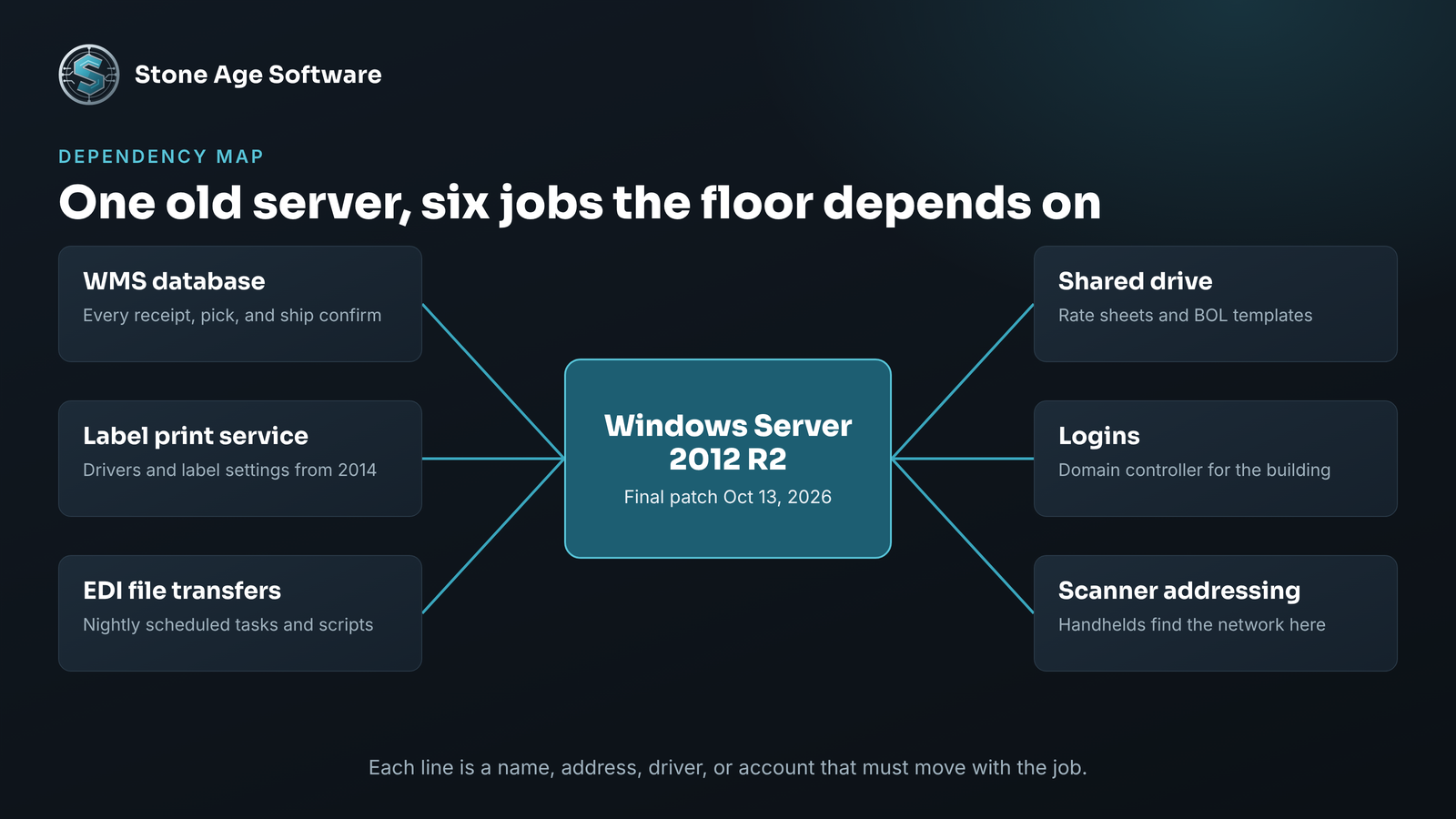
A typical 2012-era warehouse server is doing some mix of these:
- Hosting the WMS database or the WMS application itself
- Running the label print service that feeds the thermal printers
- Holding the scheduled tasks that move EDI files to and from trading partners
- Serving the shared drive where the office keeps rate sheets and BOL templates
- Acting as a domain controller, so every login in the building depends on it
- Handing out addresses to scanners and handhelds on the floor
That is six jobs on one machine. The machine itself is not the problem. The gap is that the jobs live in six different heads, and two of those people have moved on.
This is a structural seam, not a people problem. Each system was set up correctly at the time. No tool was ever asked to keep the map between them.
The dependencies that turn a server swap into a warehouse outage
Replacing a server sounds like an IT task. In a 3PL it is an operations event, because the floor talks to that server by name.
These are the connections that surprise people during a cutover:
- Hardcoded names and addresses. Scanners, label templates, and reports often point at the old server by name or IP. A new server with a new name is invisible to them.
- The database version. An old Windows server often carries an equally old database engine. The SQL Server 2016 lifecycle page shows that version left extended support in July 2026. Check both layers together.
- Printer drivers. Thermal printer drivers from 2014 do not always have a current equivalent. Label sizes and darkness settings live inside them.
- Scheduled tasks and scripts. Nightly jobs run under an account whose password nobody remembers. They move files, purge logs, and send reports.
- Old protocols. File transfers to a trading partner may rely on an older encryption setting. A modern server turns those off by default.
- Service accounts. One account may run five services. Change its password and five things stop at once.
None of these are exotic. Each one takes minutes to fix when you know about it ahead of time. Each one takes a shift to find when you learn about it at 6 a.m. on a Monday.
We saw the same pattern with printers on a warehouse floor. The fix came from understanding what the hardware actually did under load. Our industrial label printing project walks through how eight printers stopped locking up once the real cause was mapped.
Your options after the final patch
You have four real paths. They are not equally good, and the right one depends on what the server does.
1. Upgrade in place. Microsoft's guidance says Windows Server 2025 accepts in-place upgrades from up to four versions back. That includes 2012 R2. The original 2012 release needs an extra hop or a rebuild. This path keeps the name and the settings. It also carries ten years of clutter forward.
2. Build new and migrate. Stand up a current server next to the old one. Move one job at a time and test each. This is slower and cleaner. It is the right choice when the server does several unrelated things.
3. Move the workload to hosted infrastructure. This helps with hardware age and power outages. It does not buy more patches for 2012. The ESU end date is the same everywhere.
4. Isolate it and set a date. Sometimes a WMS version is supported only on the old server. In that case, wall the server off from the internet and the office network. Limit who can reach it. Then write down the retirement date and who owns it.
Option four is a bridge, not a destination. It is honest when it has a date on it. It is a risk when it becomes the plan.
Whichever path you choose, your WMS stays. The server under it changes. Most WMS products run on current Windows Server versions, and your vendor can confirm which ones. Ask them for the supported platform list before you pick a target.
One more date belongs on the same page. The Windows Server 2016 lifecycle page shows extended support ending on January 12, 2027. If you are rebuilding anyway, do not land on a version with three months left.
What good IT support does before anyone touches the server
The work that prevents an outage happens on paper first. A sound migration starts with an inventory, not an installer.
A proper plan covers these steps in order:
- List every server, its Windows version, and its database version.
- For each one, list the jobs it performs and who relies on them.
- Record every device and program that points at it by name or address.
- Confirm backups by restoring one, not by reading a green checkmark.
- Pick a cutover window that avoids peak, month-end, and cycle counts.
- Write a rollback step that takes minutes, and test it once.
This is where people matter most. Software can list installed services in seconds. It cannot tell you that the Tuesday report matters to your largest customer. Your supervisors know that. The inventory frees them to spend time on those judgment calls.
Peak season is close. A freeze on changes during November and December is sensible. That makes the inventory the right job for this month and the cutover a job for January.
A 20-minute check you can run this week
You do not need a consultant to find out where you stand. You need a login and a notepad.
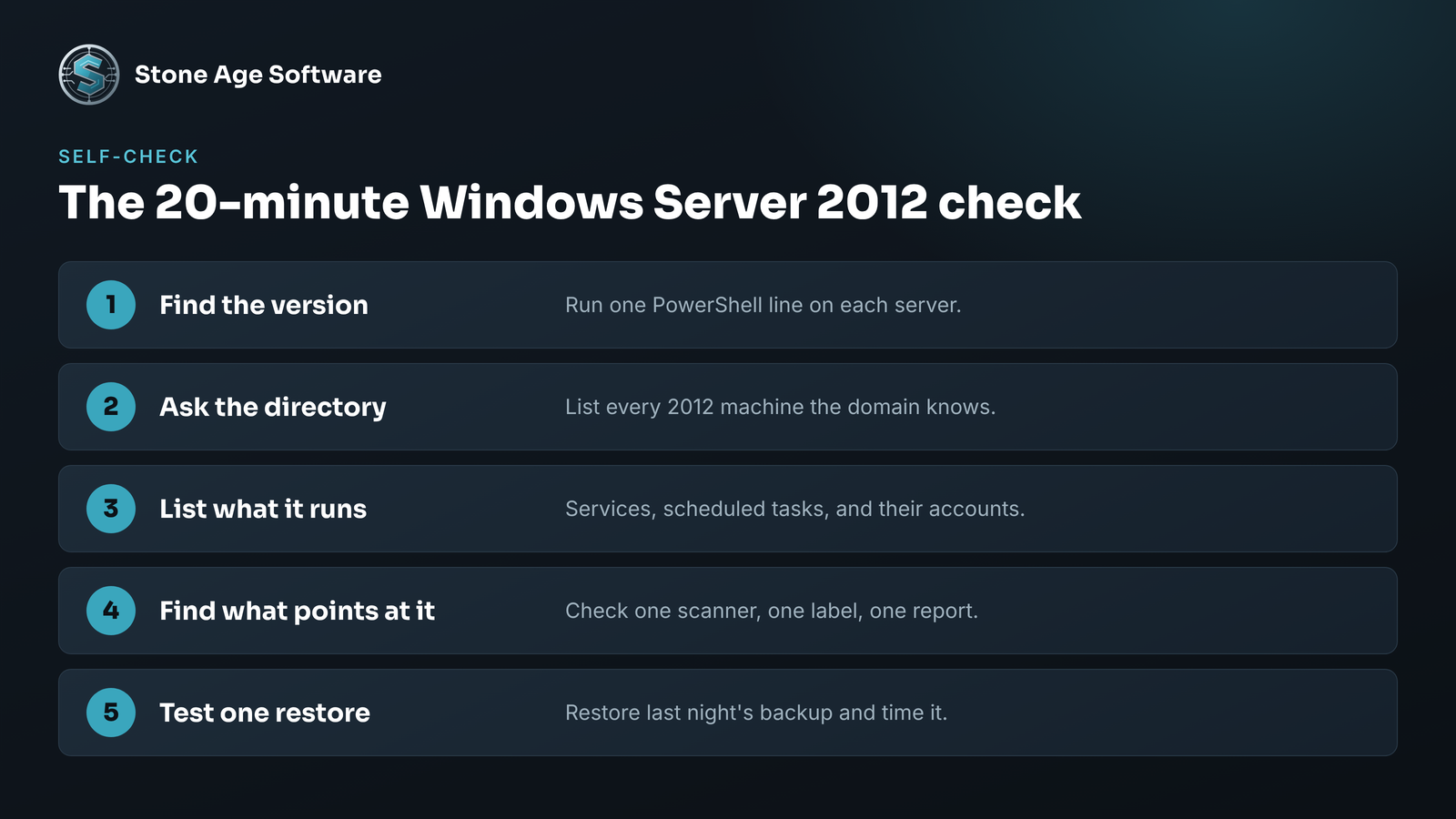
Step 1. Find the version. Log in to each server. Open PowerShell and run this:
Get-CimInstance Win32_OperatingSystem | Select-Object Caption, VersionAny line that reads 2012 or 2012 R2 goes on the list.
Step 2. Ask the directory. If you have a domain, this lists every 2012 machine it knows about:
Get-ADComputer -Filter 'OperatingSystem -like "*Server 2012*"' -Properties OperatingSystem, LastLogonDateStep 3. List what it runs. Open Services and Task Scheduler on each flagged server. Write down anything that is not part of Windows. Note the account each one runs under.
Step 4. Find what points at it. Check one scanner, one label template, and one report. Look for the server name or address in the settings.
Step 5. Test one restore. Pull last night's backup and restore a single file or database to a spare machine. Time it.
If steps one and two come back empty, you are done. If they do not, steps three through five give you the map. That map is the thing that has been missing.
Bring that list to whoever handles your IT. If the list raises more questions than it answers, that is normal, and it is fixable.
Stone Age Software handles this work as scoped projects, fixed price, quoted up front. We inventory the servers, map what depends on them, and move the workloads without stopping the floor. See how we approach it on our managed IT services page.