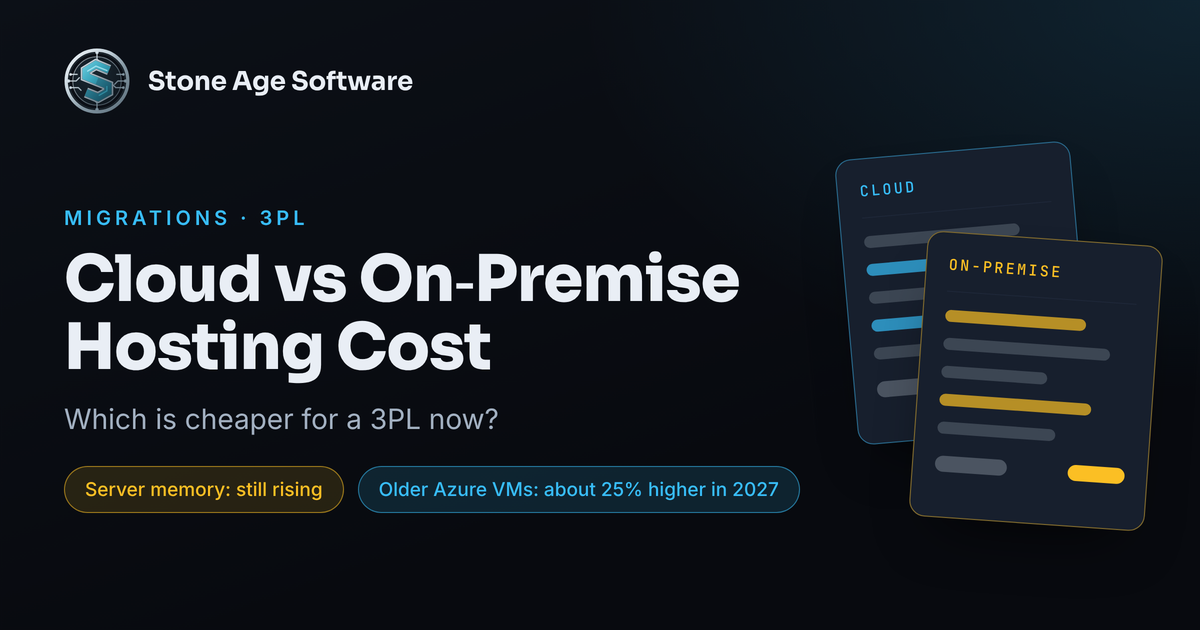
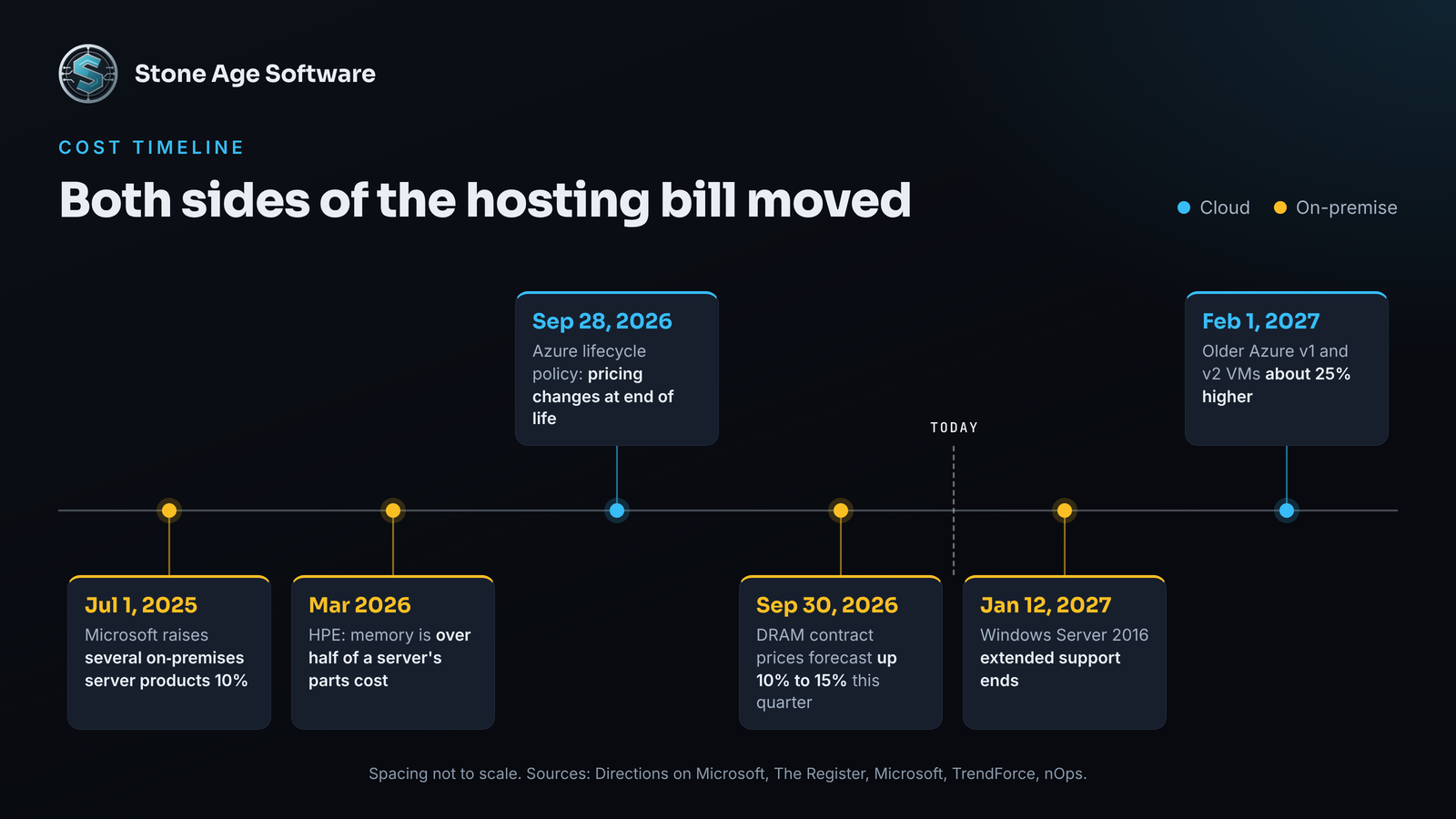
Both hosting options moved the wrong way in the last three weeks. On September 30, research firm TrendForce forecast another 10% to 15% rise in conventional DRAM contract prices this quarter. On October 5, cloud cost firm nOps reported that Microsoft is emailing Azure customers about increases that start February 1, 2027.
So the cloud vs on-premise hosting cost question is back on the table for a lot of 3PLs. The server in the back office may be due for replacement. The virtual machine your warehouse system moved onto years ago may be due for a second look.
Here is the honest answer up front. Neither option is cheaper by default. The cheaper one is the one that fits how each workload behaves. Below is what changed, what each bill really includes, and which warehouse jobs belong where.
What changed in cloud vs on-premise hosting cost this fall
Start with the cloud side. On September 28, Microsoft published a lifecycle policy for Azure virtual machines. Older VM families now move through stages toward retirement. Microsoft says customers should expect pricing and availability changes once a family reaches end of life.
The numbers followed a week later. According to nOps, the older v1 and v2 series rise about 25% in every region. Seven regions outside the U.S. also rise 8% to 17%. A server moved into Azure years ago and never resized may still sit on one of those older series.
Now the hardware side. Memory is the expensive part of a server today. HPE's chief executive said in March that DRAM and NAND make up over half the bill of materials of a traditional server. HPE also reserved the right to reprice orders between quote and shipment.
TrendForce expects NAND flash to climb another 15% to 20% this quarter. Micron, one of the three largest memory makers, told investors it expects supply to be much tighter in 2027 and 2028 than in 2026.
Then there is the calendar. Microsoft's Windows Server 2016 lifecycle page puts the end of extended support on January 12, 2027. If a warehouse server runs that version, a new box and a cloud move may get priced in the same quarter.
What the cloud bill actually includes
The cloud's advantages are real, and they are not small:
- No hardware to buy or replace. The server, the spare, and the five-year refresh become the provider's problem.
- Capacity that flexes. Peak season and a new client launch get capacity when they need it, then give it back.
- Distance without a second building. Copies in another zone or region are a configuration choice.
- Faster starts. A test environment takes hours, not a purchase order.
The costs are real too. They hide in usage, and usage grows quietly:
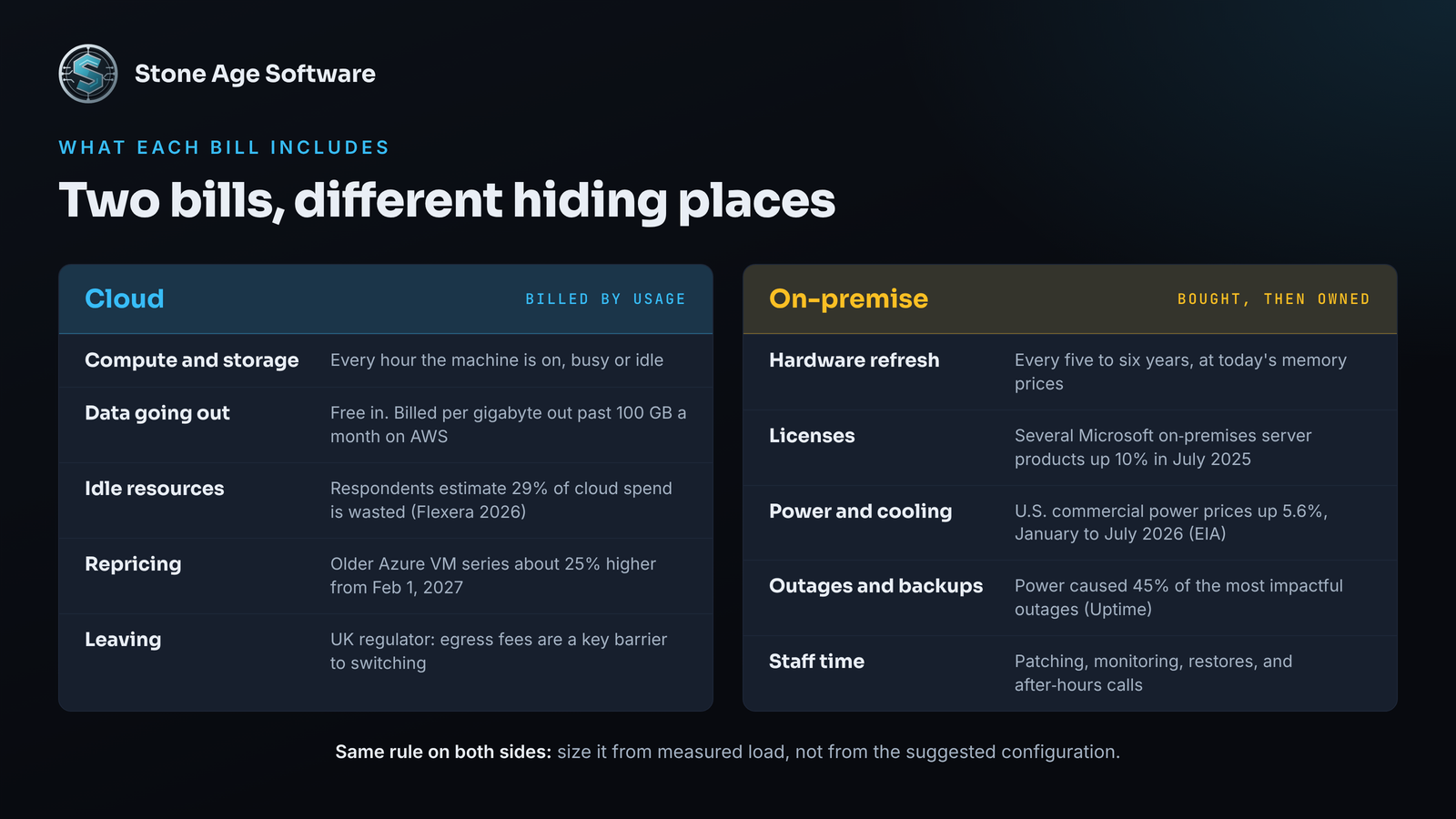
- Data going out. Inbound data is free on AWS. Outbound traffic beyond 100 GB a month is billed per gigabyte. Customer portals, EDI, and report exports all send data out.
- Resources nobody turned off. Respondents to Flexera's 2026 State of the Cloud survey estimate 29% of their cloud spend is wasted. That was the first increase in five years.
- Price changes you do not control. The Azure increase above is one. Renewals reprice on the provider's calendar, not yours.
- The cost of leaving. The UK's competition regulator found egress fees are a key barrier to switching. Fewer than 1% of customers switch providers each year. AWS now waives exit transfer fees on approval, if the move finishes within 180 days.
None of this is a people problem. A usage bill shows totals by service. It does not show which report, screen, or nightly job drove them. That gap between the bill and the work is a software seam.
What the on-premise bill actually includes
Owning hardware still wins in the right conditions. The best-known recent case is 37signals, the company behind Basecamp. It moved its apps off AWS onto its own servers in 2023. Its cofounder reported in October 2024 that the yearly cloud bill had fallen by more than half. The hardware paid for itself within that first year. The team running it stayed the same size.
That result came from steady load and a team that already ran servers. A warehouse has its own reasons to keep some systems close:
- The floor keeps moving when the internet drops. Scanners, label printers, and sorters can talk to a server down the hall. Interact Analysis notes that warehouse control software is still mostly on-premise because it needs very low latency.
- Flat cost once bought. A record peak does not raise the bill.
- Steady workloads get cheaper with age. A box that runs hard for six years spreads its cost thin.
- Data stays in your building, which some customer audits prefer.
The costs are less visible, because they land in other budgets:
- Refresh and memory prices. Every server ages out, and replacement quotes now carry this year's memory costs.
- Licensing creep. Microsoft raised prices on several on-premises server products by 10% in July 2025, and on its CAL suites by 15% to 20% that August, Directions on Microsoft reported.
- Power. U.S. commercial electricity prices averaged 5.6% higher in the first seven months of 2026 than a year earlier, per EIA's Electric Power Monthly. Texas held roughly flat.
- Outages are yours to absorb. Power caused 45% of the most impactful outages in Uptime Institute's latest survey, The Register reported. A back-office server room has fewer safeguards than a data center.
- Patching, backups, and support dates become your calendar.
Which warehouse workloads belong where
Most 3PLs do not need one answer. They need one answer per workload. The industry is already splitting the difference. Interact Analysis estimates the SaaS share of warehouse software deployments grew from just over 30% in 2018 to more than 55% in 2025. In Modern Materials Handling's 2026 software survey, 41% of respondents run cloud-based applications, and 36% are evaluating them or plan to.
Sort your systems by how they behave, not by what they are called:
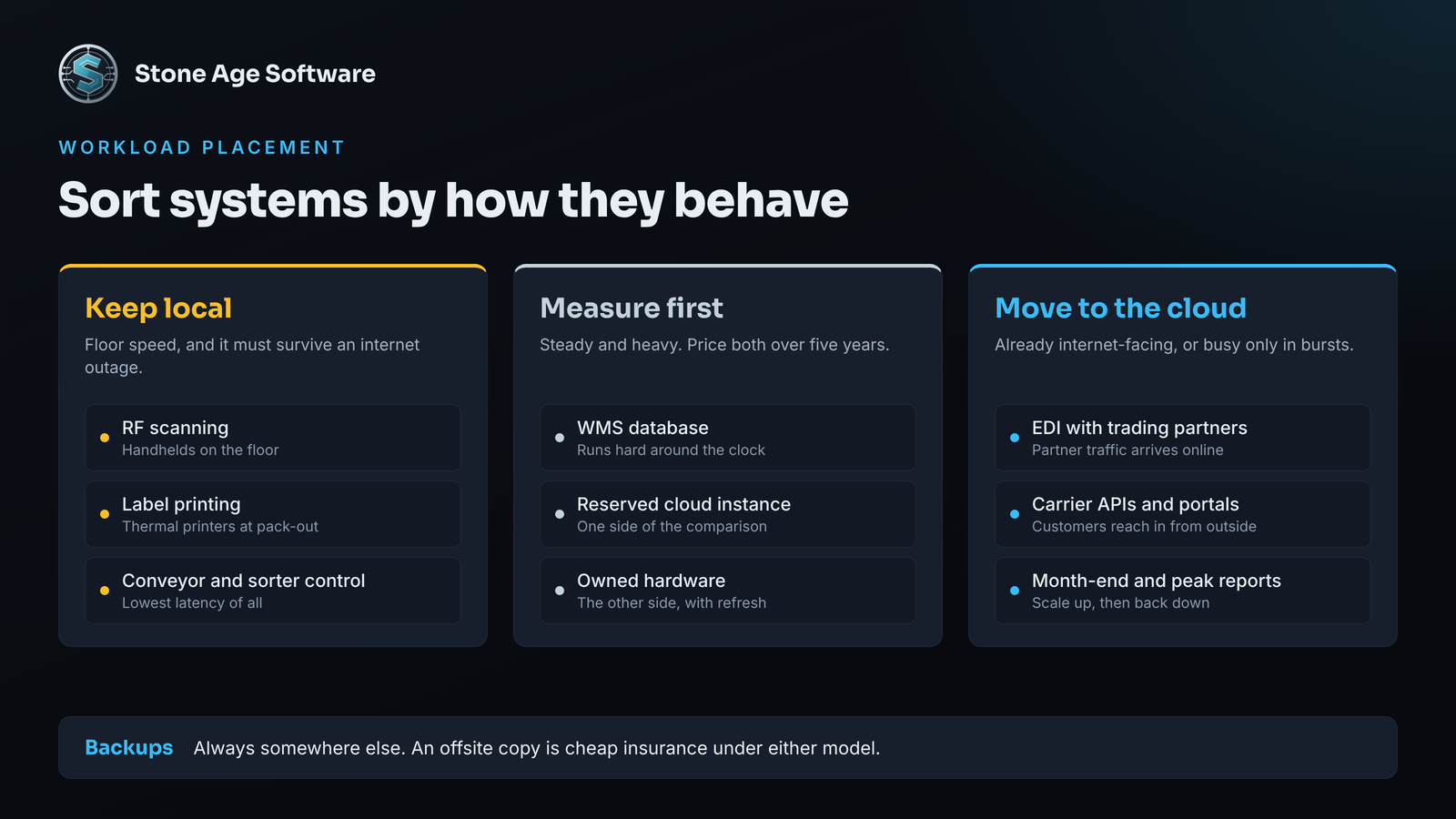
- Floor-speed jobs that must survive an outage. RF scanning, label printing, conveyor and sorter control. Keep these local, or local with a cloud copy.
- Internet-facing work. EDI with trading partners, carrier APIs, customer portals. These already depend on the internet, so the cloud costs them little in resilience.
- Spiky work. Month-end billing runs, peak-season reports, a new client's onboarding. Elastic capacity fits, if something scales it back down afterward.
- Steady, heavy work. A WMS database that runs hard around the clock. Price a reserved cloud instance against owned hardware over five years.
- Backups. Always somewhere else. An offsite copy in cloud storage is cheap insurance under either model.
Our opinion: most mid-size 3PLs end up on a hybrid. The floor stays local. The internet-facing work moves out.
Build the comparison on measured load
The biggest swing in a hosting comparison is not the price list. It is the guess about how much capacity you need. Guess high in the cloud and you pay for idle machines every month. Guess high on hardware and you pay once, for six years.
Measurement closes that gap. On one contract-logistics operations platform we instrumented, every request was timed and every background job logged its duration. Worker load and queue depth rolled up once a minute. Nobody had to guess whether the system was slow, or where. Software watched the load, so people could spend their time on the judgment calls.
A fair five-year model carries the same lines on both sides:
- Compute and storage at measured peak and average, not the suggested size
- Data out per month, at peak-season volume
- Licenses and virtualization subscriptions, including renewals
- Power, cooling, and rack space
- Backups, an offsite copy, and a tested restore
- Staff time for patching, monitoring, and after-hours calls
- The refresh or migration at year five or six
Microsoft's Azure Migrate business case counts most of these on the on-premises side, from data center lease and power to admin labor and backup. Check its defaults before you trust the verdict. It depreciates your servers over four years. In 2022, Microsoft extended the expected life of its own cloud servers from four years to six.
A 30-minute check you can run this week
You can answer most of this before you call anyone:
- List every server and cloud resource the floor depends on. Note each operating system and its support end date.
- Pull 30 days of CPU, memory, and storage use for each one. Write down the peak, not the average.
- Open the last three cloud invoices. Find data transfer out, idle resources, and any VM series flagged for retirement.
- Find the warranty end date and the last tested restore for each owned server.
- Ask one question per system: if the internet drops for four hours, does the floor stop?
Any blank line on that list is your first finding. The gap is in the tooling, not the team.
If the numbers point to a move, in either direction, our legacy modernization and migrations practice handles server and cloud moves for warehouses. Old and new run side by side until the numbers reconcile. The work is fixed price, quoted up front.