Every warehouse has an aisle where the scan gun spins. Pickers learn the spot. They step two racks over, rescan, and keep moving. The drop never reaches a ticket, so it never reaches a fix.
That workaround hides the real question behind most purchases of warehouse Wi-Fi access points. Does the brand on the ceiling matter more than where it hangs? A StayLinked report covered by DC Velocity found that dropped sessions quietly cost data and time. CILT's summary of that report says over 30% of workers lose a session at least once an hour.
The gear question got sharper this month. On October 6, Florida, Iowa, Montana, and Nebraska sued TP-Link over its security claims and China ties, The Hacker News reported. Texas filed first, in February. The suits name consumer routers, apps, and ISP-supplied devices, not the Omada business line. Still, they raise the question every buyer should ask about any access point. Who keeps it patched, and for how long?
Here is how to get reliable coverage first. Then we compare name-brand and budget gear.
Why warehouse Wi-Fi access points struggle in the racking
A warehouse is a radio maze that rebuilds itself every week. Steel racks reflect signal, and inventory absorbs it.
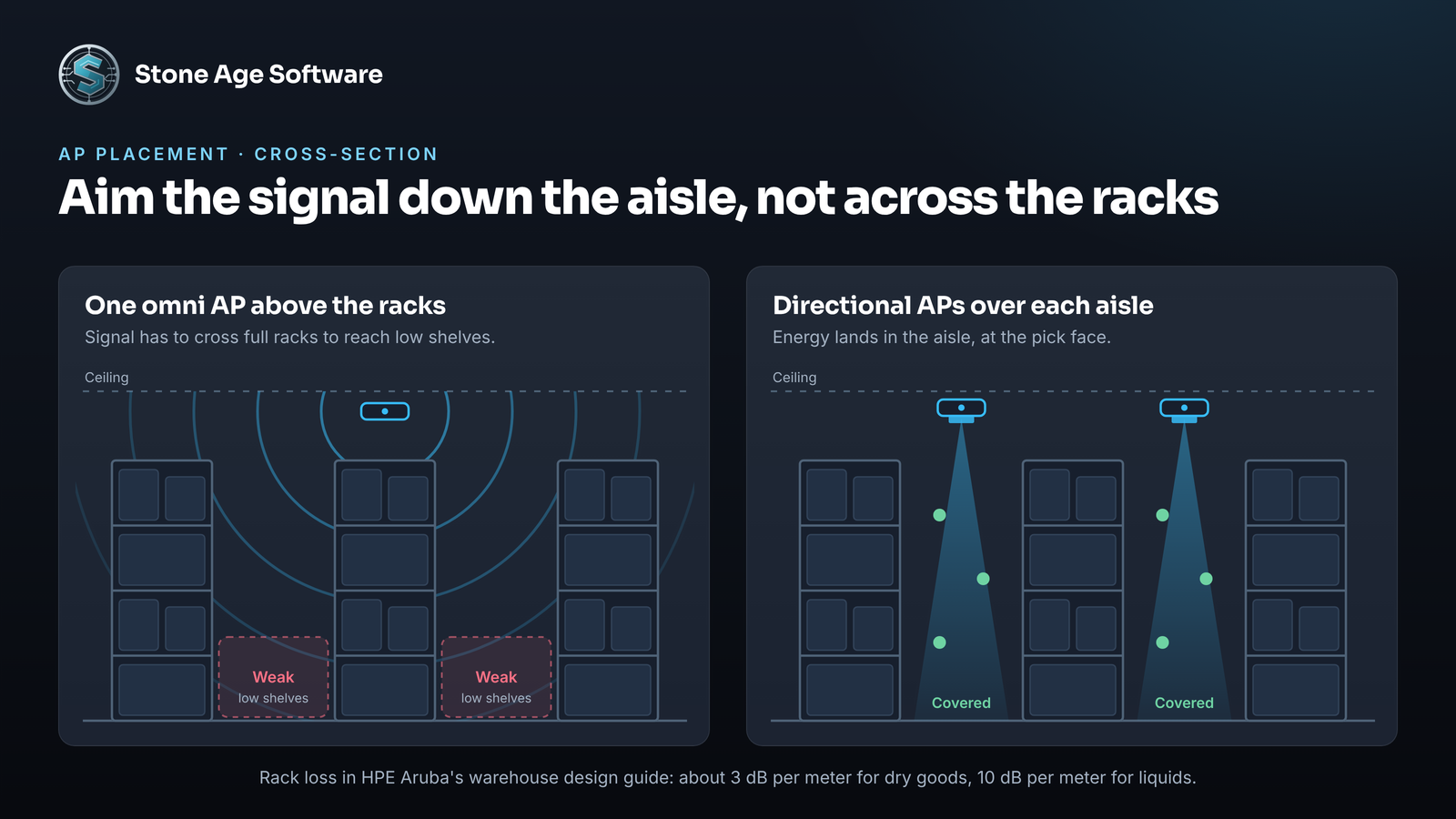
The HPE Aruba warehouse design guide models rack loss at about 3 dB per meter for dry goods. For liquids, it uses 10 dB per meter. Juniper's Mist warehouse design notes measured just under 5 dB across a rack at medium stock, and roughly 10 dB when full. A network surveyed in a slow January can fail in a packed November.
Three other things work against you:
- Ceiling height. An omni AP mounted high spreads its signal sideways, not down to the pick face. Above about 15 meters (50 feet), Aruba's guide switches to directional APs aimed down.
- Weak clients. A handheld has a small antenna and less power than the AP. The device, not the AP, decides when to roam.
- Cold. Freezers bring low temperatures and condensation. Aruba recommends outdoor-rated APs wherever the climate is not controlled.
None of this points to a bad decision by anyone. The building keeps changing, while the network was designed for one snapshot of it.
What actually makes warehouse Wi-Fi fast and reliable
Speed on a warehouse floor means a scan that confirms on the first try. Reliability means it still confirms during a roam. These practices matter more than any spec sheet:
- Survey stocked racks with your own devices. Aruba's process runs a predictive model first. Then comes an AP-on-a-stick survey with the planned AP, then a design of record. Carry the oldest scanner on the floor, held at pick height.
- Hang at least one AP per aisle, staggered. Aruba warns that skipping aisles leaves holes. It also leaves no backup when an AP fails.
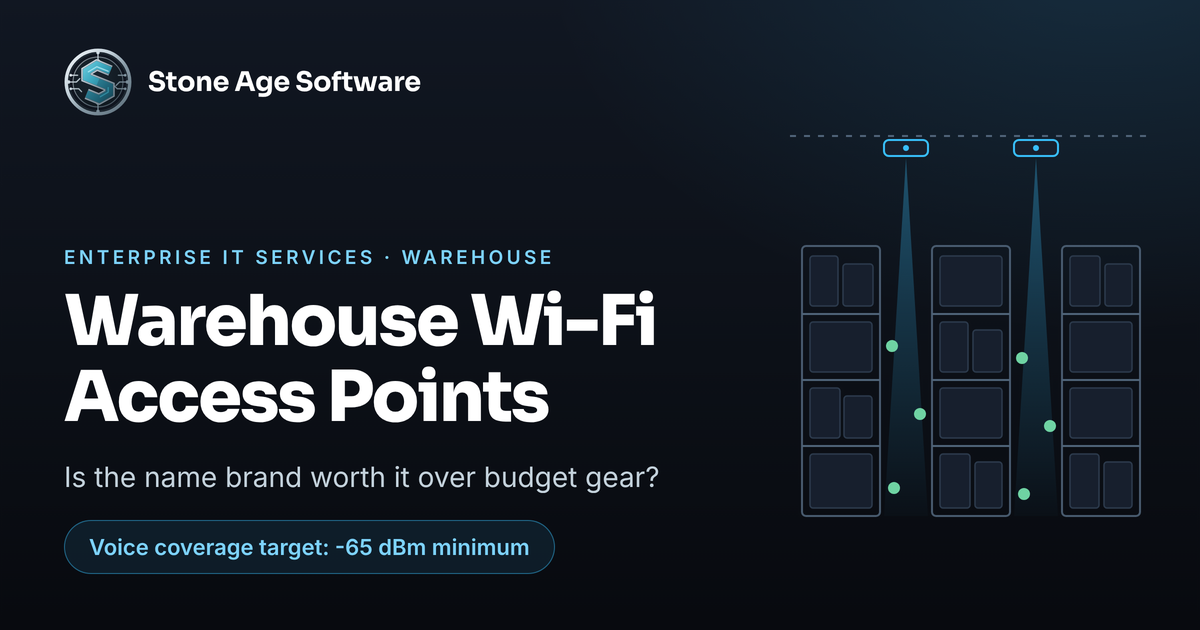
- Design to the scanner's numbers. Zebra's voice deployment best practices guide calls for -65 dBm minimum coverage and 25 dB SNR. It wants 20% overlap in critical areas. Mist targets -67 dBm for data.
- Put scanners on 5 GHz. Zebra's guide puts voice on 5 GHz only. Keep 2.4 GHz for legacy devices, on channels 1, 6, and 11.
- Tune roaming on purpose. Zebra strongly recommends 802.11r Fast Transition, plus 802.11k neighbor reports and 802.11v. On Aruba gear, it says to disable band steering for voice.
- Feed the AP. Cisco's CW9178I needs 802.3bt power for full function. On 802.3at, it loses radio chains and its 10G ports slow down.
Even a good design leaves a dead spot somewhere. Scanner workflows that queue the scan locally and sync when signal returns keep that spot from costing a pick. The picker keeps picking instead of hunting for bars. Our 3PL and warehouse software is built offline-tolerant for exactly that reason.
Name-brand access points: what you pay for
Name brand here means Cisco (Catalyst and Meraki), HPE (Aruba and Juniper Mist), Extreme, and Ruckus. Cisco took 37.2% of 2025 enterprise WLAN revenue, according to IDC. HPE took 19.7%.
The strengths:
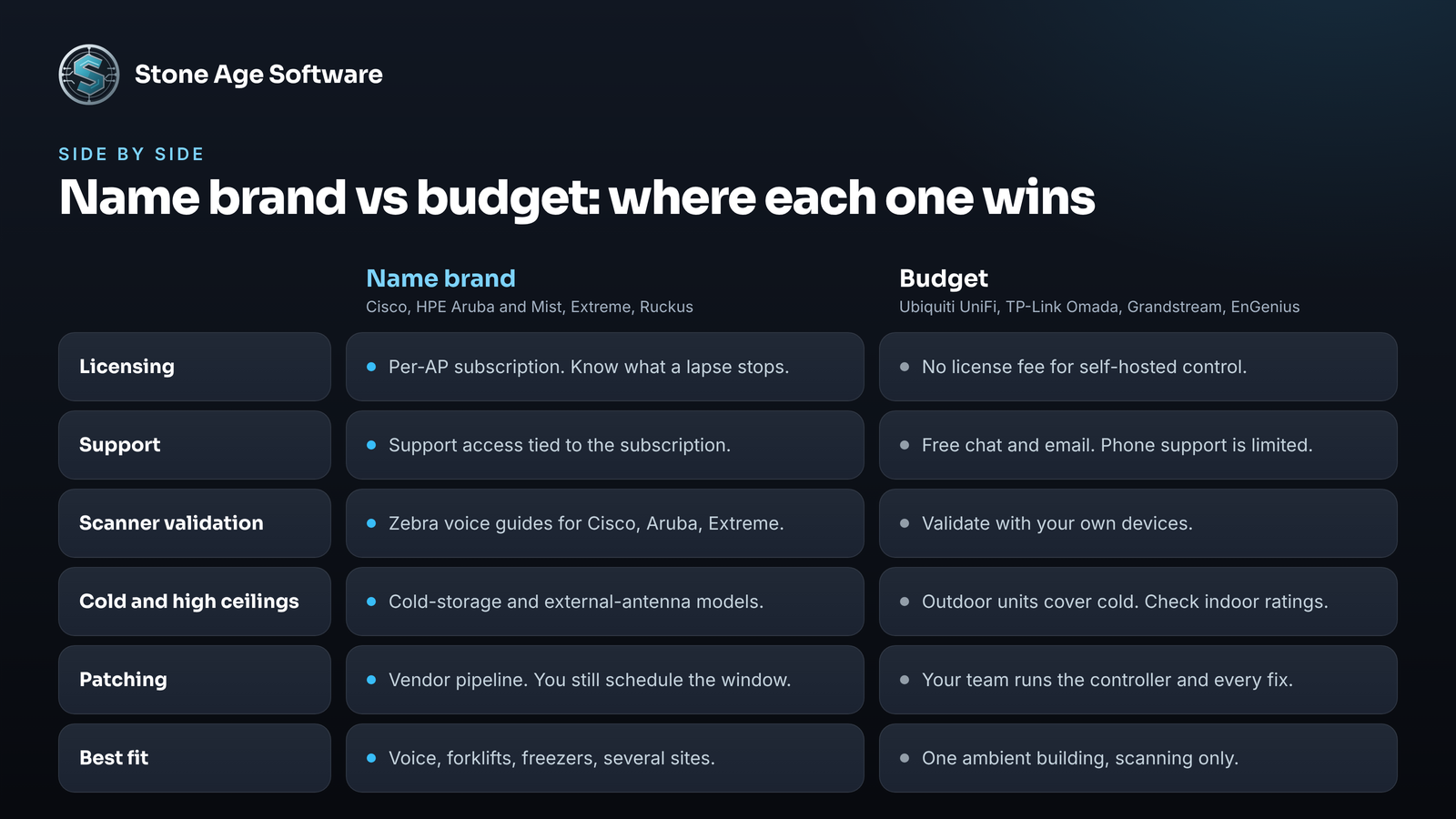
- A tested path for scanners. Zebra publishes voice guides for Cisco, Aruba, and Extreme networks. They include recommended AP models and firmware versions.
- Hardware for hard rooms. Cisco pitches its CW9174E, with external antennas, at 40-foot warehouse ceilings and cold storage. Juniper rates its Mist AP63 down to -40 °C.
- Automation at scale. Channel and power planning, client troubleshooting, and multi-site management usually come built in.
The trade-offs:
- Subscriptions, and what a lapse does. Most name-brand platforms license management per AP, on a recurring term. Cisco's Wi-Fi 7 APs keep passing traffic after a license lapses, per its licensing FAQ. Management, most updates, and support stop. Under Meraki's older co-term licensing, devices stop forwarding client traffic after a 30-day grace period.
- Complexity. The depth that helps a large site takes trained hands to run.
- Platform churn. HPE is aligning Aruba Central and Mist on common hardware. Ruckus moved to Belden on July 1, 2026. Roadmaps shift when owners do.
Budget access points: where they shine and where they bite
Budget usually means Ubiquiti UniFi or TP-Link Omada, plus Grandstream and EnGenius. Ubiquiti is not a niche player anymore. IDC put it third in 2025, with 11.7% of enterprise WLAN revenue.
The strengths are real. UniFi's self-hosted controller software is license-free. The hardware is current, with Wi-Fi 7 and 6 GHz radios. Cold-rated units exist too. Omada's EAP772-Outdoor is rated from -30 to 70 °C.
The gaps show up in operations, not on the spec sheet:
- Support. Ubiquiti offers free chat and email. Its paid 24-hour phone support covers Cloud Gateway sites, with other setups listed as coming soon.
- Replacement speed. TP-Link says every Omada RMA takes 3 to 5 business days to process. Faster advance replacement is a paid add-on.
- Warranty. Ubiquiti's standard warranty runs one year through resellers. UI Care extends replacement coverage to five years. Omada gives indoor APs five years and outdoor models two.
- Temperature. Omada's indoor EAP783 is rated 0 to 40 °C. That works for ambient storage and fails in a freezer.
- Automation. Omada's automatic channel and power adjustment requires its cloud-based controller.
- You own the controller. A self-hosted UniFi controller must run at all times, and your team keeps it patched.
Patching cuts both ways. Cisco's wireless controller software had a flaw rated 10.0 in May 2025. UniFi's Network Application had one rated 10.0 in March 2026. The logo matters less than who applies the fix, and how fast.
Policy risk belongs on the list too. On March 23, the FCC added foreign-made consumer routers to its Covered List in Public Notice DA 26-278. The definition covers gear meant for residential use and customer installation. FCC guidance excludes equipment built only for industrial or enterprise use. A later notice extended firmware updates for already-authorized routers to at least January 1, 2029. Enterprise access points appear to sit outside the rule. Prosumer gear sold at retail for self-install sits closer to the line. Ask the vendor, in writing, which side its gear falls on.
Which one fits your building
Budget gear can carry a warehouse when most of these are true:
- One building, at ambient temperature
- Ceilings low enough for omni APs to reach the floor
- Scanning only, without voice picking
- Someone in-house owns the controller, the firmware, and the spares
Name brand earns its keep when these show up:
- Voice picking or forklift computers that roam all shift
- Freezers, coolers, or yard coverage
- Several sites run by one small team
- A 24/7 operation where a slow replacement means missed trucks
Either way, layout beats logo. A well-surveyed budget network will outperform a badly placed enterprise one.
A 30-minute walk test you can run this week
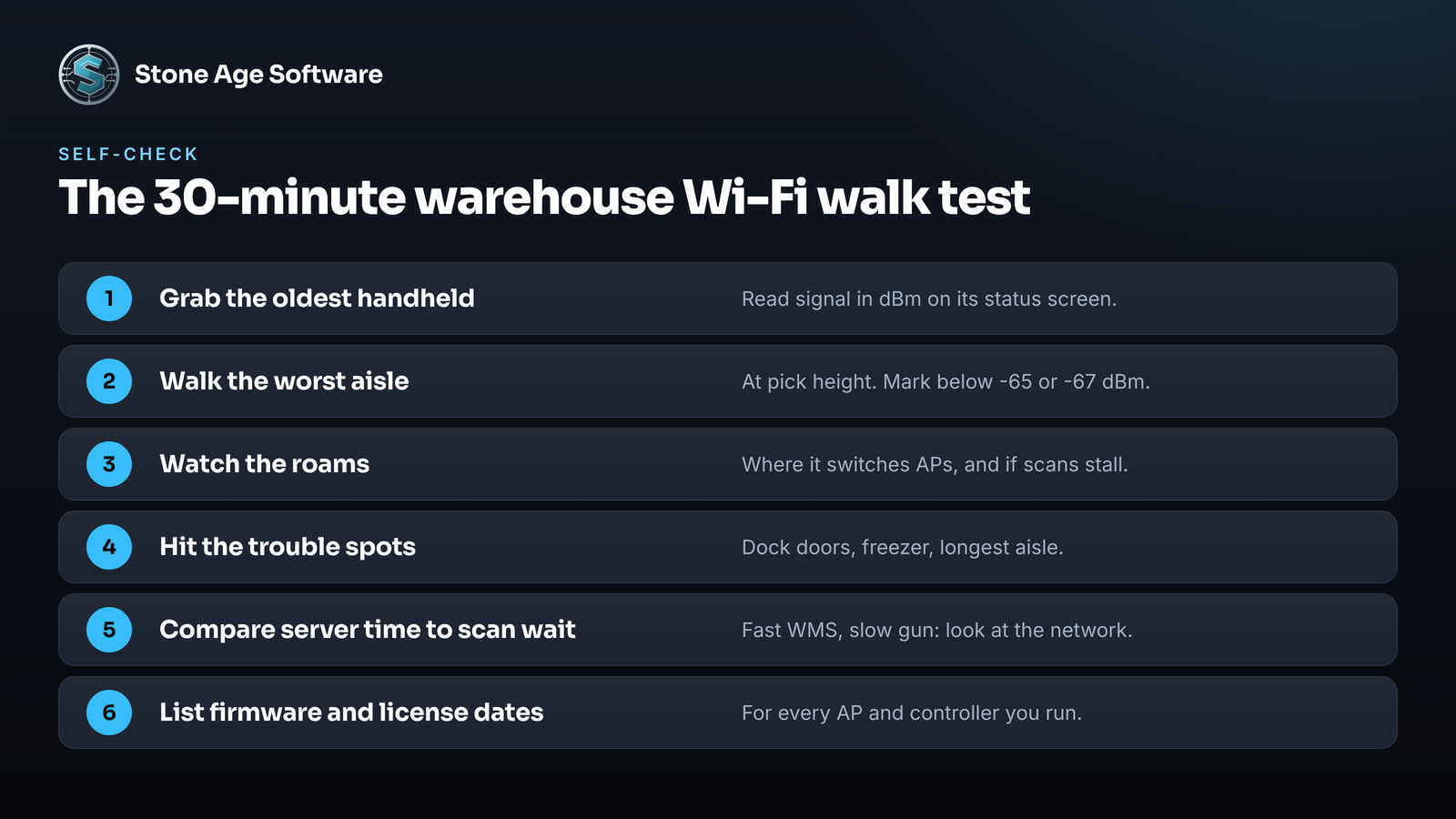
You do not need a survey kit to see where you stand. Run this before peak:
- Grab the oldest handheld on the floor. Use its Wi-Fi status screen or an analyzer app that reads signal in dBm.
- Walk your worst aisle at pick height. Mark where signal falls below -65 dBm for voice, or -67 dBm for data.
- Watch the roams. Note where the device switches APs, and whether a scan stalls during the switch.
- Repeat at the trouble spots. Check the dock doors, the freezer, and the far end of the longest aisle.
- Compare server time to scan wait. If the WMS answers fast but the gun waits, the delay lives on the network. Our platform observability project shows how timing every request settles that argument.
- List firmware and license dates. Write down both for every AP and controller you run.
If the walk test turns up gaps, our Enterprise IT Services team runs Wi-Fi surveys for the warehouse and the yard. We draw the network as it is actually cabled, then fix it at the cause.