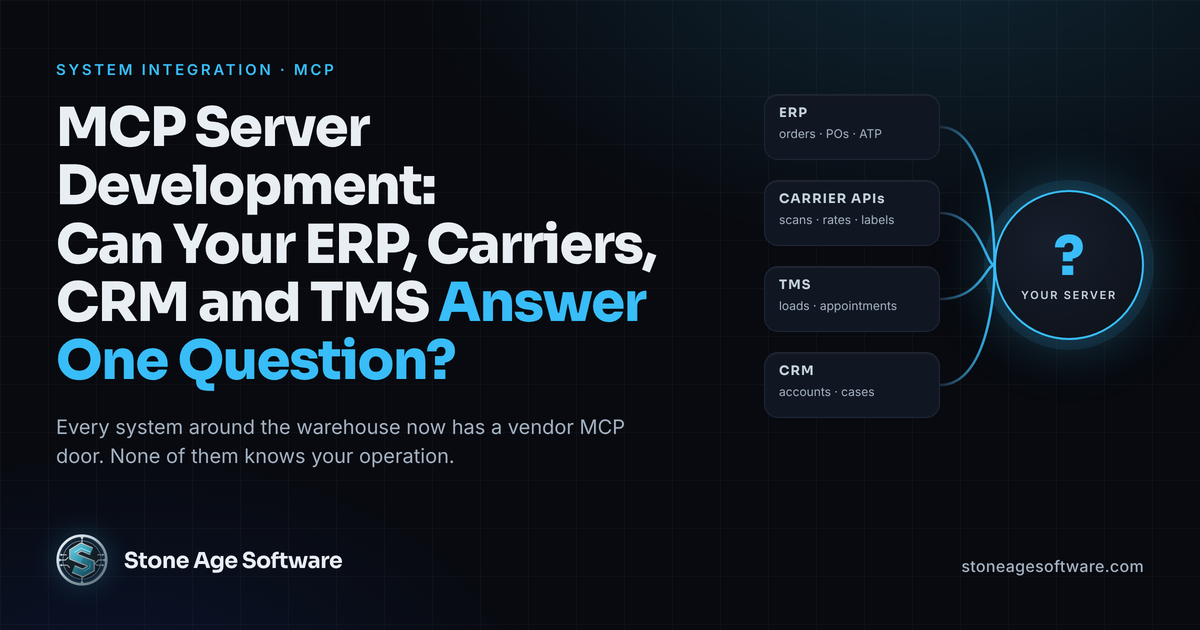
At 7:40 a customer calls the desk and asks where purchase order 4471 is. The answer lives in four places. The ERP has the order. The TMS has the load. The carrier site has the last scan. The CRM is where the call gets logged afterward. Fifteen minutes later the coordinator has the answer, and the next call is holding.
That is not a people problem. The answer was in the building the whole time. It was split across four screens that were never built to be asked one question.
MCP server development is how you put those four doors behind one set of questions. MCP, the Model Context Protocol, is an open standard that lets an AI assistant or agent call named tools on your systems, with your rules attached. The current specification is dated July 28, 2026, and it is plain JSON-RPC under the hood, so it fits beside the integrations you already run.
The vendors around your warehouse have noticed. An ERP, a TMS, two CRMs and a parcel carrier each have an MCP door of their own. Here is what those doors do, what changes on the floor, what happens when the model acts, and what a server must get right near a live order.
What an MCP server is, in dock terms
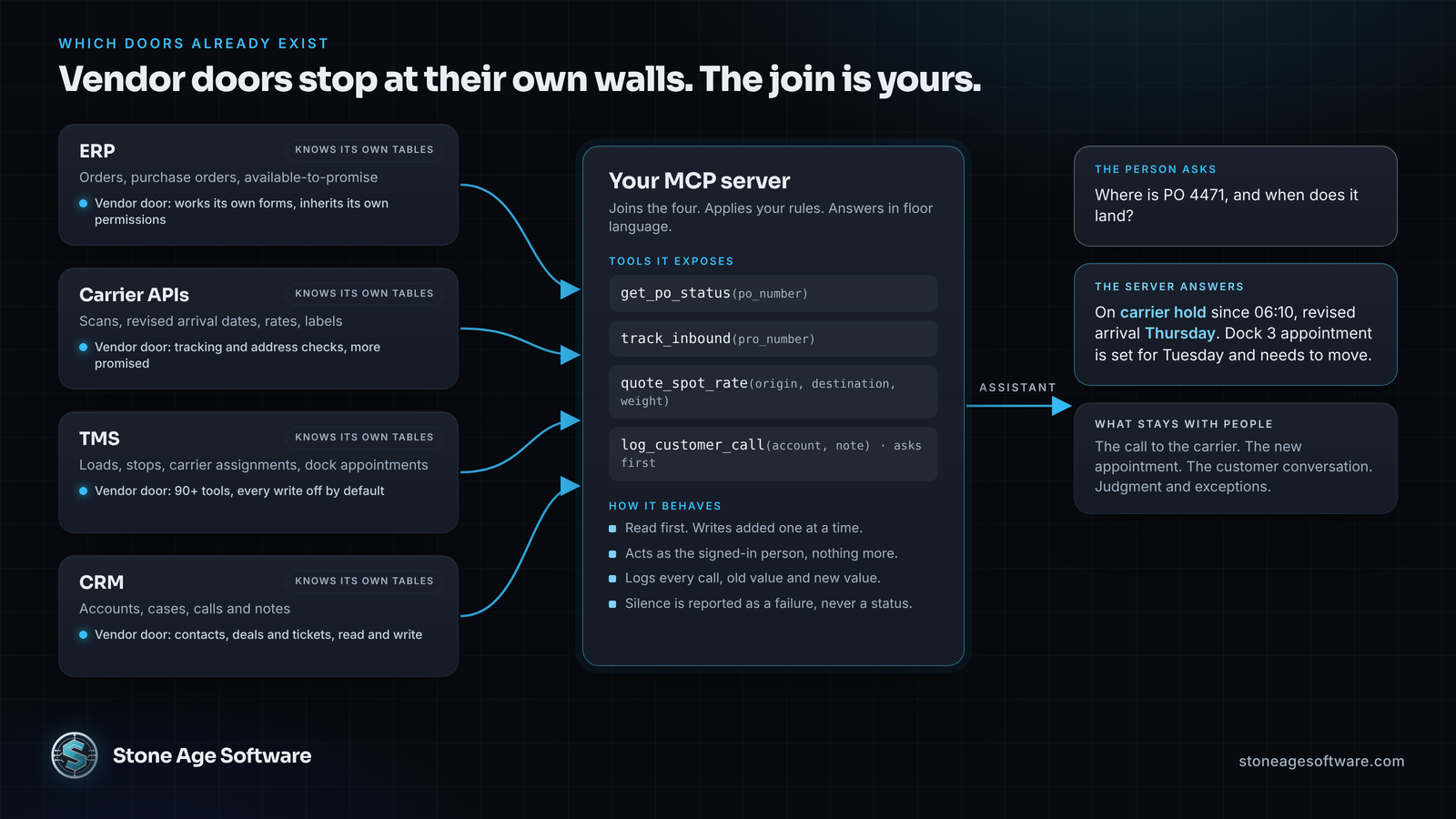
An MCP server is a small program that exposes tools. A tool is a named question with typed inputs. Think track_inbound(pro_number), get_po_status(po_number), quote_spot_rate(origin, destination, weight) or log_customer_call(account, note).
The assistant picks the tool and fills in the inputs. Your code calls the ERP, the carrier, the TMS or the CRM, applies your rules, and returns a plain answer. The person sees the answer, not the plumbing.
Under the labels, this is integration work, and the same rules apply as for any interface in our system integration practice. It retries. It cannot duplicate a record. A failure raises a flag. The only new part is the caller: a person asking in plain words instead of a nightly job.
Which doors already exist
ERP. Microsoft's Dynamics 365 ERP MCP server entered public preview in November 2025. It works through the application's own forms, and every action inherits the ERP's permissions and audit trail.
Carriers. UPS publishes an official MCP server with two tools today: package tracking and address validation for the United States and Puerto Rico. Rating and labels are not listed yet, though more tools are promised.
TMS. Shipwell runs a production MCP server with more than 90 tools. Shipments, stops, carrier assignments, orders and dock appointments can be read and written; tracking, documents, invoices and rating are read only. Every write stays switched off until the customer asks.
CRM. HubSpot's hosted MCP server reads and writes contacts, companies, deals and tickets, plus their calls and notes.
Each of those servers knows its own tables and nothing else. The UPS tool knows a tracking number, not that the shipment behind it is a customer's backorder with a dock appointment on Thursday. That join lives in your operation, outside any vendor's walls, and it is the whole reason to build your own server.
What changes on the floor before lunch
Put a dozen read-only tools over the integrations you already have, and the day changes.
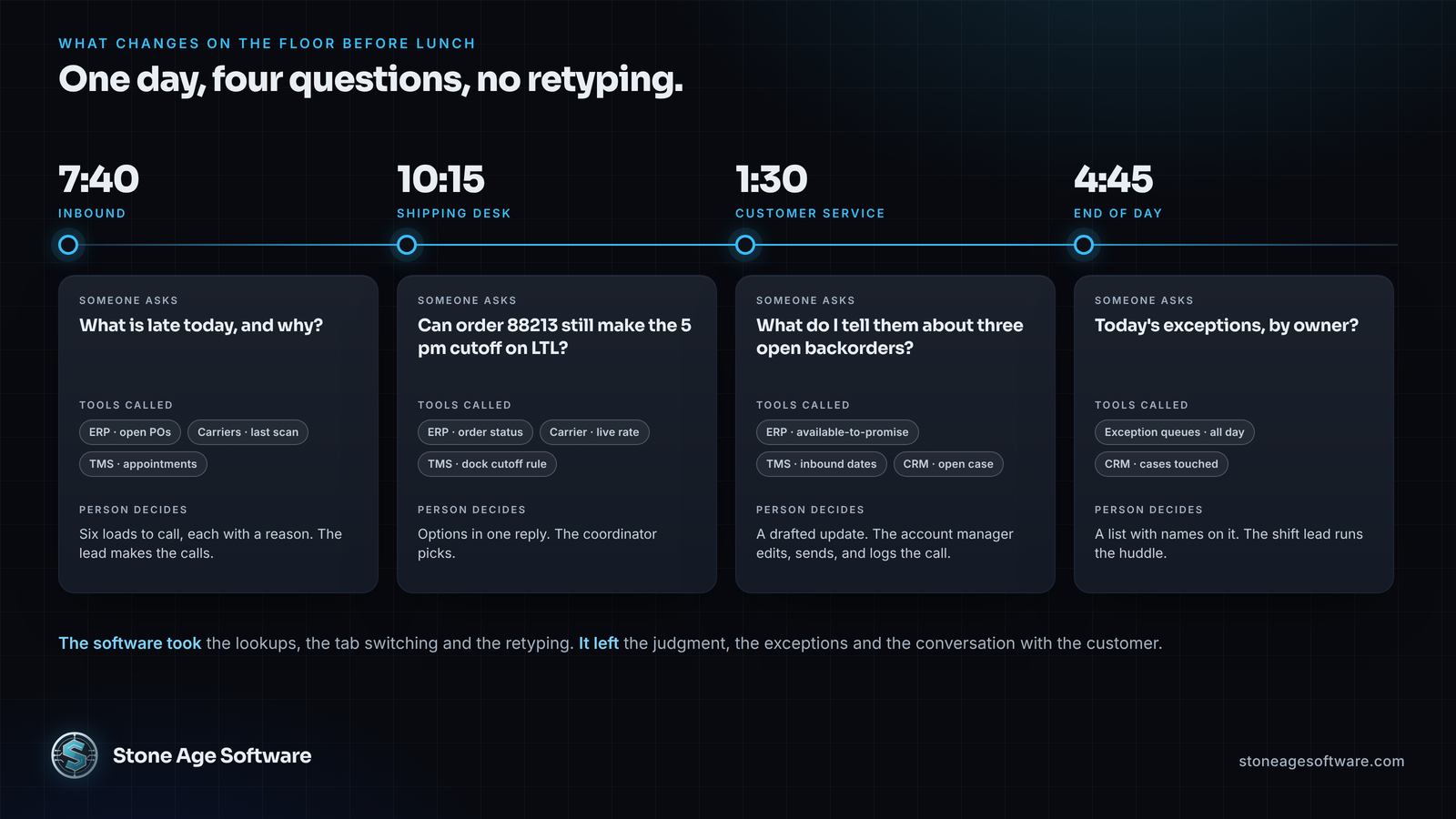
Inbound, 7:40. The receiving lead asks what is late today and why. The server reads open purchase orders from the ERP, the latest scan from each carrier, and the appointment from the TMS. It returns the six loads that need a phone call, each with a reason: carrier hold, wrong destination, past transit allowance.
We built that layer on an inbound freight visibility project. Four carrier lanes fed one engine that wrote status and revised dates onto the shipment record, and anything odd landed in a queue with an owner. A server on top lets a person ask it questions instead of scrolling the queue.
Shipping desk, 10:15. A customer asks if order 88213 can still make the five o'clock cutoff on LTL. The assistant calls three tools: order status, live rate, and the dock cutoff rule. The coordinator gets the options in one reply and makes the call. The software gathered. The person decided.
Customer service, 1:30. An account manager asks what to tell a customer about three open backorders. The server pulls available-to-promise from the ERP, the inbound dates from the TMS, and the open case from the CRM. It drafts the update. The person reads it, fixes the tone, and sends it. A second tool logs the call to the CRM, and that one asks first.
End of day, 4:45. The shift lead asks for today's exceptions by owner, and the server answers from the queues it has read all day.
The software took the lookups, the tab switching and the retyping. It left the judgment, the exceptions and the conversation with the customer. A server built this way gives people their mornings back.
When the model takes action
Lookups earn the trust. Actions earn the time back. The same tools that answer a question can carry out the fix, and the tools specification is built for it. Tools are model-controlled, so the model decides when to call one. A tool can pause mid-call to ask the person for a missing detail. And the spec says a human should always be able to deny the call.
Back to purchase order 4471. The lookup found the carrier hold, and the receiving lead says, "fix it." The assistant proposes four changes. Move the Dock 3 appointment in the TMS to Thursday. Push the date on the ERP purchase order. Open a case in the CRM. Draft the customer note. It shows all four first, and the lead approves once. The server runs the writes, logs every old and new value, and reports back. If the TMS refuses the slot, it stops and says so, rather than updating the ERP against an appointment that never moved.
The vendor doors already work this way. In Dynamics 365 an agent can update and submit a requisition, which still waits for its approver. HubSpot's server logs the call and opens the ticket. Shipwell's dry-run mode rehearses a write and returns a risk report instead of a change.
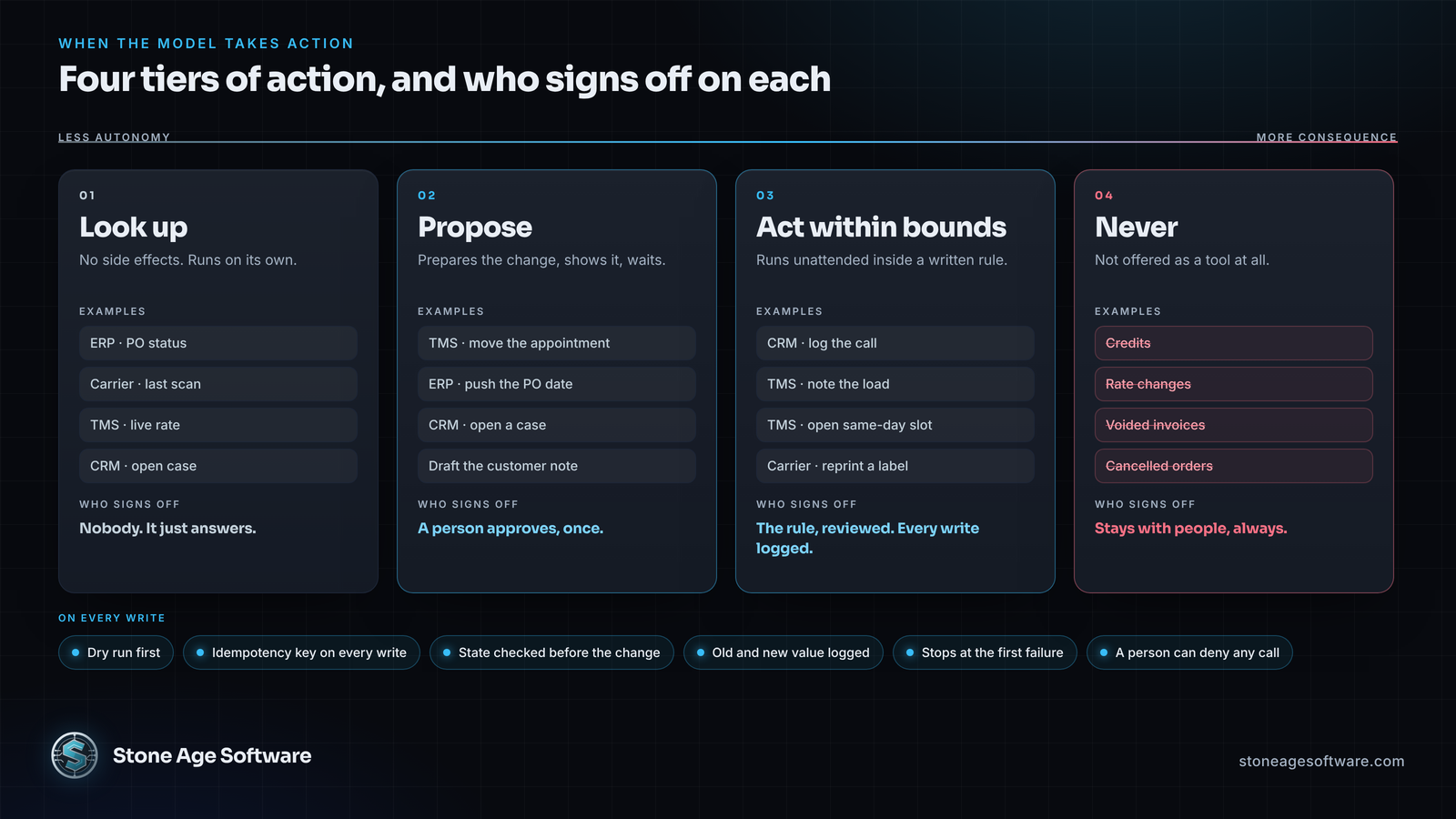
Four tiers keep it honest:
- Look up. No side effects. Runs on its own.
- Propose. The server prepares the change, shows it, and waits for a person.
- Act within bounds. A short list runs unattended inside a written rule: log the call, note the load, move an appointment into an open slot the same day. Every one is logged.
- Never. Credits, rate changes, voided invoices, cancelled orders. Anything that moves money is not a tool at all.
The model gathers, proposes and does the clerical part. The decision stays with the person.
What MCP server development has to get right
A tool is easy to write once. Trusting it on a live dock is the real work. Six rules separate a demo from a system.
- Read first. Ship the read-only tools. Add writes one at a time, each with a stated side effect, and keep them switched off until someone asks.
- Inherit the user's permissions. The assistant acts as the signed-in person. If that person cannot move a carrier assignment in the TMS, the tool cannot either. Use a dedicated integration user and log who asked.
- Name tools in floor language. A PRO number is a PRO number, not "text." Tight inputs mean fewer wrong answers and fewer wrong writes.
- Treat silence as a failure. A blank from a carrier is not "delivered." An error page is not a status. The server says it could not get an answer, every time.
- Log everything. Every call, every old value, every new value, with the user and the time. ARC Advisory Group's Logistics Viewpoints said in February that enterprise deployment needs identity controls, tool-level access, full decision logging and human approval gates.
- Assume someone will test it. Salesforce now scores every registered server for risk. On October 14, Radware launched protection built for MCP servers, naming authentication attacks and tool flooding. In Stacklok's State of MCP survey, 64% of software companies call security the top obstacle. Treat the server like any public interface: authentication, rate limits, and an allowlist of what it may touch.
Some systems have no API at all. On a warehouse system automation project we drove a platform's own screens from a bounded pool of browser sessions and failed closed. A tool can wrap that too.
Run a four-tab test this week
Sit beside the person who answers customer calls for an hour and write down the three questions that come up most. For each one, count the screens and systems they touch, and time the answer.
Then add two columns. Which system owns each field in the answer? Who is allowed to change it? Any question that needs more than two systems is the first tool worth building. Any field a person retypes between screens is the first write worth allowing.
If the vendor doors answer that list, wait. Most lists cross systems. A first server of your own is a dozen read-only tools over integrations you already run. It is plain code, in your account, with no meter on questions, scoped as a fixed price, quoted up front. For help mapping your list to the doors you already have, start with our system integration practice. It begins with the interfaces you have, not the ones a vendor wishes you had.