On October 17, four days before the public knew the bug existed, an Amazon honeypot logged the first exploit attempt against it. By the morning of October 21, Cloudflare was watching live attacks hours before the PHP project could ship a fix. The two critical PHP flaws behind that scramble, CVE-2026-109618 and CVE-2026-109619, now go by one name: PHP2Shell. If your public website runs on WordPress, Drupal, Joomla, Magento, or Laravel, this one comes up through the floor, not the front door. Here is what sits under the hood, who is exposed, and what to do today.
Why critical PHP flaws reach past your security plugin
PHP is the engine under most of the web. W3Techs puts it at 69.3 percent of all websites with a known server-side language as of today. That share includes a long tail of custom portals built for warehouses, clinics, and law offices in the last fifteen years.
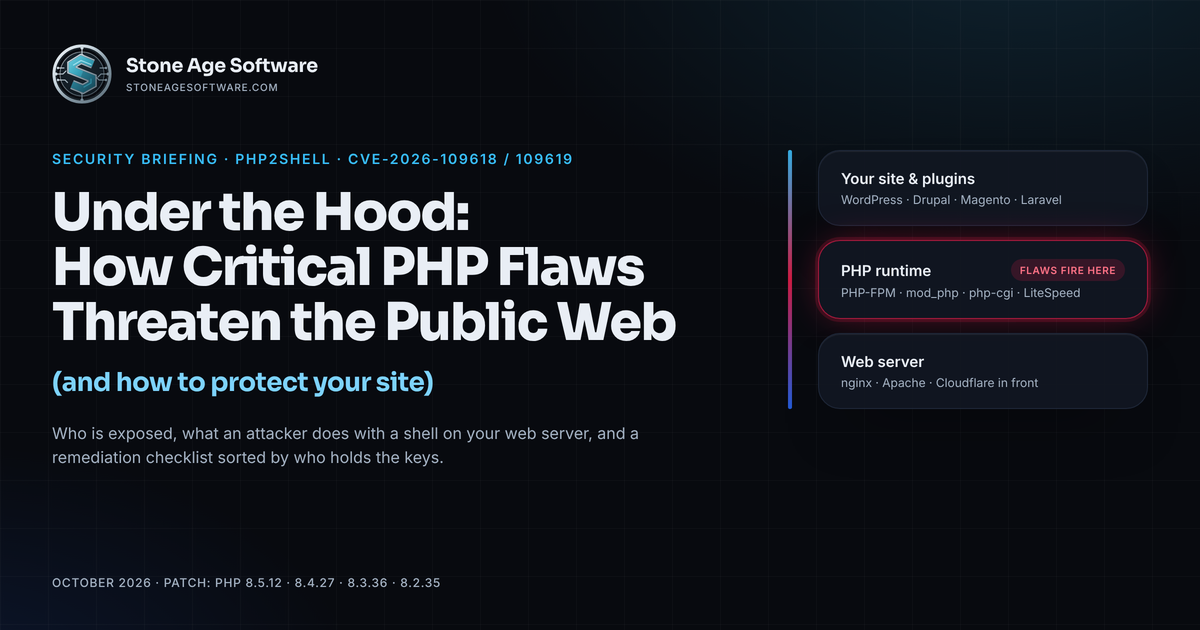
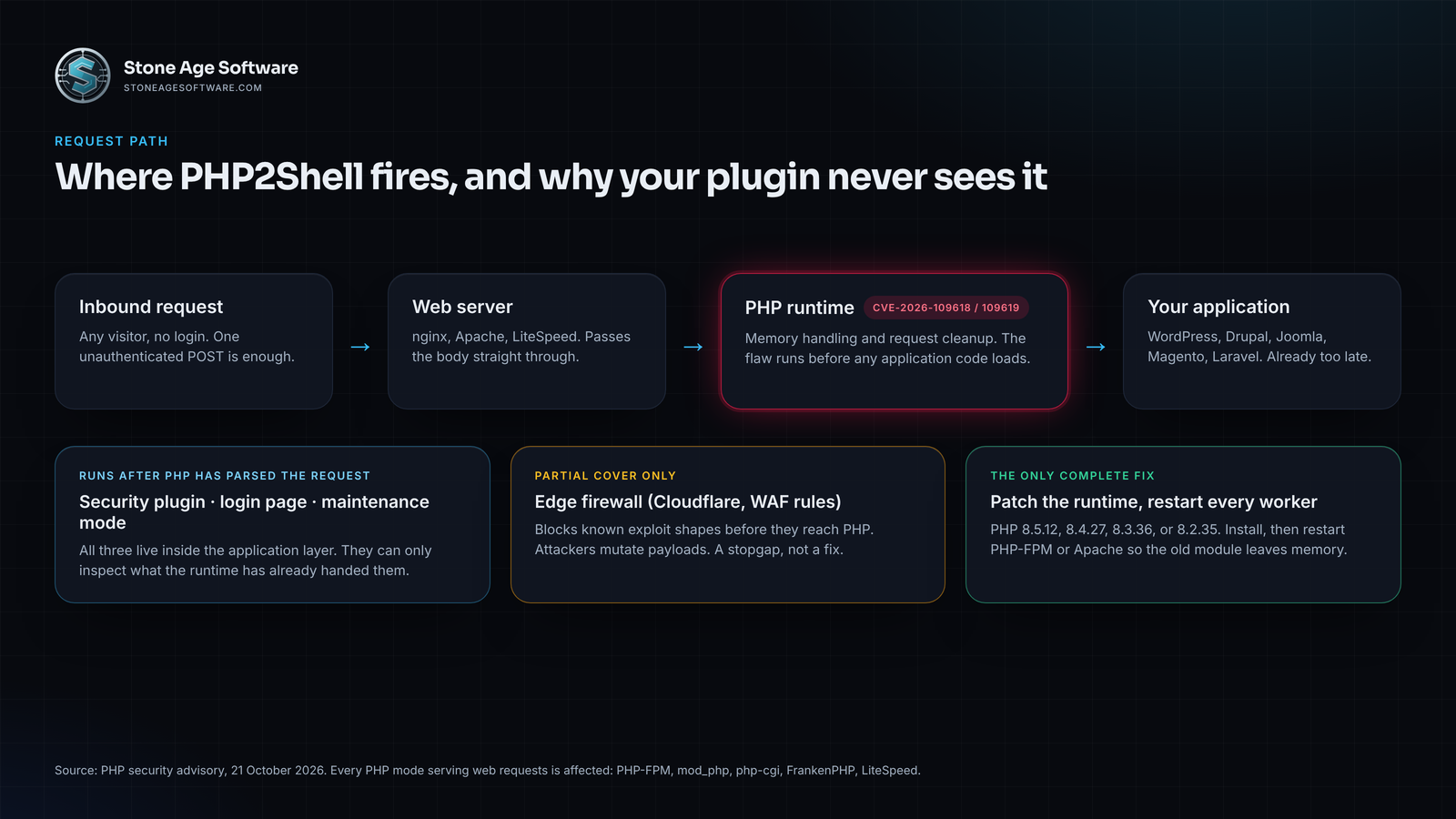
A bug in the runtime is different in kind from a bug in a plugin. A security plugin lives inside the application. It can only inspect a request after PHP has parsed it. PHP2Shell fires earlier than that. According to the PHP security team's advisory, the first flaw interrupts PHP during out-of-memory handling while request data is only half built. Cleanup then trusts the broken data. The second lets internal state from one request survive into the next request the same worker handles. Both end with an unauthenticated attacker running code as the web server.
Datadog reproduced the attack with one unauthenticated POST and noted that application-level authentication cannot block it. Every PHP mode that serves web requests is exposed: PHP-FPM, Apache with mod_php, php-cgi, FrankenPHP, and LiteSpeed. The advisory rates mod_php the highest risk. The vulnerable code has shipped in PHP since version 5.4 in 2012, and default configurations are exploitable. Your login page, your maintenance mode, and your plugin firewall all run after the damage is done.
Who is exposed, and who can watch from the sidelines
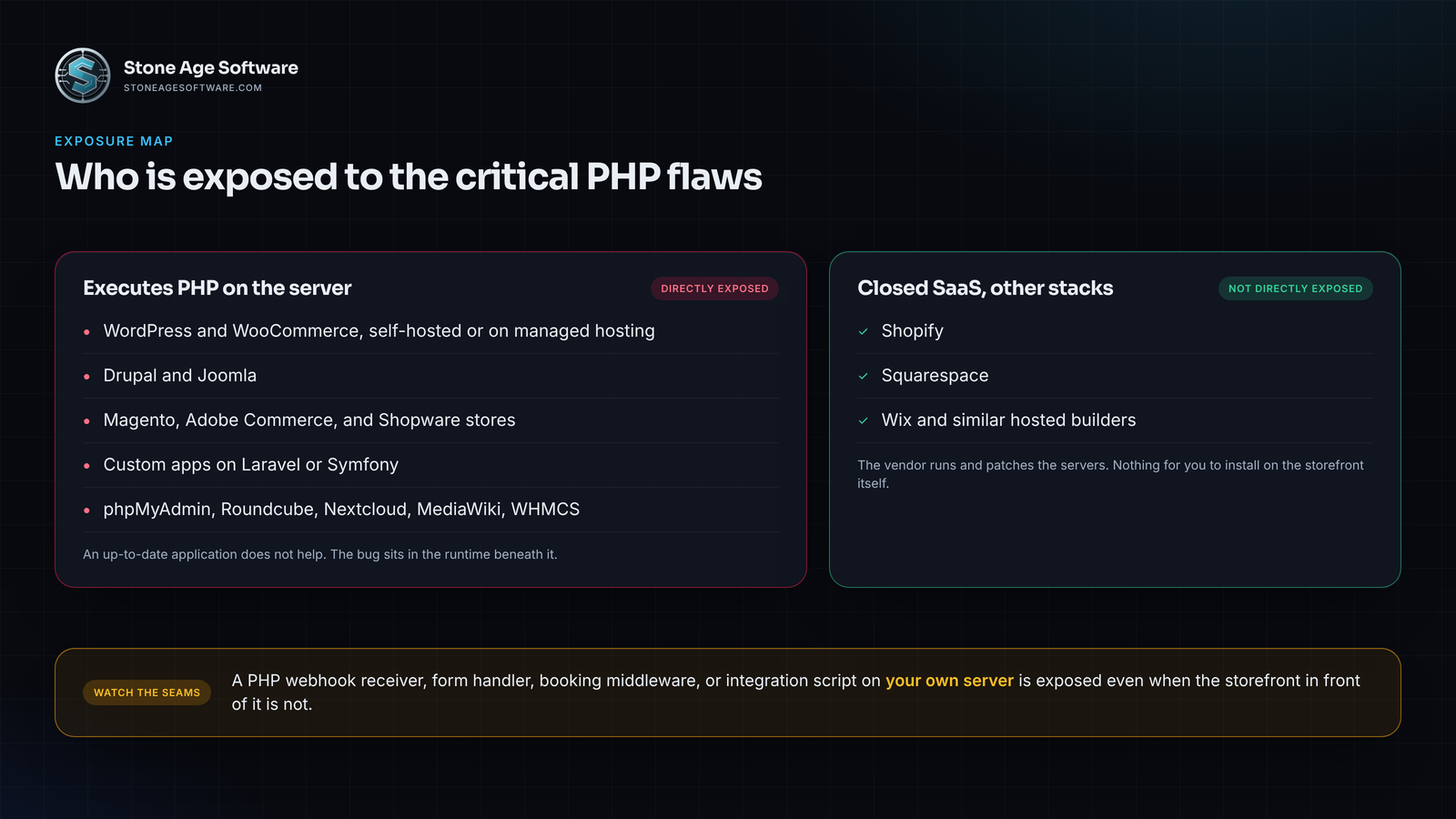
The dividing line is simple. Does your server execute PHP?
Directly affected:
- WordPress and WooCommerce, self-hosted or on managed WordPress hosting
- Drupal and Joomla
- Magento, Adobe Commerce, and Shopware stores
- Custom applications built on Laravel or Symfony
- The long tail: phpMyAdmin, Roundcube, Nextcloud, MediaWiki, and WHMCS
Calif researchers demonstrated unauthenticated code execution on current releases of all of them, per Sansec's write-up. Being up to date made no difference.
Not directly affected:
- Shopify, Squarespace, Wix, and similar closed SaaS platforms. They run on their own stacks, and the vendor patches the servers.
The catch sits in the seams. A Shopify store that posts order webhooks to a PHP script on your own server is exposed at that script. So is a Squarespace site with a PHP form handler or booking middleware. The storefront is safe; the integration box beside it is not. List every place a PHP process answers an inbound request, including the ones nobody has looked at in years.
What an attacker does with a shell on your web server
Unauthenticated remote code execution hands the attacker every key your website holds. It usually plays out in this order:
- Drop a webshell. A small PHP file in an uploads or cache folder gives the attacker a browser-based command prompt that outlives the patch.
- Read the configuration. WordPress, Magento, and Laravel all keep database credentials in plain-text config files. Sansec notes CVE-2026-109618 can also leak passwords, session tokens, API keys, and TLS private keys from other requests.
- Touch the checkout. On a store, the payoff is a card skimmer injected into the payment page or a quietly redirected payout.
- Plant SEO spam. Hidden pharmacy and casino pages ride your domain's reputation until search engines blacklist it.
- Borrow your name. Malwarebytes points out that a hijacked legitimate site becomes a trusted channel for phishing and malware delivery.
Exploitation did not wait for the patch. Amazon's MadPot sensors logged an attempt on October 17, then several actors with different payloads in the early hours of release day. Amazon's advice: start any investigation from October 17, not disclosure day.
The end-of-life problem
Then there is the server nobody can patch. The PHP project supports only 8.2 and later, and 8.2 itself retires on December 31, 2026. PHP 8.1, 8.0, and every 7.x branch get no routine updates. The security team did publish minimal source backports for 7.4, 8.0, and 8.1, and some Linux distributions ship their own. But a site on 7.4 behind a generic hosting panel is waiting on someone to compile that backport, with no deadline attached. W3Techs counts 34.6 percent of PHP sites still on version 7 or 5. That is more than a third of the PHP web with no vendor fix on the way.
The remediation checklist, sorted by who holds the keys
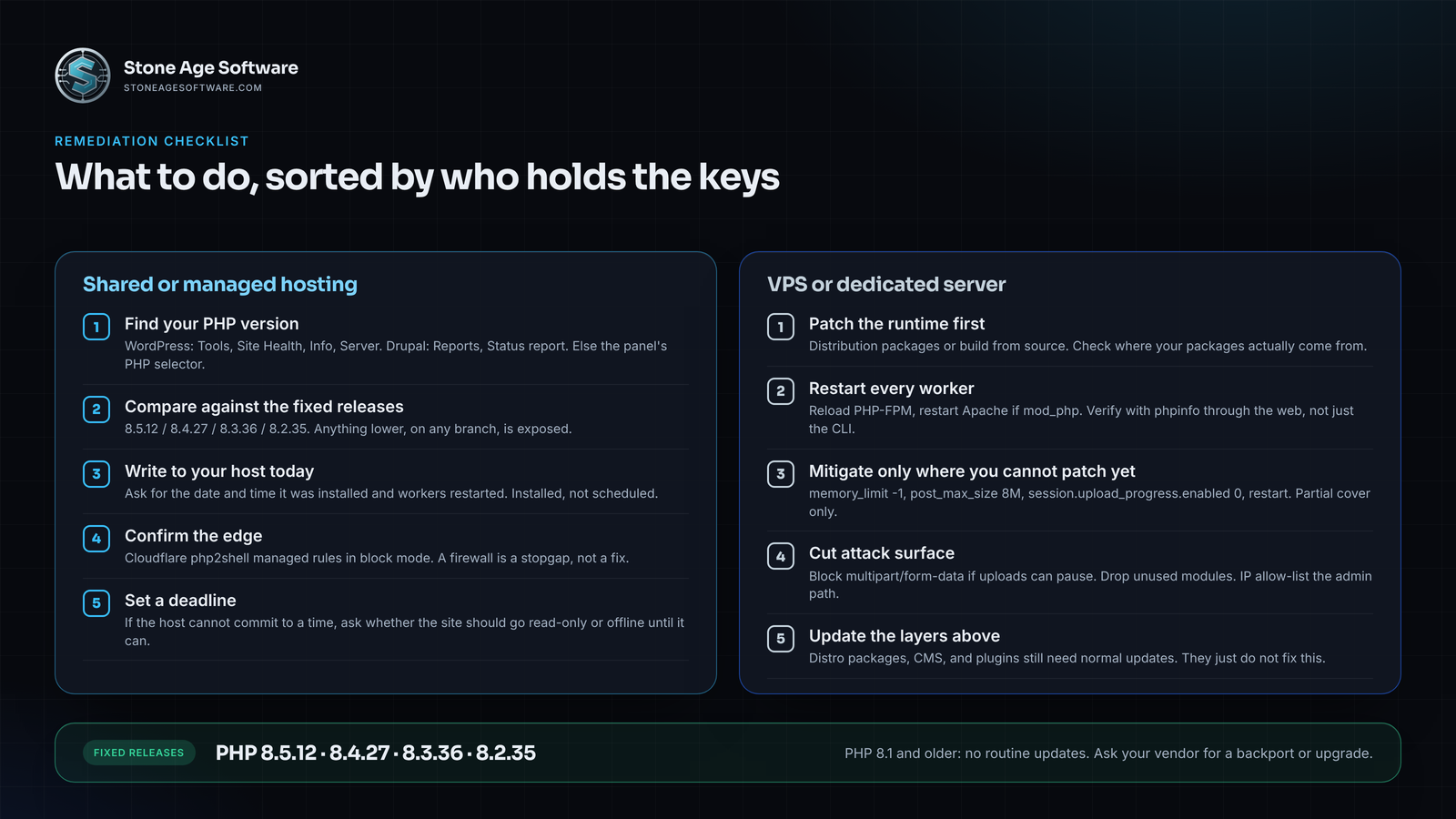
If you are on shared or managed hosting
- Find your PHP version. In WordPress, open Tools, then Site Health, then the Info tab, and expand Server. Drupal shows it under Reports, then Status report. Elsewhere, the hosting control panel's PHP selector shows it.
- Compare it against the fixed releases: 8.5.12, 8.4.27, 8.3.36, and 8.2.35. Anything lower, on any branch, is exposed.
- Write to your host today. Ask for the date and time the fixed build was installed and every worker restarted. Installed, not scheduled. A package install without a restart leaves the old module in memory, as yesterday's patch checklist covered.
- Confirm the edge. If you sit behind Cloudflare, its php2shell managed rules went live on all plans, including free, on October 21. Check they are in block mode. A firewall is a stopgap, not a fix.
- Set a deadline. If the host cannot commit to a time, ask whether the site should go read-only or offline until it can. Several Dutch sites, including the national cyber security center, did exactly that on October 21.
If you run the VPS or dedicated server
- Patch the runtime first. Install the fixed version from your distribution or build from source. The advisory warned that the volunteer Remi repository had no update on release day; check where your packages come from.
- Restart every worker. Reload PHP-FPM pools, and restart Apache, FrankenPHP, or LiteSpeed as applicable. Confirm with a phpinfo page through the web, since the CLI binary and the web module can differ.
- Mitigate only where you cannot patch yet. The advisory lists partial measures. Set memory_limit to -1 through php_admin_value. Cap post_max_size at 8M, or 32M if uploads are required, and keep upload_max_filesize below it. Set session.upload_progress.enabled to 0 in php.ini or the pool config, then restart. On PHP 8.5, also set fatal_error_backtraces to 0. Do not use RLIMIT_AS or RLIMIT_DATA. The advisory's own position is that none of these make an installation safe.
- Cut attack surface. Block multipart/form-data at nginx or Apache if the application can live without uploads for a day. Remove PHP modules you do not use. Put the admin path behind an IP allow-list where possible.
- Update the layers above. Distribution packages, the CMS, and plugins still need their normal updates. They just do not fix this.
Indicators that you were probed or breached
Was the site hit before the patch landed? Look for:
- POST requests carrying the string PHP_SESSION_UPLOAD_PROGRESS inside a multipart upload, especially from October 17 onward.
- Unusually large form submissions, and memory-exhaustion errors during request startup in the PHP error log.
- A PHP worker spawning a shell: sh, bash, curl, or wget running as a child of php-fpm or httpd.
- New or modified .php files in uploads, cache, or tmp directories, or fresh timestamps in code you have not touched.
- Scheduled tasks you did not create: system cron entries, WordPress or Magento cron jobs.
- Admin users nobody recognizes, changed passwords, or new API keys.
- Outbound connections from the web server to anything that is not your database, mail relay, or payment gateway.
Find any of these and treat every credential the server could read as burned: database passwords, API keys, session secrets, and TLS private keys. Rotate them after patching, not before, or the attacker reads the new ones too.
Catching this takes logs you can query. On a platform we instrument for a contract-logistics client, request telemetry, worker-thread state, and a console ring buffer sit on one screen. Spotting an exploit attempt is a filter, not a forensic project.
A check you can run in fifteen minutes
- List every hostname that executes PHP, including webhooks and integration scripts.
- For each, record the running PHP version through the web, not just the command line.
- Mark anything below 8.2.35, 8.3.36, 8.4.27, or 8.5.12 as exposed.
- For each exposed host, note who holds the keys and send the patch request with a deadline.
- Search the last week of access logs for PHP_SESSION_UPLOAD_PROGRESS.
Most of this is a plumbing problem, not a plugin problem. If a PHP portal, integration script, or storefront has no owner anymore, that is the gap our custom software and web development practice closes. Built, documented, and kept patched, fixed price, quoted up front.