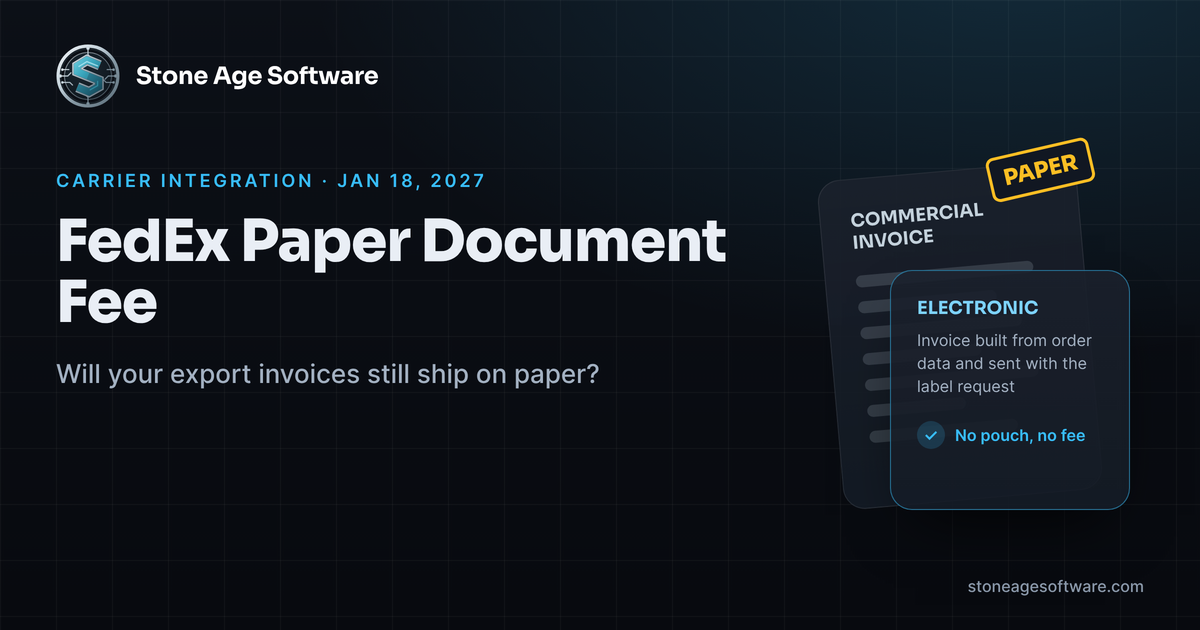
On January 18, 2027, a sheet of paper in a clear pouch starts costing money. It costs money on every international FedEx shipment that carries one.
The FedEx paper document fee is new for 2027. FedEx will charge it per shipment when a trade document arrives on paper instead of electronically. For a 3PL shipping cross-border orders for several clients, that pouch can hide in a lot of places. This guide shows where it hides and how to find it before the first January bill.
What the FedEx paper document fee covers
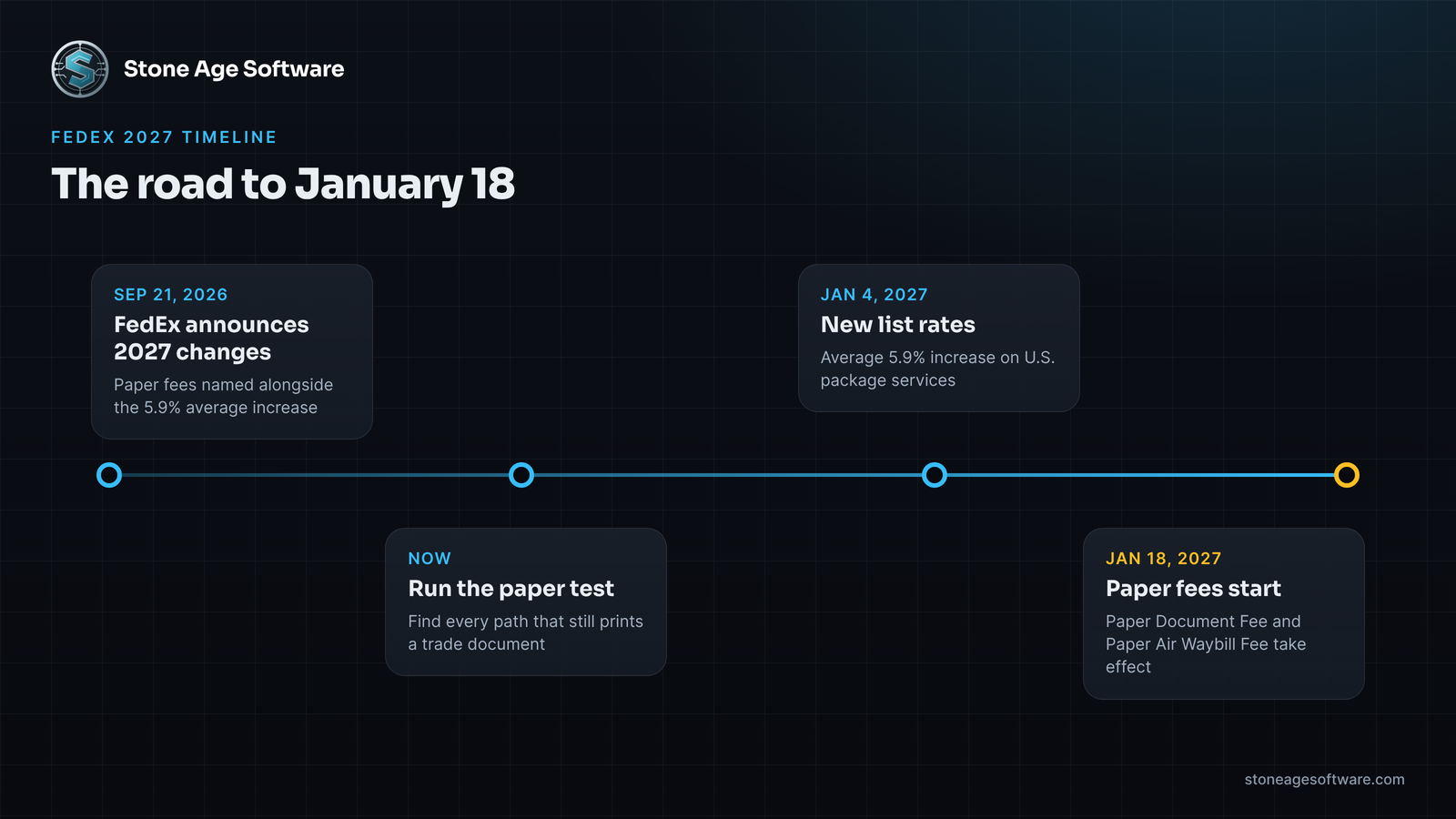
Start with the carrier's own page. The FedEx 2027 shipping rate changes list two new fees. Both take effect January 18, 2027.
- Paper Document Fee. A flat charge per shipment. It applies when an associated trade document is provided in a non-electronic format before the shipment is processed.
- Paper Air Waybill Fee. A smaller flat charge per shipment. It applies to U.S. domestic and export shipments started on a manual paper airbill.
The same page extends the residential delivery charge to qualifying international shipments. FedEx says it will publish the destination country list later.
Supply Chain Dive covered the 2027 announcement on September 21. Its report confirms both new fees and the January 18 date. Most coverage led with the 5.9% average rate increase. The paper fees got a line or two.
That is the part worth a closer look. A rate increase moves a number you already track. A paper fee charges for a habit nobody tracks.
Why paper still rides with cross-border orders
Paperless customs filing is not new. FedEx calls it Electronic Trade Documents, or ETD. The service is free. It works for imports and exports. It is built into FedEx Ship Manager, the FedEx API, and the other FedEx shipping tools.
So why does paper survive? Because a 3PL's pack station sits at the end of several systems. Each one was set up for a different client at a different time.
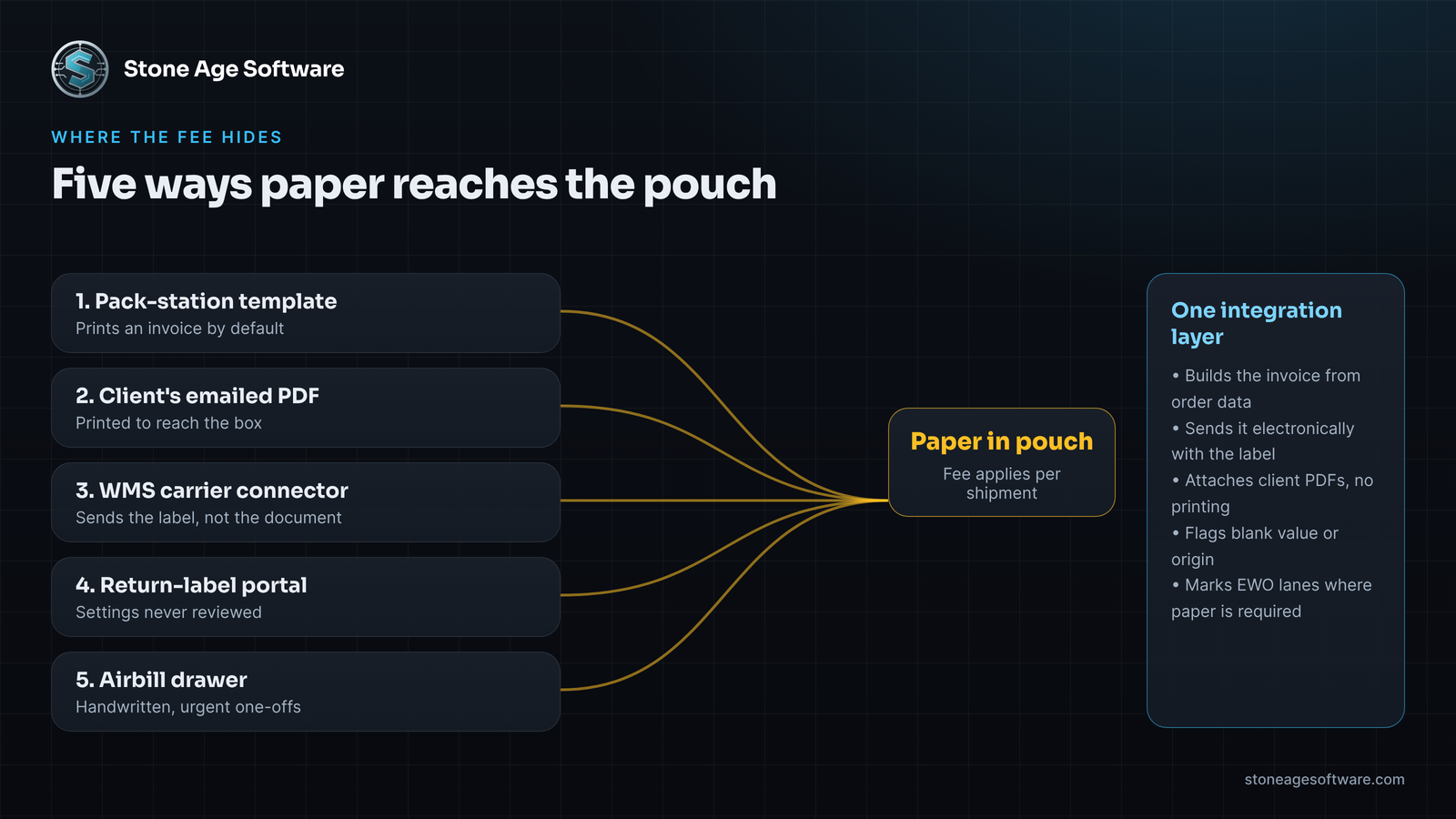
Here is where a printed invoice usually comes from:
- A template at the pack station. The shipping screen prints a commercial invoice. A packer folds it into the pouch. Nobody unchecked anything; paper was simply the default when the station was set up.
- A client's own invoice. Some clients email a PDF per order. Someone prints it, because printing is the only path from an inbox to a box.
- A connector that skips the document. The WMS creates the label through a carrier connection. The connection sends the label request but not the invoice file.
- Return labels from a client portal. Cross-border returns get labels from another system entirely. Its settings were never reviewed.
- The airbill drawer. One-off urgent shipments go out on a handwritten airbill. That now carries its own fee.
None of these is anyone's mistake. Each path was built to get a box out the door, and each one does. No connection ever ran between them and a single setting that says "send electronically."
What an electronic invoice needs from your data
Turning on ETD is a setting. Feeding it is a data problem. An electronic invoice needs the same facts a paper one does. The difference is that a person can no longer fill a blank with a pen.
For goods coming into the U.S., federal rules spell out the content. 19 CFR 141.86 lists what a commercial invoice must contain. That includes:
- A detailed description of the merchandise
- Quantities in recognized units
- The purchase price or value of each item, with currency
- The country of origin
- Itemized charges such as freight and packing
That rule matters for a 3PL that receives cross-border returns. Exports follow the destination country's rules, plus U.S. export reporting under the Foreign Trade Regulations. The fields overlap heavily.
Now compare that list to a typical client item master. Description and quantity are always there. Value often lives in the client's order, not in your system. Country of origin is frequently blank. Tariff codes may sit in a spreadsheet the client's broker keeps.
On paper, a packer or a lead fills the gap by hand. Electronically, a blank field either stops the upload or sends an incomplete document. That is why paper hangs on. It is the fallback that absorbs missing data.
What ETD can and cannot do
The FedEx ETD page sets out the working limits. They are worth knowing before you design anything.
- Up to five documents per shipment, including the invoice.
- Up to 5 MB per document.
- Common formats are accepted, including PDF, spreadsheets, and images.
- A company letterhead and signature image can be stored and applied.
- Documents can be uploaded after the label is created, through post-shipment document upload.
The last point helps 3PLs most. A client invoice that arrives an hour after packing can still go electronic.
There is also a hard limit. Not every country accepts paperless clearance. If the origin or destination does not, the label shows "EWO," and paper copies are still required. Those shipments are not a failure. They are a known exception, and they should be counted separately so they never look like a missed setting.
Where a carrier integration fits
The fix is not a new shipping platform. Your WMS ships orders and should keep doing it. What helps is a small layer between the WMS and the carrier that handles trade documents on purpose.
That layer does a few plain things:
- Builds the commercial invoice from the order and the item master, using the client's letterhead.
- Sends it as an electronic document with the label request, or uploads it right after.
- Accepts a client's own PDF from email or a portal and attaches it without printing.
- Flags orders with a blank value, origin, or description before they reach the pack station.
- Marks EWO destinations so the packer knows paper is expected there.
- Logs, per shipment, whether the document went electronic, went on paper, or failed.
The flag step matters most. Software does the routine part: building, attaching, and logging thousands of documents. Your people handle the judgment. They chase a client for a missing country of origin. They decide whether a held order ships today on paper. They talk to the client about the new fee. Those calls need a person, and they are easier when the list is short and accurate.
We built a version of this pattern for returns. The return shipment document automation project builds receiving paperwork straight from the check-in scan. It tracks every document to accepted or failed, and a failure always carries its reason. The same shape works for export invoices. Build the document from the data, send it electronically, and never leave a blank state.
You own the result. The code, the data, and the carrier credentials stay with you. The work is fixed price, quoted up front.
Who pays when paper slips through
Some paper will still ship after January 18. A new client goes live mid-month. A portal setting gets missed. When the fee shows up on the carrier invoice, it lands somewhere.
Each client agreement decides that. Does the fee pass through? At cost or with handling? Starting on which date? Those are business decisions, and they belong in the agreement, not in a setting.
The software's job is narrower. It should tie each fee on the carrier bill to a shipment and a client. Then the billing run can apply whatever the agreement says. Without that link, the fee lands in a general freight line. It stays there until someone wonders why international margin slipped in February.
The paper test you can run this week
You can size your exposure in about an hour.
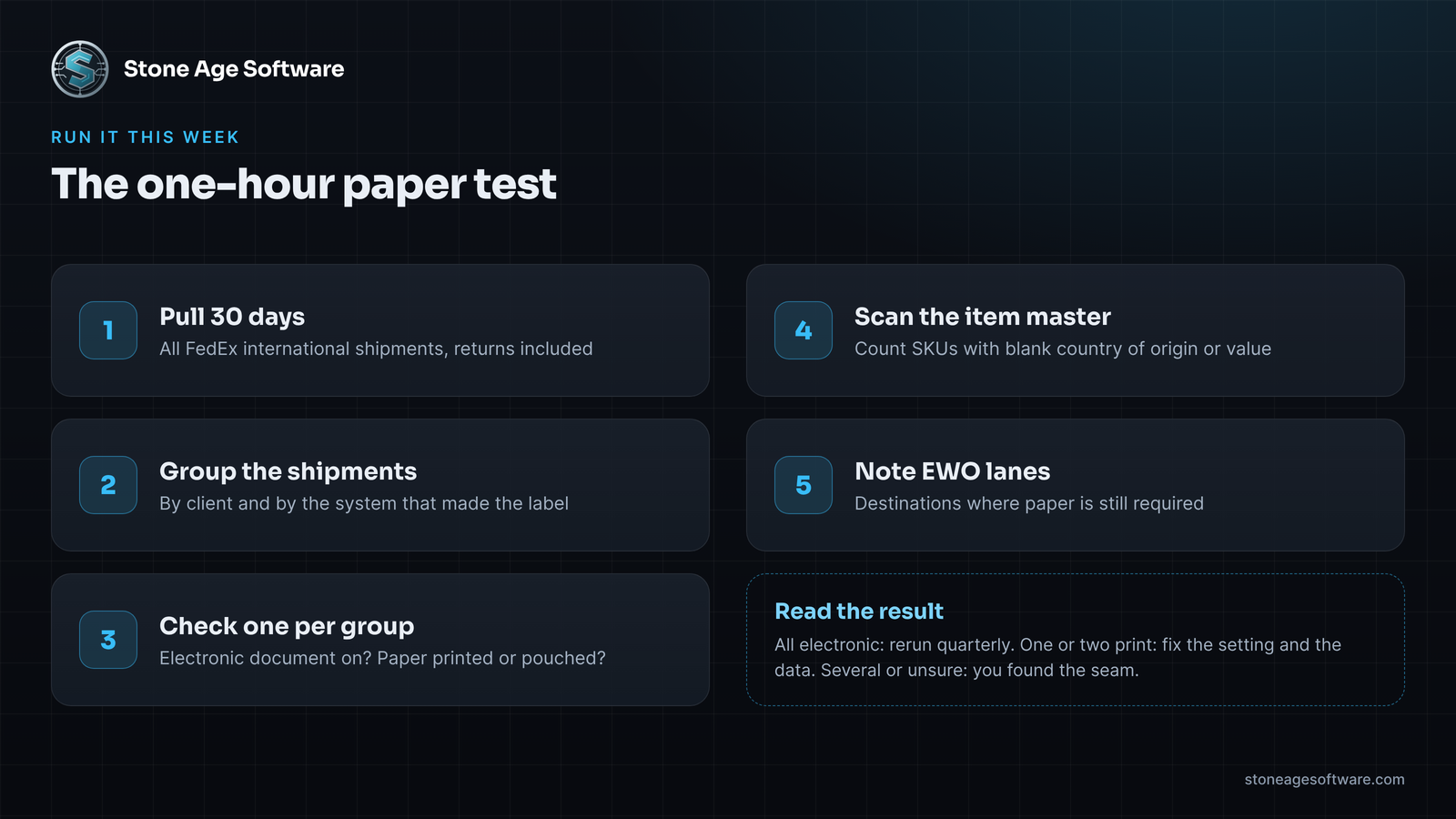
- Pull your last 30 days of FedEx international shipments, including returns.
- Group them by client and by the system that created the label.
- For each group, check one recent shipment. Was the electronic document option on? Was a paper invoice printed or pouched?
- Check the item master for those clients. Count SKUs with a blank country of origin or value.
- Note any destinations that came back as EWO.
Read the result this way:
- Every group sent electronically. January 18 is a non-event. Keep the report and rerun it quarterly.
- One or two groups print paper. Fix the setting, then fill the missing item data so the setting holds.
- Several groups, or "not sure." You have found the seam, and now you know its size.
If the test turns up more paths than you expected, our carrier integration practice builds the layer that closes them. It sits on top of the WMS you already run, sends trade documents electronically, and gives your team one short list of real exceptions.