At 6:40 on a Tuesday morning a technician in Baytown finishes a pre-use inspection on a clipboard. The office sees that record at 3:15 in the afternoon, when the truck is back in signal and someone types it into the maintenance system. For eight and a half hours the company is running on a piece of paper in a cab. That gap is the real subject of most mobile application development Houston operators ask about. Nobody is asking for an app. They are asking for the record to exist the moment the work happens, and for the person who did the work to stop being the data entry clerk afterwards.
This guide is for the founder, the CTO, and the operations director who has to make that call. It covers why the generic app fails Houston's core industries and what the working use cases look like. It then weighs native against cross-platform, sets out what offline and compliance demand, and shows how to vet a partner on outcomes instead of a demo.
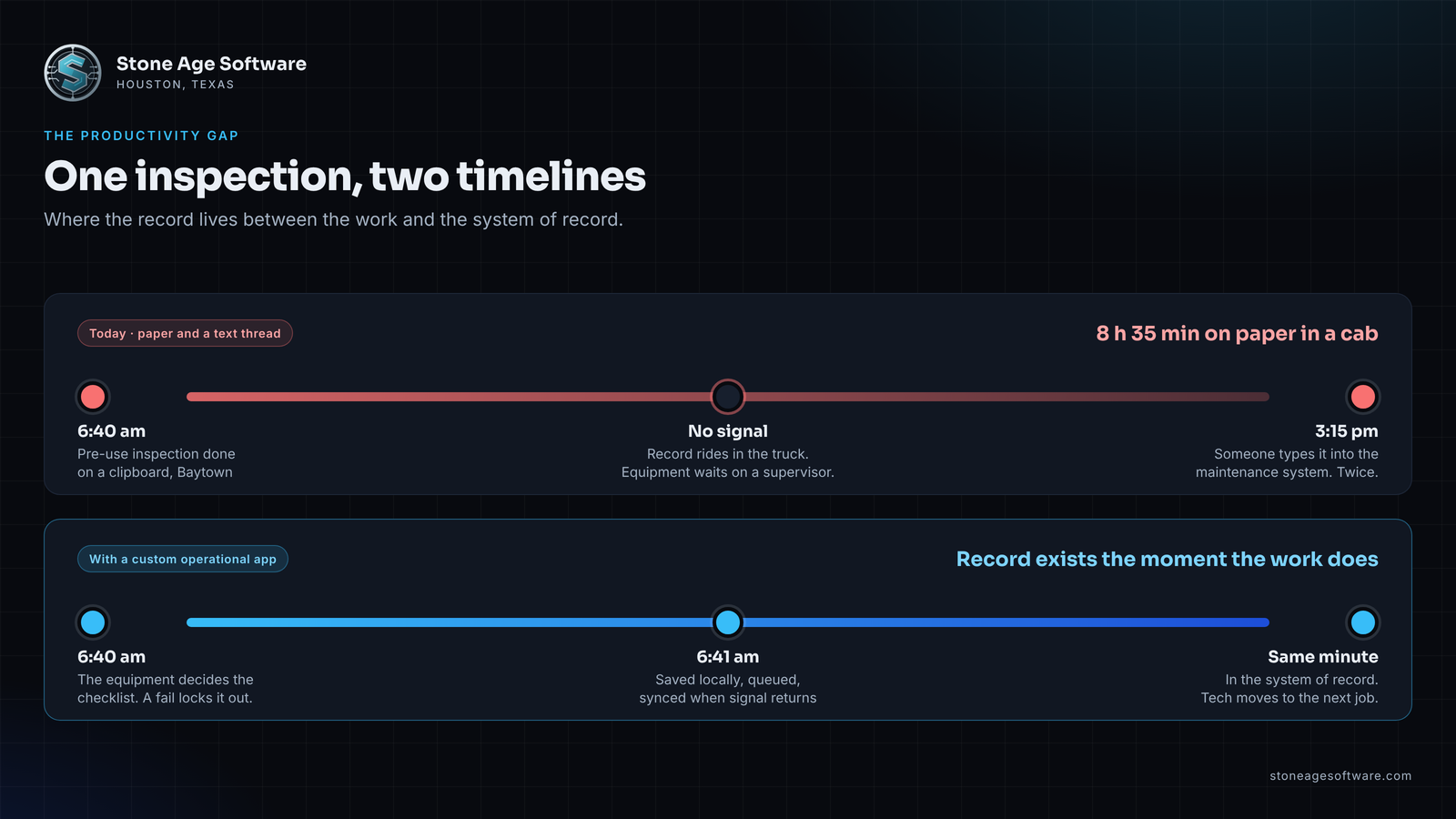
The productivity mandate: why off-the-shelf apps fail Houston's core industries
Houston does not run on average workflows. Each of its signature industries carries a structural requirement that a generic app cannot see.
Energy and oil and gas. Offshore operators must keep a documented safety and environmental management program. The federal rule, 30 CFR 250.1902, lists seventeen required elements, including hazards analysis, mechanical integrity, auditing, and recordkeeping. It also requires a job safety analysis for covered activities. A generic forms app does not know that a cherry picker needs a harness check and a counterbalance truck does not. So the crew fills in a blank template and the record lives in a camera roll.
Port logistics. Port Houston marked the completion of its segments of Project 11 on October 8, with the Galveston Bay reach widened from 530 to 700 feet, as Maritime Executive reported. Bigger vessels arrive on fewer calls, so freight lands in heavier bursts. FreightWaves reported deep-draft transits up 9 percent and barge transits up 10 percent in August. A gate, yard, or dock app built for the standard path breaks on the first burst. Bursts are made of exceptions.
Healthcare. The HIPAA Security Rule's technical safeguards in 45 CFR 164.312 require unique user identification, audit controls, person or entity authentication, and transmission security. A consumer messaging app satisfies none of them. Yet that is where shift handoffs drift when the sanctioned tool takes six taps too many.
The common failure is not the crew and not the vendor. It is the seam between the app and the system of record. Off-the-shelf tools assume a generic workflow, a constant signal, and a person who will retype the result later. Each assumption costs the same three things. Manual data entry. Equipment or people waiting on a record. Field reports that arrive after the decision they were meant to inform.
Custom operational mobile applications close that seam by design. The app is the front door to the ERP, WMS, maintenance system, or clinical record, with validation at the point of capture and a sync layer underneath. The record exists once. The person who did the work moves on to the next exception, not the paperwork.
Mobile tech as an operational multiplier: three Houston use cases
The multiplier is simple to measure. Each use case removes one re-keying step and one wait. Across a shift, that frees the crew for the judgment calls that needed a human all along.
Offline-first field inspections. The inspection that works is the one the equipment decides. A badge scan picks the truck, the truck picks the questions, and an unticked box is a failed point, never a blank. In our safety equipment inspection system, a failed check-out locks the item out of the available pool until an administrator clears it. A passed inspection releases the equipment instantly, with no supervisor hunting for a clipboard. The same pattern fits a wellsite, a tank farm, or a fabrication bay with no signal.
Real-time fleet and freight telemetry. Carrier data, hours-of-service data from FMCSA-registered electronic logging devices, and proof-of-delivery stamps already exist. The gap is that nobody has wired them to a decision. Our inbound freight tracking integration polls four carrier lanes every ten minutes. Anything unusual lands in one of four exception queues, each with an owner. A driver app that stamps delivery with signature, photo, and GPS closes the loop from the other end. The dispatcher stops checking websites and starts working the exception list.
Digital clinical handoffs. A handoff is a structured record, not a conversation that happens to be written down. On a managed device, a handoff app enforces the fields the receiving nurse needs, logs who viewed what, and keeps protected health information off personal phones. Role-based access and an audit trail separate a compliant tool from one that quietly moves the problem.
In each case the pattern is the same. Capture once, validate on the device, sync to the system of record, and route exceptions to a named person. That is the workforce productivity app Houston operations actually need, whether the industry calls it field service mobile development or enterprise mobile solutions.
Native vs cross-platform: a decision matrix for operational apps
The choice is usually framed as a technology debate. For an operations director it is a cost-of-ownership question with three variables.
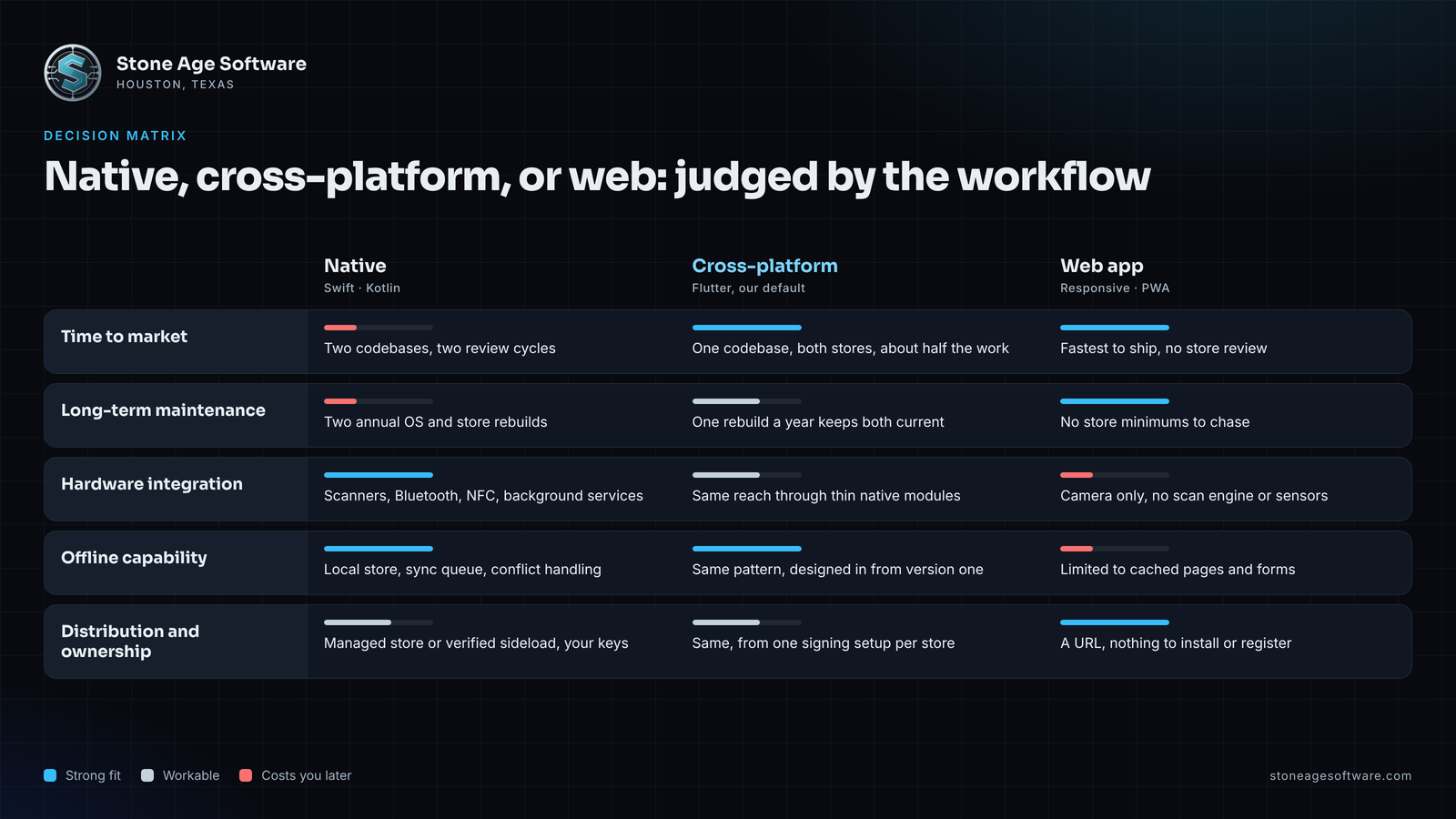
Time to market. Cross-platform, with Flutter as the default, ships iPhone and Android from one codebase. It is roughly half the work of writing the app twice. Native wins only when the app lives on one platform forever, such as a rugged Android fleet.
Long-term maintenance. Both stores raise their minimums every year, and an app that is not rebuilt against them stops being accepted. Apple's upcoming requirements page shows the cadence. Since April 28, 2026, uploads must be built with Xcode 26 or later. Since September 9, 2026, iOS apps must target iOS 13 or later. Two native codebases mean two of those cycles every year. One codebase means one.
Hardware integration. This is where native earns its keep, and where many cross-platform projects fail. Zebra and Honeywell handhelds expose their scan engines through documented interfaces. Bluetooth sensors on a pump, a reefer, or a gate arm speak through platform APIs. A good cross-platform build reaches all of that through thin native modules. A bad one wraps a web page and asks the operator to use the camera. Ask to see the scanner working on the actual device, not a demo phone.
The honest matrix.
- Rugged Android fleet, scanner-heavy, no iPhones: native Kotlin or Flutter with native scanner modules, decided by who maintains it.
- Mixed fleet of company phones and personal devices: Flutter, one codebase, both stores.
- Heavy platform-specific behavior such as background Bluetooth or augmented reality: native Swift or Kotlin, as a shared decision.
- Used at a desk as often as in the field, changed weekly, no offline need: a responsive web app, with no store review in the way.
The decision belongs to the workflow, not the developer's preference. Enterprise app engineering that starts from the device in the crew's hand, and the system the record must land in, gets this right on the first quote.
Compliance, security, and offline capability in remote deployment zones
Offshore rigs, tank farms, cross-dock warehouses, and hospital basements share one property. The network is a guest, not a host. Productivity has to survive its absence.
Offline is designed in, never bolted on. Every record lands in local storage first. A sync queue holds what changed, with conflict handling for the case where two people edited the same job. Uploads have to be engineered too. Our damage and exception case management build sends each photo one file per request. It downscales through a six-step ladder and retries up to three times with a tighter target each time. A file that still refuses to go gets a named warning, and the case saves anyway. That is offline-first on a dock with one bar of signal.
Security is a build requirement, not a policy document. For healthcare, the current rule already requires access control, audit controls, and transmission security. The proposed Security Rule update is still pending, with a final rule targeted for 2027. It would make encryption at rest and in transit and multi-factor authentication mandatory wherever protected data lives. Build to that standard now. For energy, SEMS recordkeeping means an inspection record has to show who did it and when. Capture that on the device, with location and duration, rather than from memory.
Distribution is now a compliance item on Android. Google's developer verification program took effect on September 30, 2026 for users in Brazil, Indonesia, Singapore, and Thailand. Google says it will expand the protections globally in 2027. Registering as an organization requires a D-U-N-S number, which can take up to 28 days to obtain. Google's verification FAQ says apps distributed through an organization store on managed devices will not need verification. It still recommends registering them, so an install on a non-managed device keeps working. Unregistered apps can otherwise be installed only through the advanced flow or over ADB. If your internal app is sideloaded onto rugged handhelds today, 2027 is the year that habit needs a plan.
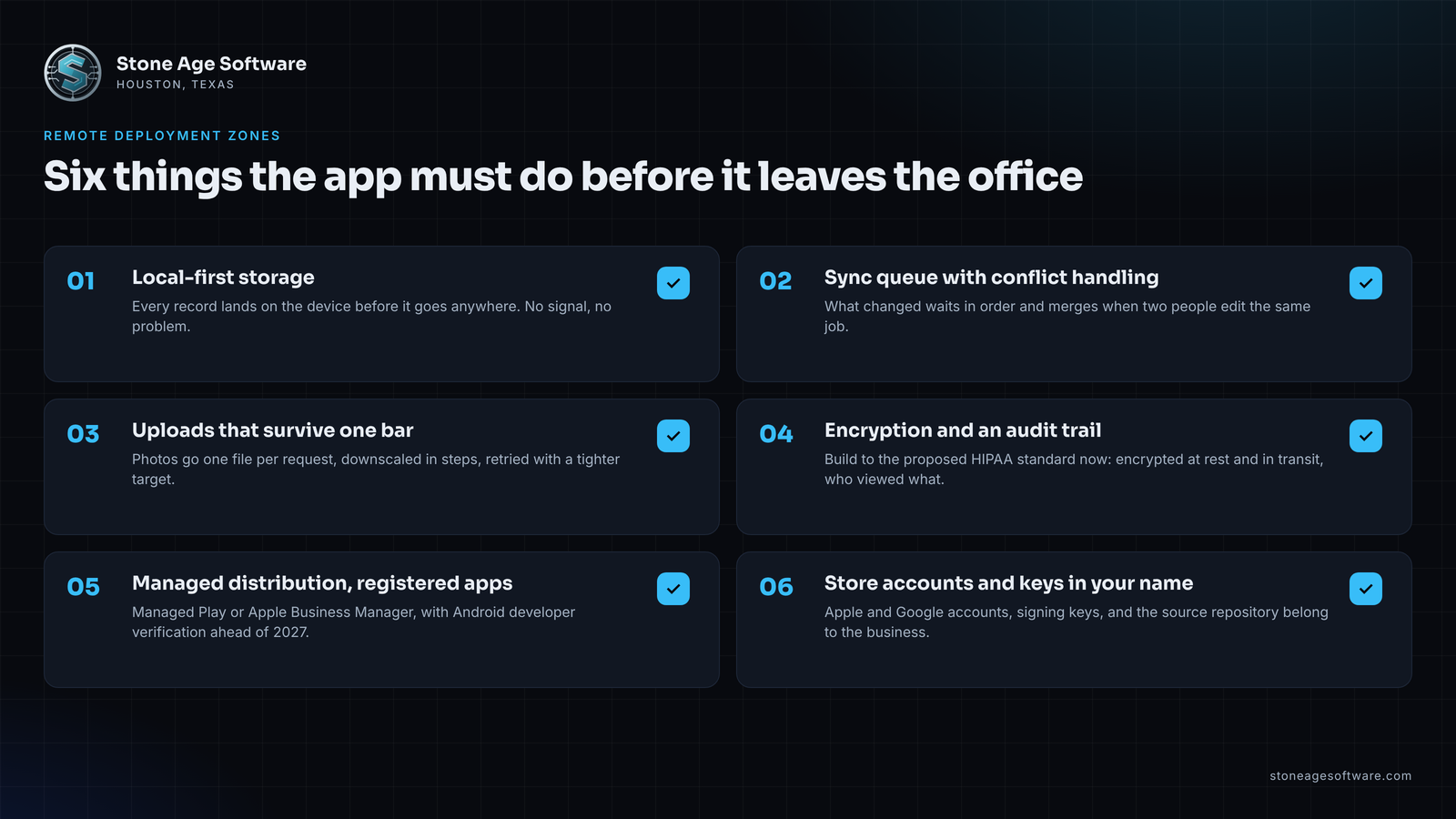
Ownership closes the loop. Apple and Google developer accounts belong in your business's name. Signing keys and the source repository belong in your hands. Google notes that a lost signing key means the package cannot be registered at all. An app published under a contractor's account is a problem you inherit later. Users, reviews, and the listing cannot move without that contractor's cooperation.
How to vet a mobile application development Houston partner on operational outcomes
Houston app developers are easy to find. Partners who can be held to a productivity number are not. These criteria separate the two.
- They open with the workflow, not the feature list. The first question should be what the crew does now, where the signal drops, and whether an app is even the right answer. A pitch that skips to screens treats integration as an afterthought.
- They can name the adoption metric. Two numbers tell the truth. The share of records created on the device versus re-keyed later. The time from the event to the record in the system. Ask how both get measured after launch.
- They design for the glove and the glare. Large tap targets, hard contrast, one job per screen, scanner-first input, and a flow that survives an interruption. Field UI is a safety constraint, not a style preference.
- The server side is in the quote. The API, the sync layer, and the integration into your ERP, WMS, maintenance, or clinical system belong in the same engagement. Expect a fixed price, quoted up front, with the app and the server side priced separately.
- You own everything on day one. Store accounts, developer verification registration, signing keys, source repository, hosting. Get it in writing before the first build.
- Post-launch support is defined. Annual OS and store compliance rebuilds, crash monitoring, and small changes, on a retainer you can take in-house later. Ask whether another team could pick up the code tomorrow.
- They show production work with the failure modes included. A case study that only shows the happy path has not been to a dock. The partner should be able to say what broke in the field and what the fix was.
A partner who meets these criteria will sometimes tell you not to build an app. That is a point in their favor. Our earlier guide on the customize, build, or mobilize decision path covers when packaged software still wins.
Run this check before you book anyone
Spend one shift on it, with nobody from a vendor in the room.
- Count the double entries. Walk one job from the field or floor to the system of record. Mark every point where a person retypes something that already exists on paper, in a photo, or in a text thread.
- Time the lag. For yesterday's inspections, deliveries, or handoffs, note when the work happened and when the record appeared. The median gap is your productivity number.
- Map the dead zones. Ask the crew where the signal drops. If the answer includes anywhere they do real work, offline is a requirement, not a feature.
- Check who owns the accounts. Find the Apple and Google developer accounts for any app you already run. If they are not in your company's name, start the transfer now.
- Check Android registration. If any internal app is sideloaded onto Android handhelds, confirm its package name is registered under your organization before the 2027 rollout.
More than one double entry per job, or a lag measured in hours, means the app is already paying for itself. Book a Workflow Productivity Audit through our custom software and web development practice, or reach us directly for a 30-minute technical discovery session. Bring the shift's numbers from the check above. We will tell you what the app would take, what it would remove, and whether a simpler option does the job.