
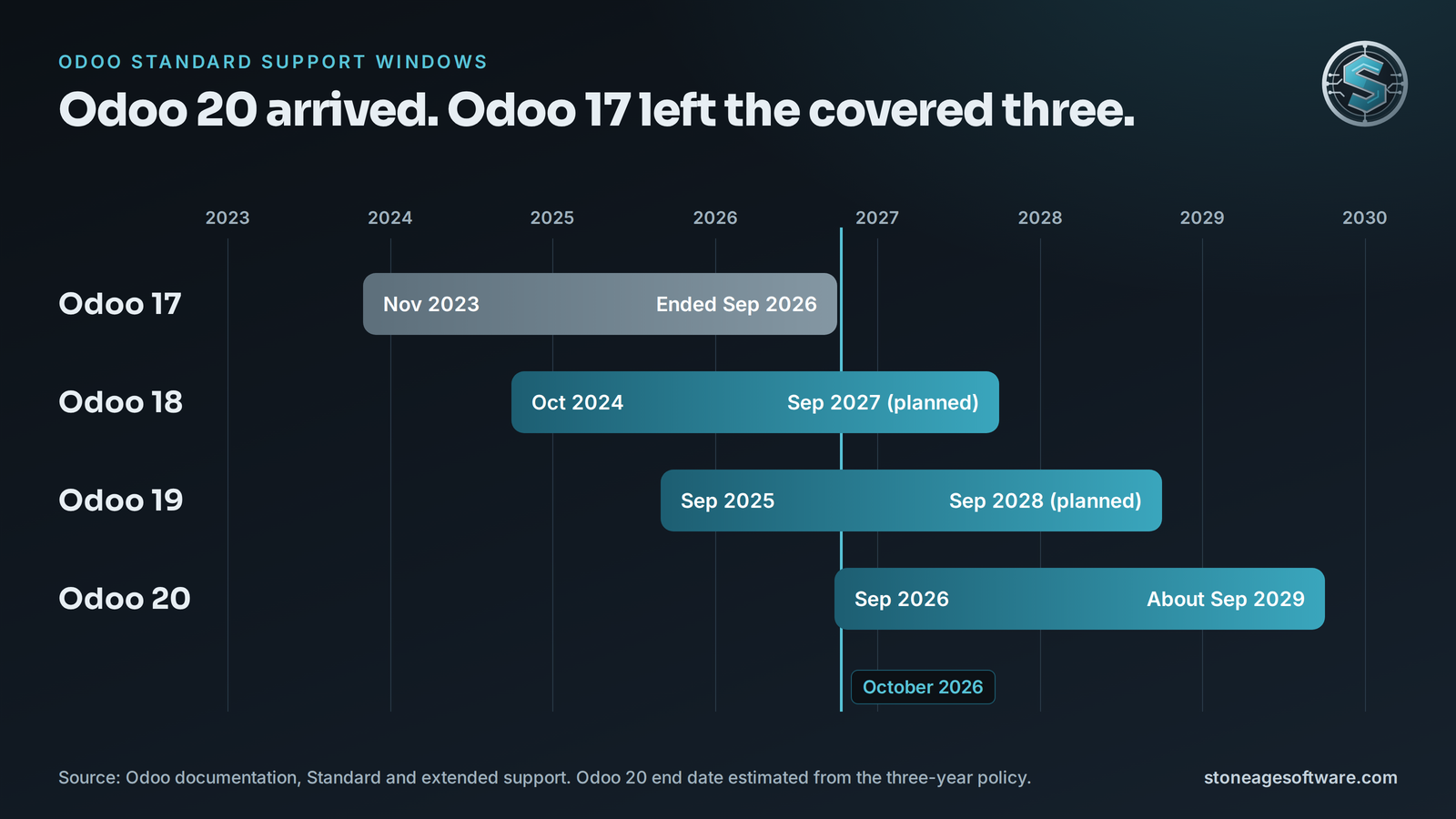
Odoo 17 end of support is no longer a date on a roadmap. Odoo's own table lists standard support for 17.0 as ending in September 2026. Odoo 20 shipped on September 24. That pushed 17 out of the three covered versions.
Your warehouse did not notice. Receipts still post. Pickers still scan. Nothing turned red.
That is the trap. The risk is quiet, and the bill arrives later. So this article answers two plain questions. What actually changed? And what does an upgrade cost, in real numbers?
What Odoo 17 end of support really changes
Odoo splits support into two phases. Its standard and extended support page spells them out.
- Standard support covers the first three years. It includes helpdesk, bug fixes, and security updates.
- Extended support starts when standard support ends. It costs extra. Fixes arrive only where technically feasible.
Where you host decides which options you have.
- Odoo Online: no extended option exists. The platform sets your upgrade timetable.
- Odoo.sh: extended support is available for a limited number of versions.
- On-premise: extended support is available for a fee.
- Community edition: there is no vendor support either way. You carry the patching yourself.
One more rule sits on that page. You can upgrade to any version still under standard support. You can also target a version that left standard support less than six months ago. So a shop on 15 or 16 that planned to stop at 17 has a short window left.
What staying on Odoo 17 costs
Staying is a legitimate choice. It just carries a price now.
The Odoo Enterprise Subscription Agreement adds an extra fee for databases older than the covered versions. The fee is charged once per year. It cannot be charged sooner than six months after a new major release. Partner write-ups put it at 25 percent of the annual subscription.
Run that math on your own renewal.
- A subscription of USD 8,000 a year adds USD 2,000 a year.
- A subscription of USD 20,000 a year adds USD 5,000 a year.
Odoo 20 landed in late September 2026. Six months later is spring 2027. That is the earliest the surcharge can reach an Odoo 17 database. Confirm the timing against your own agreement.
The fee is the visible cost. The quieter costs matter more on a warehouse floor.
- Security fixes come slower, or not at all.
- Third-party apps stop shipping updates for 17.
- Carrier and marketplace connectors move on to newer versions.
- Insurers and large customers ask about unsupported software on security questionnaires.
None of this is anyone's failure. Version 17 worked, so nobody had a reason to touch it. The gap sits between a vendor's calendar and a building that cannot stop shipping.
Odoo upgrade pricing: what the market charges
Most upgrade articles stop before the numbers. Here they are.
Start with what is free. On Enterprise, Odoo upgrades the standard database at no charge through its upgrade platform. You pay for everything around it. That means custom code, third-party apps, integrations, testing, and cutover.
Community edition works differently. There is no vendor upgrade service. The open-source OpenUpgrade project does that job, with more hands-on work.
Published ranges from Odoo partners land close together.
- One 2026 cost guide puts most upgrades between USD 1,500 and USD 15,000. Heavily customized systems reach USD 30,000 or more.
- A second guide puts most projects between USD 2,500 and USD 35,000.
- Hourly rates for this work run USD 75 to USD 150 or more.
Custom modules drive the hours. One upgrade calculator estimates 8 to 15 hours per simple module, per version jump. Complex modules take 30 to 60 hours per jump.
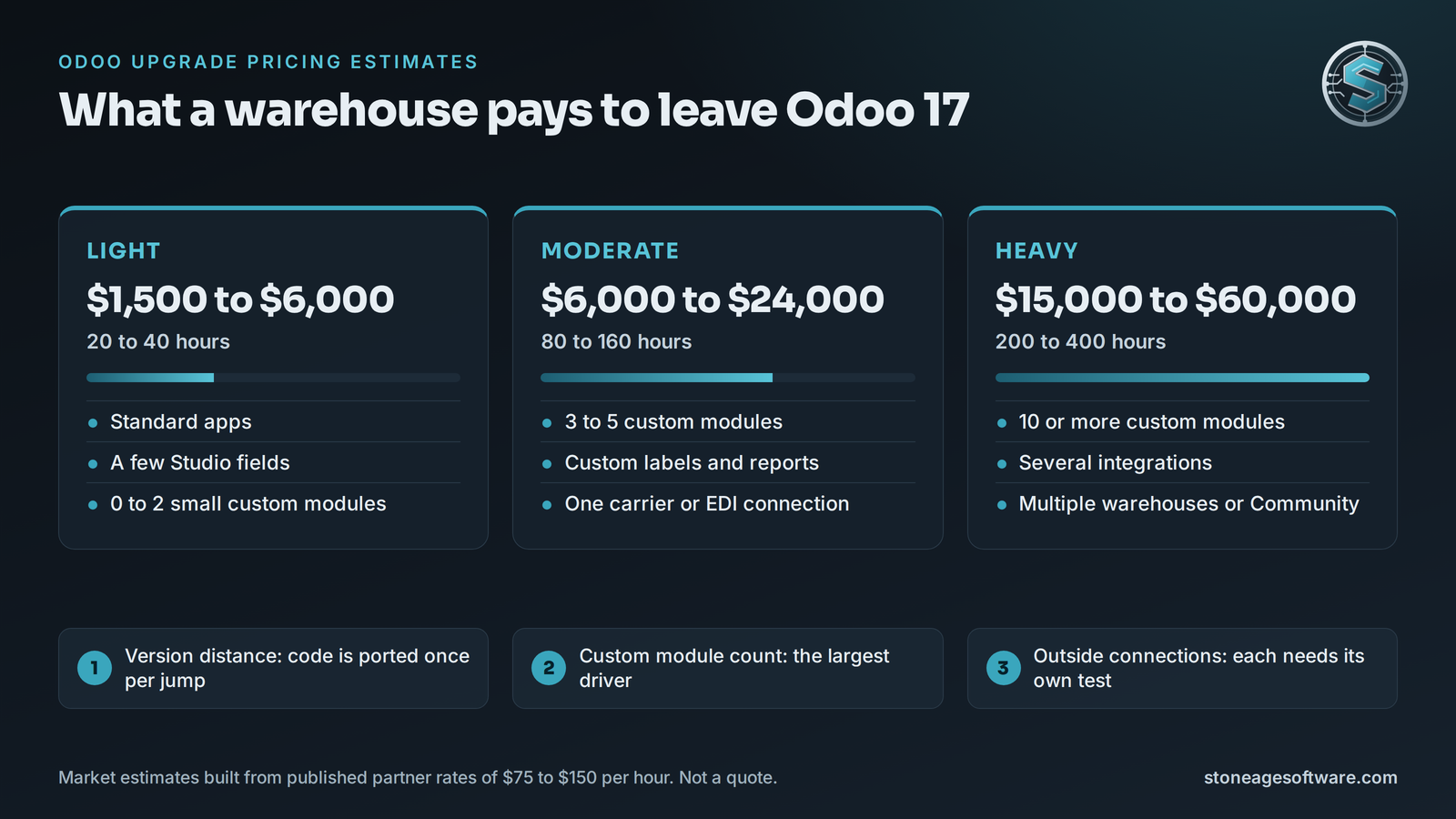
Using those published rates, here are our estimates for a warehouse leaving 17. They are market estimates, not a quote.
- Light: about USD 1,500 to USD 6,000. Standard apps, a few Studio fields, and zero to two small custom modules. Roughly 20 to 40 hours.
- Moderate: about USD 6,000 to USD 24,000. Three to five custom modules, custom labels, and one carrier or EDI connection. Roughly 80 to 160 hours.
- Heavy: about USD 15,000 to USD 60,000. Ten or more modules, several integrations, multiple warehouses, or a Community database. Roughly 200 to 400 hours.
Three things move you between tiers.
- Version distance. Going from 17 to 19 is two jumps. Going to 20 is three. Custom code gets ported once per jump.
- Custom module count. This is the largest single driver.
- Outside connections. Every carrier, EDI partner, storefront, and script needs its own test.
Here is a worked example. Say you run five simple custom modules and move from 17 to 19. That is ten module ports. At 8 to 15 hours each, expect 80 to 150 hours. At published rates, that is USD 6,000 to USD 22,500 before testing and cutover.
A wide range is not a dodge. It is what an estimate looks like before anyone reads the code. A real number needs an inventory first.
Where warehouse upgrades break
The standard apps usually survive an upgrade. The seams around them are where things give.
- Barcode flows. Custom scan steps and screen changes rarely carry over clean.
- Labels and documents. Report templates and printer formats need rework and test prints.
- Lot and expiration rules. Custom fields and checks at receiving must be retested. We covered that seam in warehouse expiration date tracking.
- Automation rules. Small scripts stored inside the database can break without warning.
- Third-party apps. Each one needs a release for your target version. Some never get one.
- Integrations. Odoo 19 introduced a newer external API and marked the older RPC endpoints deprecated. Outside scripts deserve a full test.
Every item on that list is a join between two pieces of software. Nobody owns the join by default. That is where upgrades slip, not in the core.
Which version should you pick? This part is opinion.
Version 18 leaves standard support in September 2027. That is a short runway for the effort. Version 19 has a year of fixes behind it, with support planned through September 2028. Version 20 has the longest runway and the youngest app ecosystem. For most warehouses today, 19 is the calm choice.
The upgrade sequence that keeps the floor moving
A good upgrade is boring. It follows the same order every time.
- Inventory. List every custom module, app, report, and connection.
- Test upgrade. Run a copy of the database through the upgrade platform. Read the report it returns.
- Port the custom code. Fix modules against the upgraded copy, one jump at a time.
- Floor rehearsal. Receive, put away, pick, pack, and ship in the test system. Use real scanners and real printers.
- Reconcile. Compare stock on hand, open orders, and lot records between old and new.
- Cut over in a quiet window. Keep a tested way back.
- Stay close for the first week. Exceptions surface on real volume.
Step four is the one a tight schedule squeezes out. It is also the one that catches the label printing sideways.
Your leads know where the odd cases live. The software work should free them to test those judgment calls, not retype data.
We wrote up that discipline in deploying to a system that nobody can stop using. The same rules apply to an Odoo cutover.
A 20-minute check you can run today
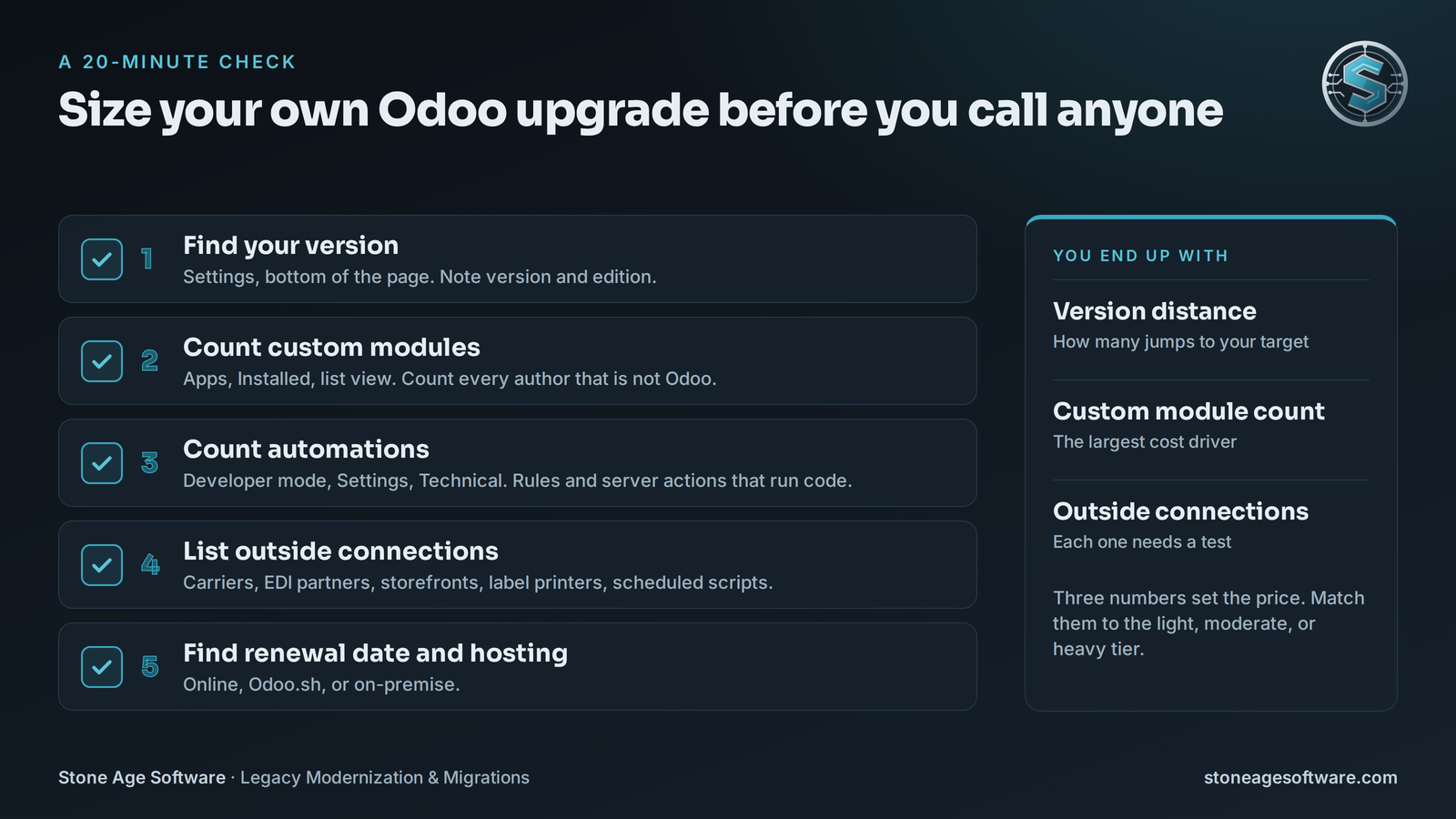
You can size your own upgrade before calling anyone.
- Find your version. Open Settings and scroll to the bottom. Note the version and the edition.
- Count custom modules. Open Apps, filter to Installed, and switch to list view. Count every module whose author is not Odoo.
- Count automations. Turn on developer mode. Under Settings, open Technical. Count the automation rules and server actions that run code.
- List outside connections. Carriers, EDI partners, storefronts, label printers, and scheduled scripts all count.
- Find your renewal date and hosting type. Online, Odoo.sh, or on-premise.
Now you hold three numbers. Version distance, custom module count, and outside connections. Match them to the tiers above.
A count in the light tier may need only a test upgrade and a floor rehearsal. A higher count deserves a written inventory before anyone quotes.
That inventory is where we start. Our legacy modernization and migrations work begins with an assessment and ends with a fixed price, quoted up front. The ranges above tell you what the market charges. The assessment tells you what your system needs.