
The picker pulls a case, turns it over, and reads the date. It passed three weeks ago.
Now the order is short. Someone walks the aisle for a replacement. The pallet goes back in the rack, or onto a hold shelf. And nobody can say how many more like it are sitting up there.
That is what warehouse expiration date tracking looks like when the date is first read at the pick face. The check works. It just happens at the last possible step.
We worked with a client recently who was in exactly this spot. Here is what was happening, what we changed, and how to test your own building.
Why warehouse expiration date tracking fails at the pick face
The client's process was reasonable on paper. Staff verified the expiration date during picking. Expired product got caught before it went in a box. Most of the time.
The trouble was everything that process could not see:
- How much dead stock was in the racks. Nobody knew until a picker reached it.
- Where it was. The system knew quantity and location. It did not know dates.
- How it got there. There was no record of how much shelf life each pallet had on arrival.
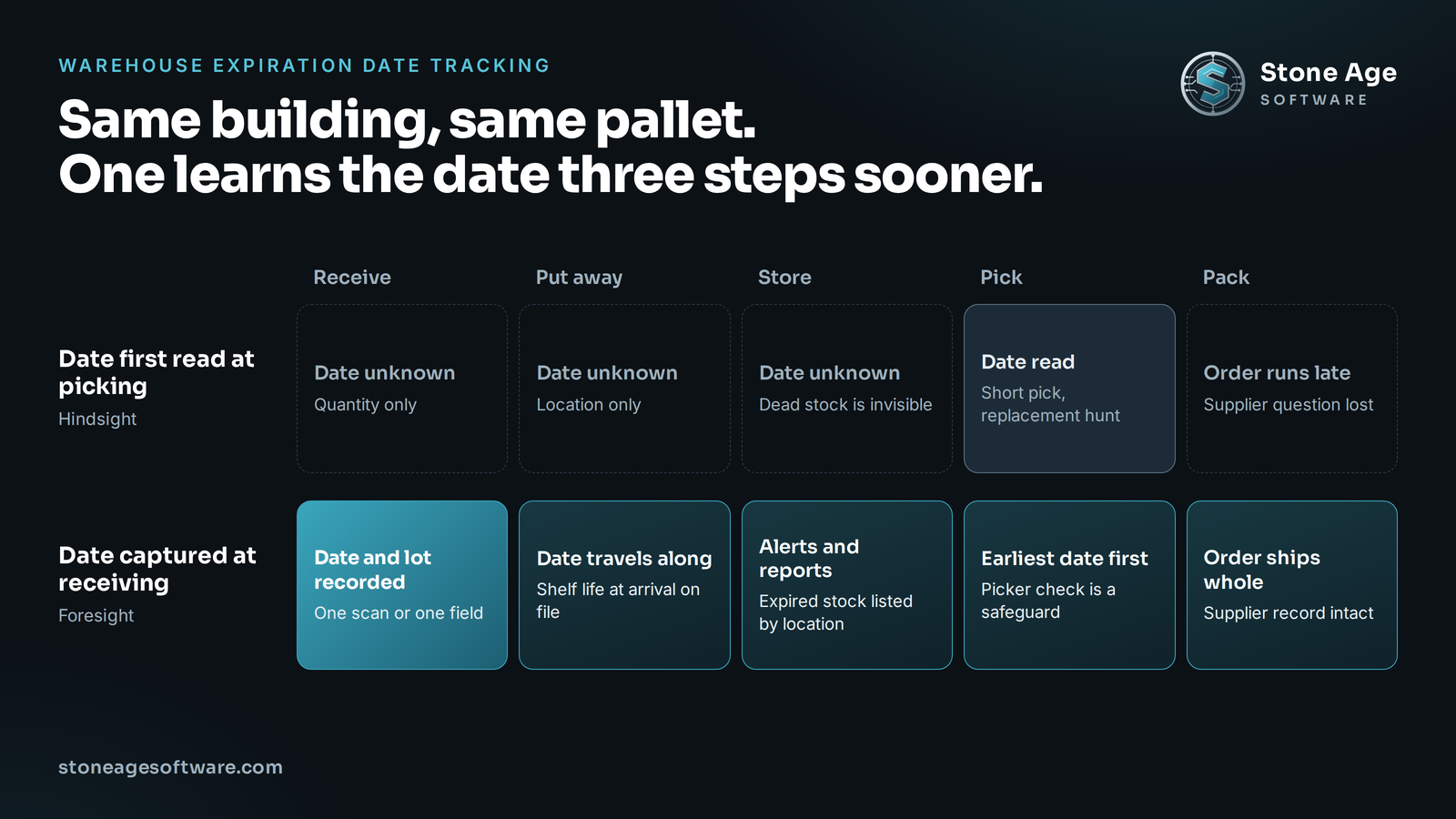
None of that is a people problem. The pickers did their job every time. The gap was structural. The system only learned a product's date at the moment the product was leaving.
A date read at picking is hindsight. By then the pallet has held a rack position for weeks. The order is already running late. And the one question that could prevent a repeat can no longer be answered. Who sent this, and how old was it when it arrived?
The date is already on the pallet when it arrives
Here is what makes this fixable. On the receiving dock, the date is right there. It is printed on the case. Often it is in the barcode too.
The GS1 application identifiers are the public standard for this. A GS1-128 case or pallet label can carry:
- (10) the batch or lot number
- (15) the best before date
- (17) the expiration date
So for many inbound pallets, capturing the date is one scan. For the rest, it is a few keystrokes. The receiver is already standing at the pallet with the paperwork in hand.
That is the cheapest moment in the building to record it. Every later step makes the date harder to get. Once the pallet is three levels up, reading a carton means a lift and a spotter.
What we changed, and what we left alone
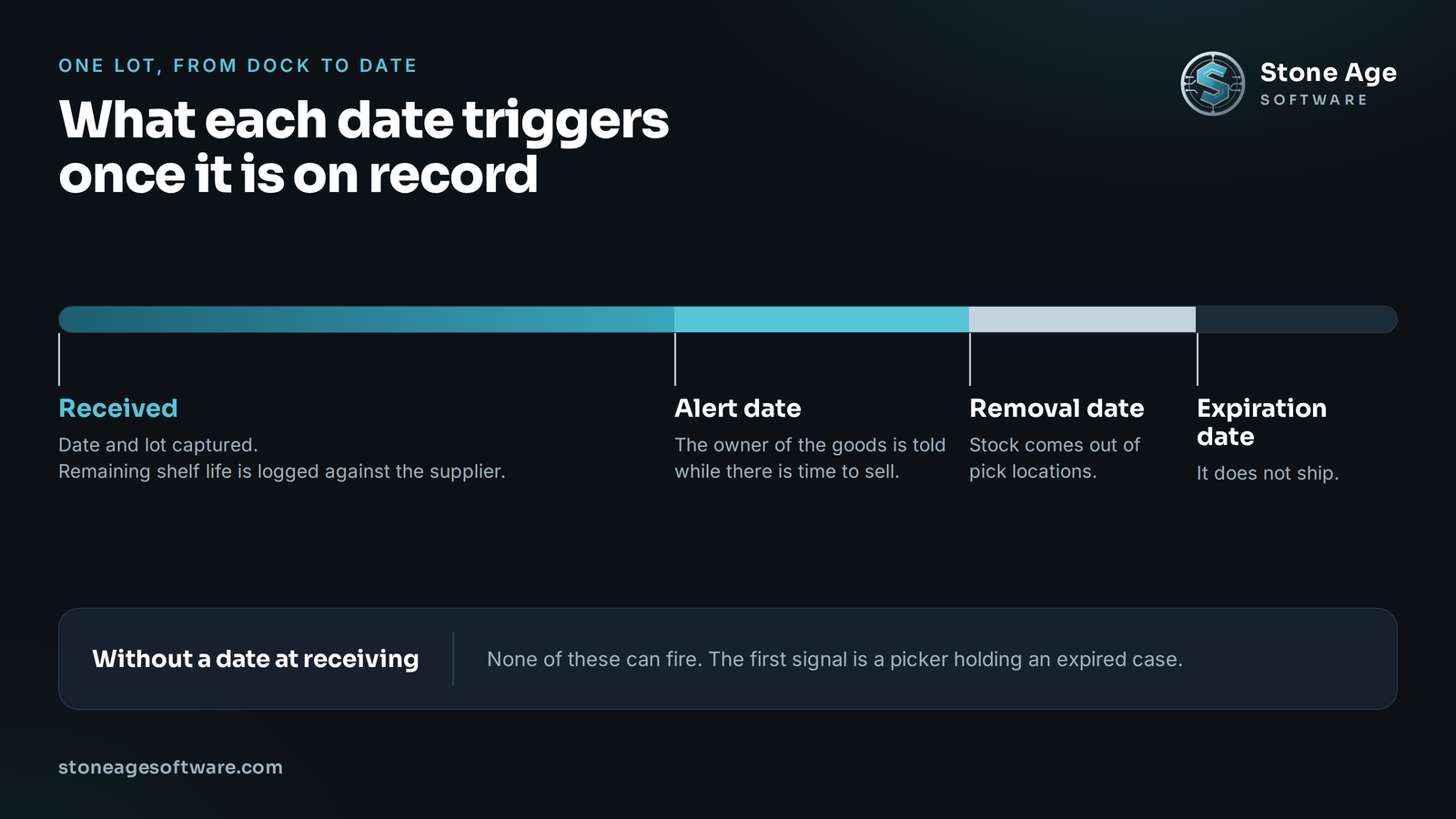
We did not replace the client's software. They run Odoo as their ERP, and it already supports this. The Odoo documentation on expiration dates describes four dates the system can hold for each lot:
- An expiration date.
- A best before date.
- A removal date.
- An alert date.
The capability was already paid for. It simply was not required at the dock. So the change was small and specific. The expiration date became mandatory the moment a pallet is received.
The receivers' work changed by one field. The pickers' date check stayed in place as a final safeguard. Nothing else about the building had to move.
Once the date exists, the rest of the system has something to work with. Alerts can fire ahead of time. Reports can sort by days remaining. Picking can offer the earliest date first.
One practical note. Stock already in the racks has no date on record. It needs a one-time count to backfill. That count is tedious. It is also the last time anyone has to do it.
Three things the date buys you at the dock
1. You find expired stock before a picker does. Pull a list of everything past its date, with locations. Clear it on your schedule, not in the middle of an order.
2. You see what is about to expire. A report of soon-to-expire stock gives the owner of the goods time to act. They can run a special, move it through a faster channel, or donate it. For a 3PL, that report is a service your clients will notice.
3. You can hold suppliers to a standard. Record the date at receipt and you know the remaining shelf life of every inbound pallet. Sort that by supplier. If one keeps sending product with a third of its life gone, the pattern is on record. Your client can push back with data instead of a hunch.
That third one matters most for 3PLs. You are the only party who watches the pallet arrive. Nobody upstream is going to report their own short-dated shipments.
Two kinds of date, and why the wording now matters
Not every printed date means the same thing. California wrote that distinction into law this year.
Under Assembly Bill 660, the rule covers food made on or after July 1, 2026 and sold in the state. A date label on that food must use one of two phrases:
- "BEST if Used by" for a quality date.
- "USE by" for a safety date.
The law also takes the phrase "sell by" off consumer-facing labels. Coded dates for stock rotation are still allowed. A Food Dive explainer walks through the details.
Why should a warehouse outside California care? Manufacturers rarely print separate packaging for one state. Expect those two phrases on more of what crosses your dock.
That is useful, because the two phrases call for two different actions:
- Past a quality date, the goods may still be usable. The statute says it does not discourage their sale or donation. What happens next is the owner's call.
- Past a safety date, the goods do not ship.
Your system should hold the two dates separately. Your receivers should know which printed date goes in which field. Decide that once, write it down, and build it into the receiving screen.
If you handle food, the same scan does double duty. The lot code captured at that step also feeds your FSMA 204 records.
Where a mandatory date field goes wrong
A required field can turn into a bad field. Watch four seams:
- Typed dates. Month and day get swapped. Scan where the barcode carries the date. Validate the entry where it does not.
- Coded dates. Some cartons print a production code, not an expiry. The screen should accept what is printed and work out the rest from the item's shelf life.
- Mixed pallets. One pallet, two lots, two dates. The receipt has to allow a split.
- A dock in a hurry. If the field holds up the truck, people will route around it. Make the fast path the correct path.
This is where software earns its place. It does the arithmetic and the reminding. Your receiving lead decides what to do with a short-dated pallet. Accept it, hold it, or refuse it. That call needs a person, and it needs to be recorded.
We built the same idea for damage and discrepancies at a contract-logistics site. There, receiving exceptions open their own case at the dock, while the evidence is still in front of someone.
Run the 20-pallet check
You can test this in an hour, with no new software.
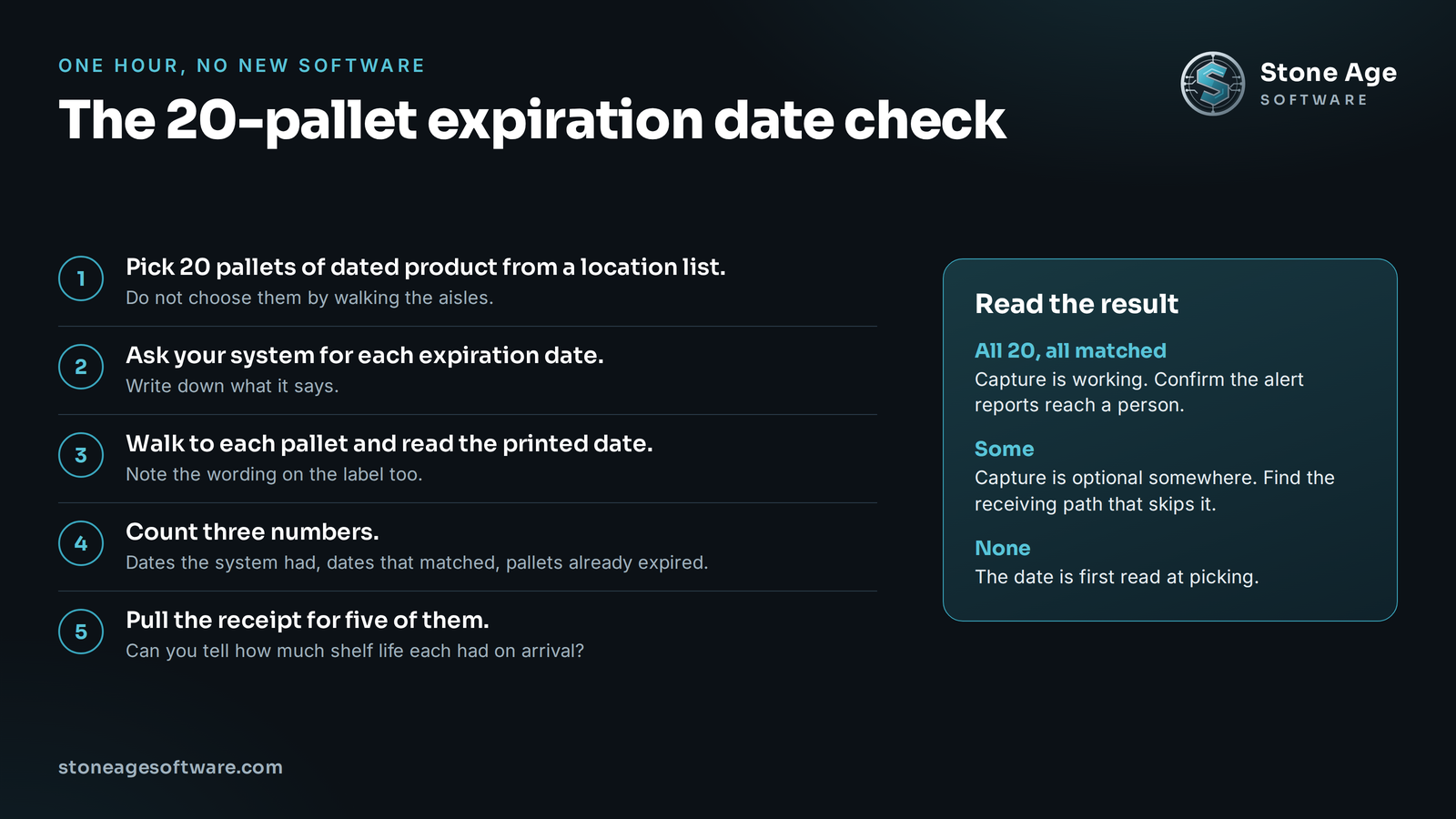
- Pick 20 pallets of dated product from a location list. Do not choose them by walking the aisles.
- Ask your system for the expiration date of each one. Write down what it says.
- Walk to each pallet and read the printed date. Note the wording on the label too.
- Count three numbers. How many dates did the system have? How many matched? How many pallets were already expired?
- Pull the receipt for five of them. Can you tell how much shelf life each had on arrival?
Then read the result:
- The system had all 20 and they matched. Capture is working. Confirm the alert reports reach a person.
- The system had some. Capture is optional somewhere. Find the receiving path that skips it.
- The system had none. The date is first read at picking. Everything above applies to you.
Capturing a date at receiving is rarely a new system. Usually it is the system you already run, asked one more question at the right step. Your warehouse software should give you foresight, not just hindsight.
That is the work our 3PL and warehouse systems practice does. We work inside the software you already own and build only what is missing. Fixed price, quoted up front.