It is week two of peak. One client's inventory report has refreshed every half hour since spring. The shift board in the break room reloads itself every few seconds. A dozen shippers open their dashboards before their own morning meetings.
Until last month, when that load outgrew the capacity behind your reports, the reports slowed down. Now they can keep running, and the extra usage lands on its own meter. That is Power BI usage-based billing in practice.
On September 29, Microsoft made capacity overage generally available for Fabric capacity. It also announced two more pay-for-what-you-use options, due in preview within weeks. Here is what changed, what did not, and what a 3PL should check before the next refresh storm.
What Microsoft changed on September 29
The news came out of FabCon Europe in Barcelona. Power BI capacity is sold as Microsoft Fabric capacity now, so Fabric billing news is Power BI billing news. Three pieces matter:
- Capacity overage, generally available. When demand runs past an F SKU's limit, Fabric can bill the excess instead of slowing reports down.
- On-demand billing, in preview in the coming weeks. Supported workloads are billed by what they consume. Microsoft's Azure announcement pitches it as paying for compute only when you use it.
- F0, in preview in the coming weeks. Microsoft calls it zero-provisioned. There is no upfront capacity commitment, and on-demand billing is on by default.
Redmond Magazine called F0 a pay-as-you-go model in all but name. Neither preview has published rates yet. Overage came with a rate, and it is already live.
What did not change: the seat license
Per-user licensing is untouched. Power BI Pro and Premium Per User are still sold per person, per month. The Pro list price already rose 40 percent in April 2025. Nothing announced in Barcelona moves it again.
The viewer rule holds too. Microsoft's Fabric license page says that below F64, every person viewing Power BI content needs Pro, Premium Per User, or a trial. Only at F64 and above can free users with a viewer role open reports. The announcement does not say how Power BI licensing will work on F0.
So the split is simple:
- Pro seats only, no capacity: these announcements do not change your bill.
- Reports on an F SKU: your bill can now flex with usage.
Plenty of 3PLs sit in the second group. Sharing reports with shippers, especially through an embedded portal, tends to pull a team onto capacity.
How Power BI usage-based billing works on a capacity
A Fabric capacity is a fixed pool of compute, measured in capacity units. Every report and refresh in its workspaces draws from that pool. Microsoft sorts the draw into two kinds.
A person clicking through a report creates interactive operations. Fabric smooths interactive usage over 5 to 64 minutes. A scheduled refresh is a background operation, and Fabric spreads its cost across 24 hours. So a heavy 6 a.m. refresh is still drawing on the pool at 4 p.m.
Picture eleven client models refreshing at 6 a.m. The day starts partly spent. Add the morning wave of shipper logins, and the first slowdown can arrive before lunch.
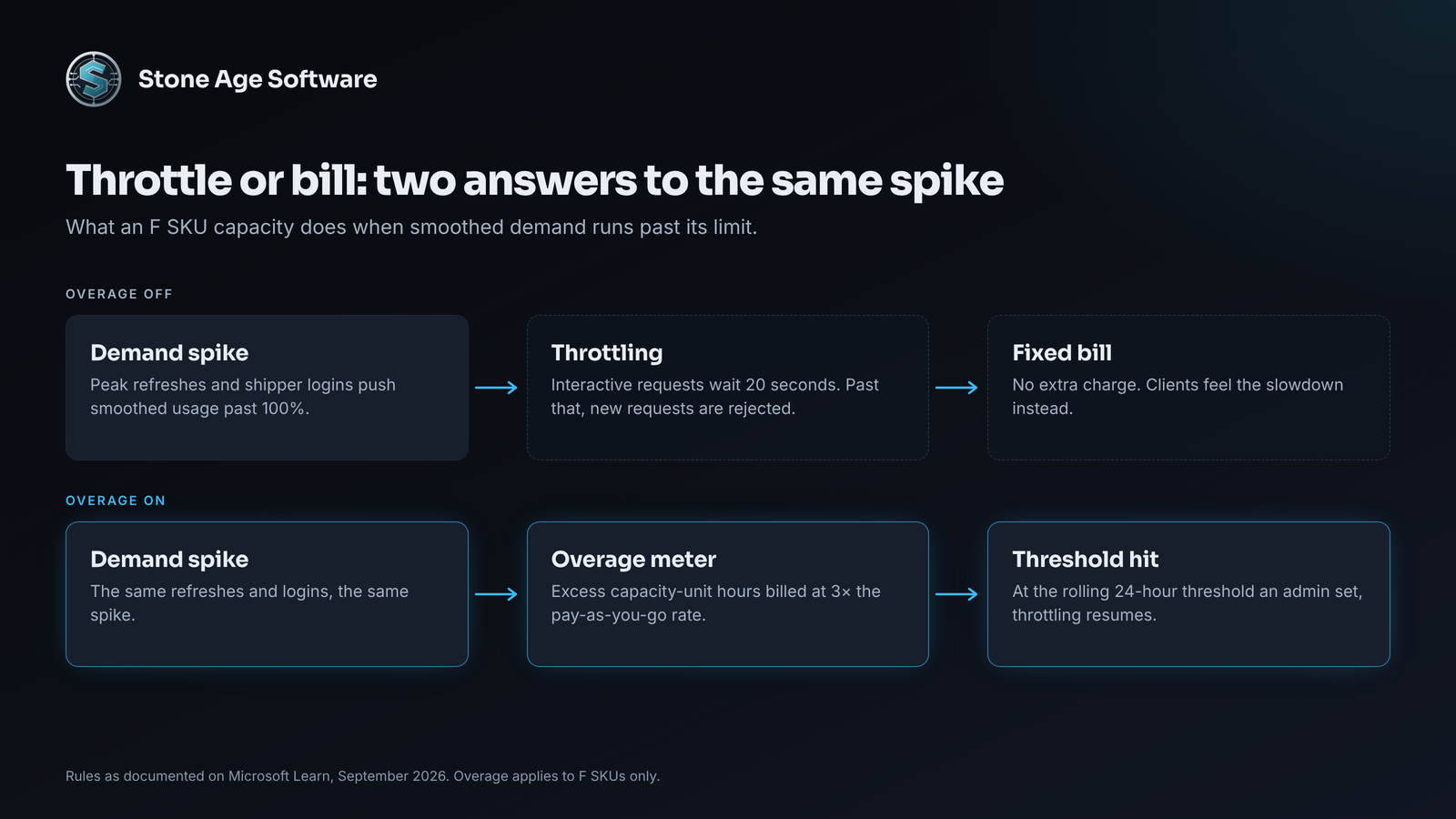
When smoothed usage runs ahead of the pool, Fabric throttles in stages. First, interactive requests wait 20 seconds. Next, new interactive requests are rejected. In the last stage, new requests of every kind are rejected until the backlog clears.
Capacity overage steps in at the point of throttling. Microsoft's documentation lays out the rules:
- Excess usage is billed at three times the pay-as-you-go rate, on a separate meter.
- An admin sets a rolling 24-hour threshold, in capacity-unit hours.
- Fabric checks every five minutes, so the threshold is not a hard spending cap.
- At the threshold, overage stops and throttling resumes.
- Overage is available only on F SKUs. Microsoft points older Premium P capacities to Autoscale instead.
Overage buys time, not size. Memory and concurrency limits still apply.
One line deserves a second look. The same page calls overage opt-in, then says it is enabled by default on new capacities. Check your own setting rather than trusting either sentence.
Where a 3PL's capacity actually goes
Overage pays for the excess. It does not explain it. In 3PL tenants, the same few seams show up again and again:
- One model per client. Copying a model was the fastest way to keep each shipper's data apart. Now eleven near-identical models refresh on eleven schedules.
- Refreshes faster than the data. A model refreshes every 30 minutes, but the WMS extract it reads lands once a night.
- Floor screens on a loop. Automatic page refresh turns a wall display into a steady stream of queries.
- DirectQuery into the WMS. Every click becomes a live query, so report traffic and database load rise together.
- Month-end all at once. Subscriptions and exports fire together when billing closes. Microsoft's operations list counts email subscriptions as background work.
None of these were mistakes when they were set up. The capacity carried fewer clients then, and no one's role included revisiting the schedule. Peak season raises every line at once: more orders to refresh, more shippers checking in.
Throttle, pay, or shrink the load
There are three moves, and most teams end up using some of each.
Leave overage off. The bill stays fixed. During a spike, reports slow down or fail, often while a client is watching.
Turn overage on with a threshold. Reports stay quick through the spike. The cost becomes a variable line someone has to watch.
Shrink the load. Merge client copies into one shared model with row-level security, so one refresh serves every shipper. Match refresh frequency to how often the source changes. Use incremental refresh for large history tables.
Whichever mix you choose, give the threshold an owner. An overage line nobody reviews only gets noticed on the invoice.
Microsoft added one more control worth knowing. Workspace-level surge protection, in preview, caps a workspace's rolling 24-hour consumption. Set limits on internal workspaces, and mark the client-facing one mission critical so it cannot be auto-blocked. Capacity-level throttling still applies, but one runaway workspace can no longer starve the rest.
F0 may suit a team that needs capacity for a few heavy jobs. Until Microsoft publishes rates and Power BI terms for it, treat F0 as a preview to test, not a plan to budget around.
The pattern is older than Fabric. On one contract-logistics site, we instrumented every route and background job of an internal platform the whole floor used. The point was to see what was costing time before someone walked over to say it was slow. Usage-based billing makes that kind of visibility a budget question, not just a performance one.
Where Apache Superset saves money
Some of this load does not need a Microsoft meter at all. Apache Superset is an open-source dashboard and data exploration platform, released under the Apache 2.0 license. There is no seat license, no viewer license, and no overage meter. You run it on a server you control, so its cost follows that server, not the number of people looking.
That matters most for shipper-facing dashboards. Every buyer, planner, and controller at a client is one more viewer. Below F64, each of them needs a paid license to open a Power BI report.
Superset's embedded dashboards can live inside your own customer portal. Viewers sign in through your portal, not Superset. Row-level security rules ride along in each viewer's token, so a shipper sees only its own orders. A built-in caching layer keeps repeat views from hitting the database every time.
It is not a drop-in replacement. Superset reads from SQL databases, so it belongs on a reporting database you own, not on spreadsheets. There is no DAX, so Power BI measures get rebuilt as SQL. Someone also has to patch and upgrade the server.
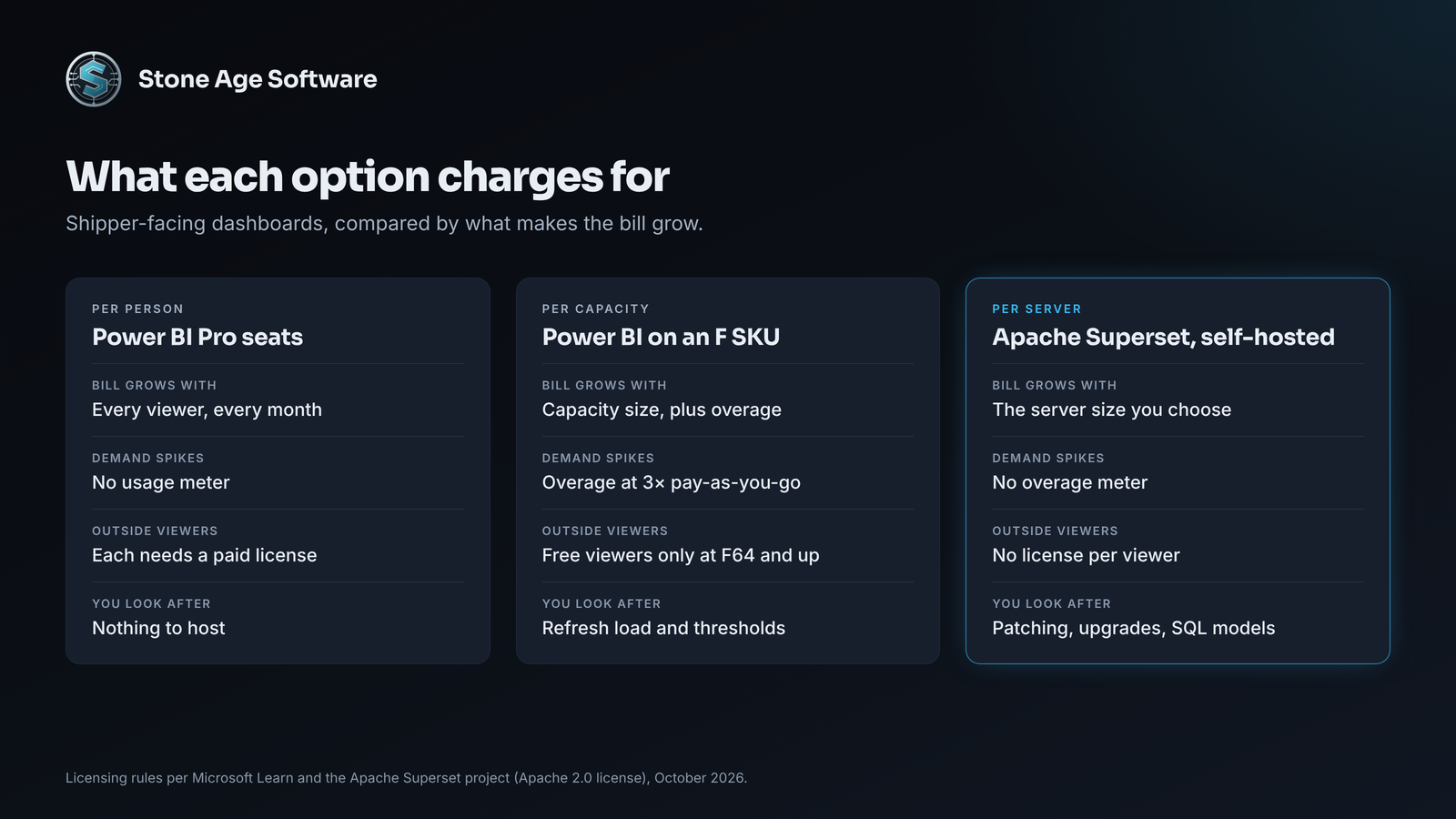
The split that usually works is simple. Keep Power BI for internal analysis, where your team is already licensed. Move the high-viewer, client-facing dashboards to Superset. We build with both, so the choice can follow the bill, not the tool.
A check you can run this week
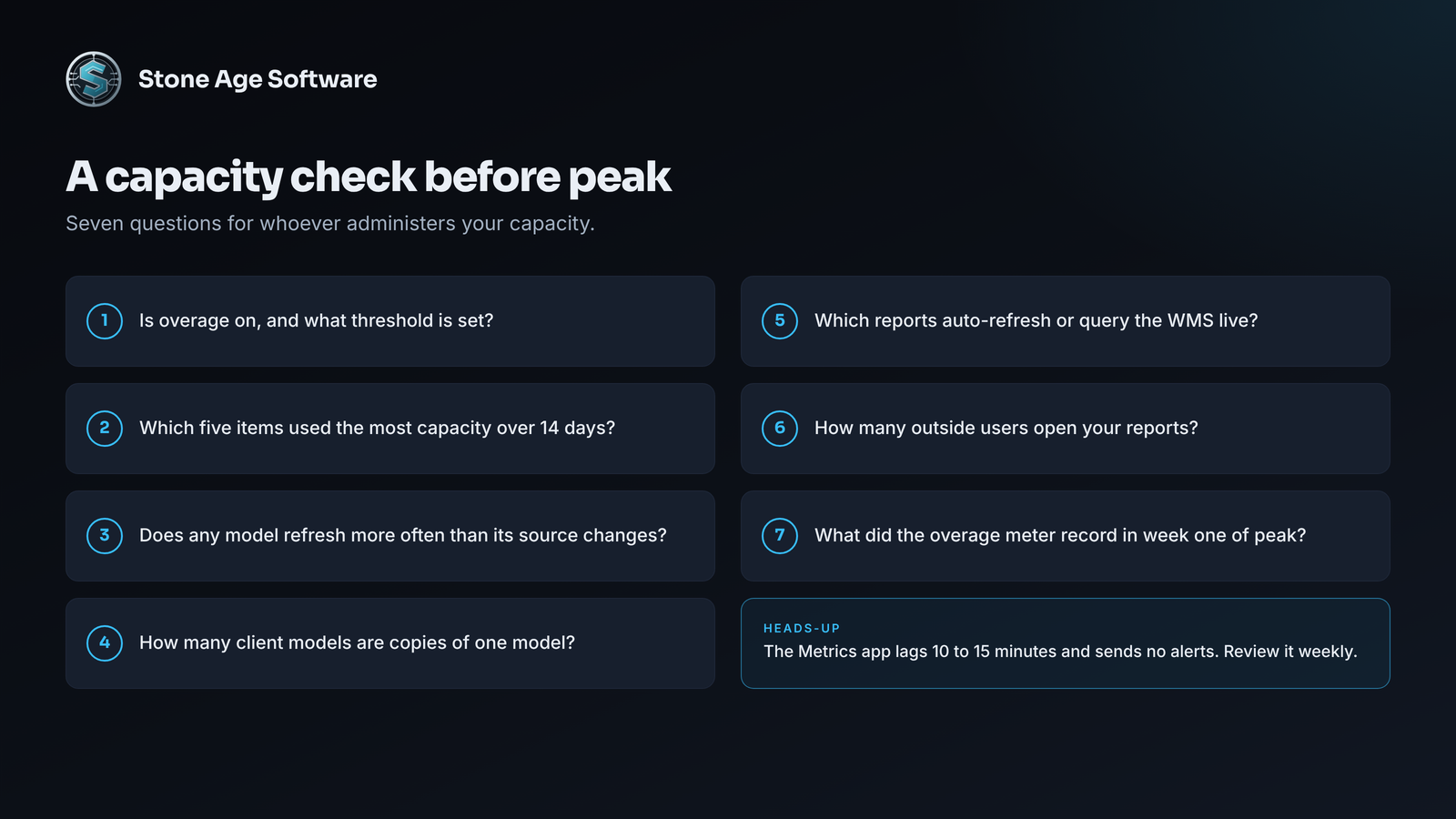
Set aside an hour with whoever administers your capacity:
- Open the capacity settings. Confirm whether overage is on, and note the threshold.
- Open the Capacity Metrics app. On the Compute page, sort items by usage over 14 days and note the top five.
- For each of those five, compare refresh frequency with how often the source data changes.
- Count semantic models that are copies of one model for different clients.
- List reports that use automatic page refresh or DirectQuery against the WMS.
- Count the outside users who open your reports. That number drives the Power BI versus Superset math.
- After the first week of peak, filter Azure Cost Management for the meter named Capacity Overage Capacity Usage CU.
One caution: Microsoft says the Metrics app lags 10 to 15 minutes and sends no alerts. Treat it as a weekly review, not an alarm.
If the list surprises you, that is common. Power BI usage-based billing does not create these costs. It puts a meter on them. Our Power BI and Power Platform practice starts with this exact review. We map what runs, what it costs, and whether each report belongs on a seat, a capacity, or Superset. The work is fixed price, quoted up front.