A returns pallet lands at door 6 with two crushed cartons. The customer wants a photo of each one before they will issue credit. The receiving screen has a quantity field and a reason code. It has nowhere to put a picture. So the photo goes on a personal phone, then into an email, then into a folder nobody can find three weeks later. That gap is where most operators start pricing warehouse software customization services. The real question is not whether to fix it. It is where the fix should live.
Every WMS is built to run the common path well. Receiving, putaway, picking and shipping work much the same way in thousands of buildings. The last few steps on your floor do not. Your customer's photo rule, your kitting sequence and your gate check-in are specific to your building. No product built for everyone can know them in advance. That is a structural gap, not a flaw in anyone's system.
Why the question is louder this month
On October 14, ARC Advisory Group published its 2026 map of the warehouse management systems market on Logistics Viewpoints. It sorts vendors by architecture rather than ranking them. Two of its buyer tests matter here. Check how far a system configures without heavy customization. Then check whether it upgrades cleanly.
The map also places the WMS in the middle of a crowded stack. ERP and order management sit above it. Yard, labor, parcel, transportation and automation systems sit around it. Each of those connections is a seam where floor work can fall through.
An August piece on the same site went a step further. It argued that custom logic should sit above the core application, so platform updates do not break customer workflows. Put simply, where your changes live is now a buying criterion. It is an operating one too.
What warehouse software customization services actually change
Most changes fall into one of three layers. Each one behaves differently on upgrade day.
- Configuration. These are settings the system already exposes, such as pick rules or RF screen layouts. They survive upgrades because the platform planned for them.
- Core customization. This is new code inside the WMS itself. It is the right tool for allocation logic, inventory valuation and anything an auditor reads from the system. Every upgrade has to carry it forward and test it again.
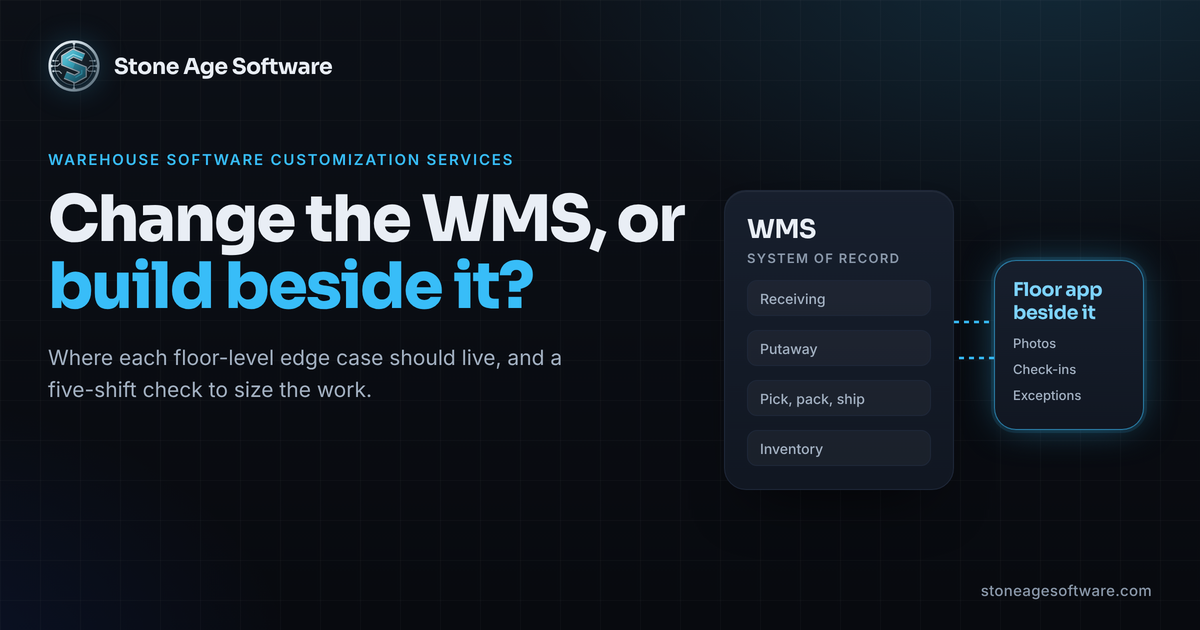
- Extension beside the core. This is a separate application that reads from the WMS and writes back through a supported path. The WMS stays the system of record. The new workflow lives next to it.
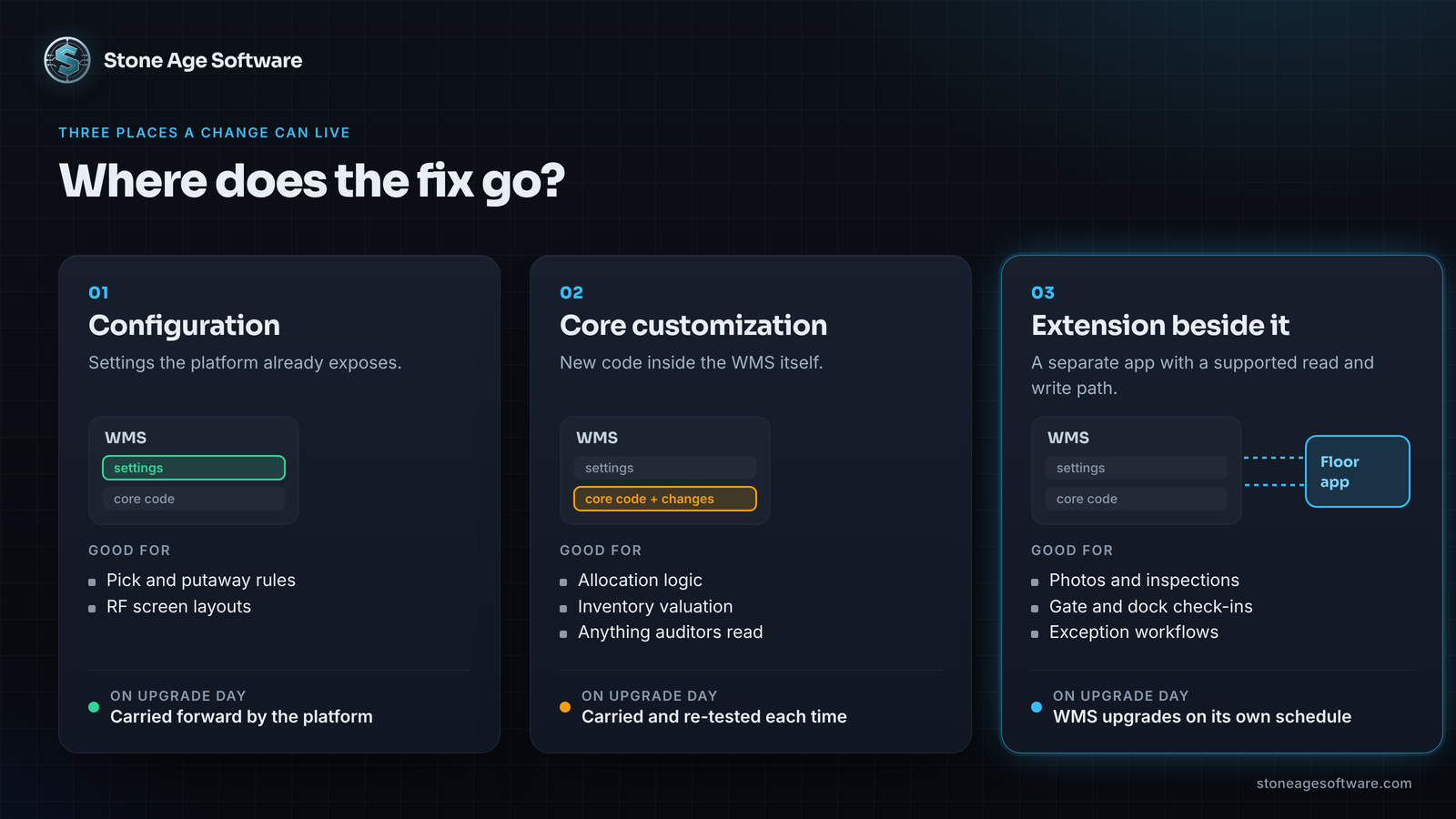
The first layer is safe but limited to what someone anticipated. The second is powerful, but it adds a seam to the one system you can least afford to destabilize. The third is where most floor-level edge cases belong.
A custom software application beside the WMS
For many warehouses, Power Apps is the practical way to build that third layer. A canvas app is a focused custom software application with a handful of screens. It runs on a tablet or a rugged Android handheld. It does one job and hands the result back to the WMS.
Good first candidates look like this:
- Returns and QA inspection. Scan the SKU, pick a reason, take photos and open a case in one pass.
- Yard and gate check-in. Log the trailer, seal number and assigned door on a tablet instead of a clipboard.
- Triggered cycle counts. Queue a count automatically when a picker reports a short.
- Customer-specific packing steps. Show the kitting sequence or label rule for one account at the pack station.
Two details from Microsoft's own documentation should shape the design before anyone draws a screen.
First, scanning. Most rugged handhelds send a scan as keystrokes, so a plain text field captures it. If you use the device camera instead, the Power Apps barcode reader control works on Android, iOS and Windows. It does not scan inside a web browser. Data Matrix codes also do not read on Windows.
Second, dead zones. Racking blocks Wi-Fi, so offline support matters. Microsoft's mobile offline limits for canvas apps state that offline works only with Dataverse tables. SharePoint lists do not go offline. Choose the data store first, because changing it later means rebuilding.
We learned the same lesson building exception casework for a contract-logistics receiving operation. The form was never the hard part. Getting the photos off the floor before the moment passed was. That system opens its own case for most exception types and escalates itself after 48 hours. It lives beside the receiving system, not inside it.
Power BI turns floor events into one shared picture
A floor app does more than replace paper. It records timestamps the WMS never captured. When the trailer hit the gate. When the damage was found. When the case closed.
Feed those events into one Power BI model alongside WMS data, and new measures appear:
- Dock-to-stock time per receipt, from gate check-in to putaway confirm.
- Pick and pack errors by zone and by shift.
- Trailer dwell and on-time arrival by carrier and by door.
Define each measure once, in a shared model, and the office and the floor see the same number. End-of-shift exports become a live view. Supervisors stop transcribing clipboards. They spend that time on the exceptions that need their judgment.
Where satellite apps touch the core
An extension is only as good as its connections. Plan three paths before the build starts.
- Read. Pull orders, locations and inventory through an API, a database view or a scheduled export.
- Write back. Use a supported API when one exists. When the WMS offers no write interface, careful screen automation can fill the gap. We did exactly that when automating a warehouse system with no API.
- Ship. If the dock app prints labels or rate-shops, you face one more choice. You can route through a shipping platform or call carriers directly. We weighed both in Direct Carrier API Integration: Rent the Layer or Own It?
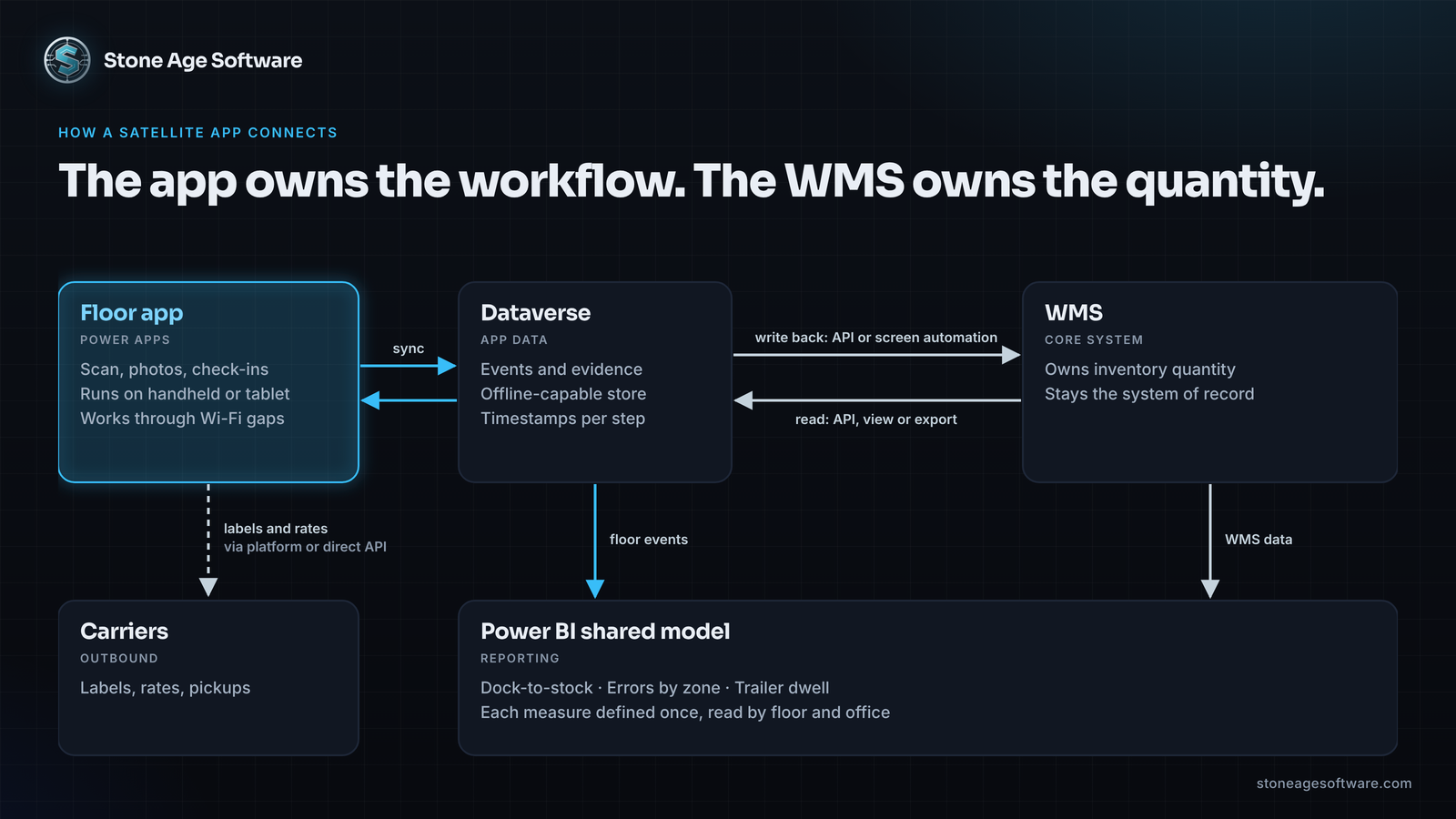
Keep the WMS as the source of truth for inventory. The app owns the workflow and the evidence. The WMS owns the quantity.
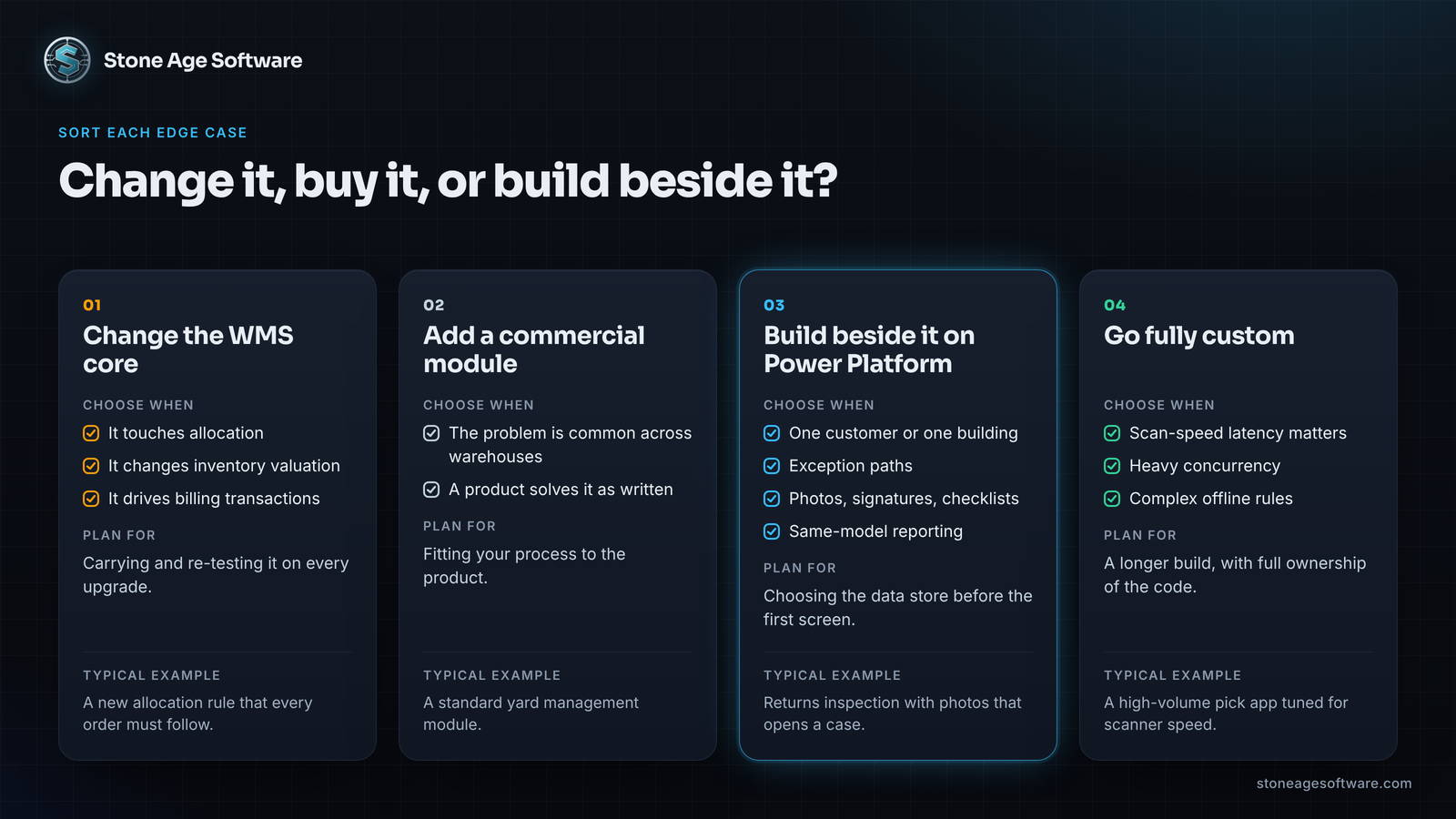
Change the WMS, add a product, or build beside it?
Use four tests to sort each edge case.
Change the core when the work touches allocation, inventory valuation or billing transactions. Those belong where the auditors look.
Add a commercial module when the problem is common across warehouses and a product already solves it as written. Yard management is often one of these.
Build beside it on Power Platform when the workflow is specific to one customer or one building. Exception paths, photo or signature capture, and checklists you want reported in the same model all fit here.
Go fully custom when the app outgrows the platform. Scan-speed latency, heavy concurrency and complex offline rules are the usual signs. That is a job for custom software development, and we say so plainly when an app has crossed that line.
Run the edge-case census this week
You can size this problem in five shifts with one shared sheet.
- Ask each supervisor to log every time someone leaves the WMS to finish a task. Paper, a personal phone, a spreadsheet and an email all count.
- For each entry, note the task, the account, the minutes it took and what data was lost.
- At the end of the week, sort the list with the four tests above.
- Total the minutes in the "build beside it" pile. The top three tasks by minutes are your first app.
A short, repetitive list is good news. Repetition is what makes a workflow worth an app.
Got that kind of list? Our Power BI and Power Platform practice builds these apps inside your own Microsoft tenant. Documentation and a second owner come included. Every engagement is fixed price, quoted up front.