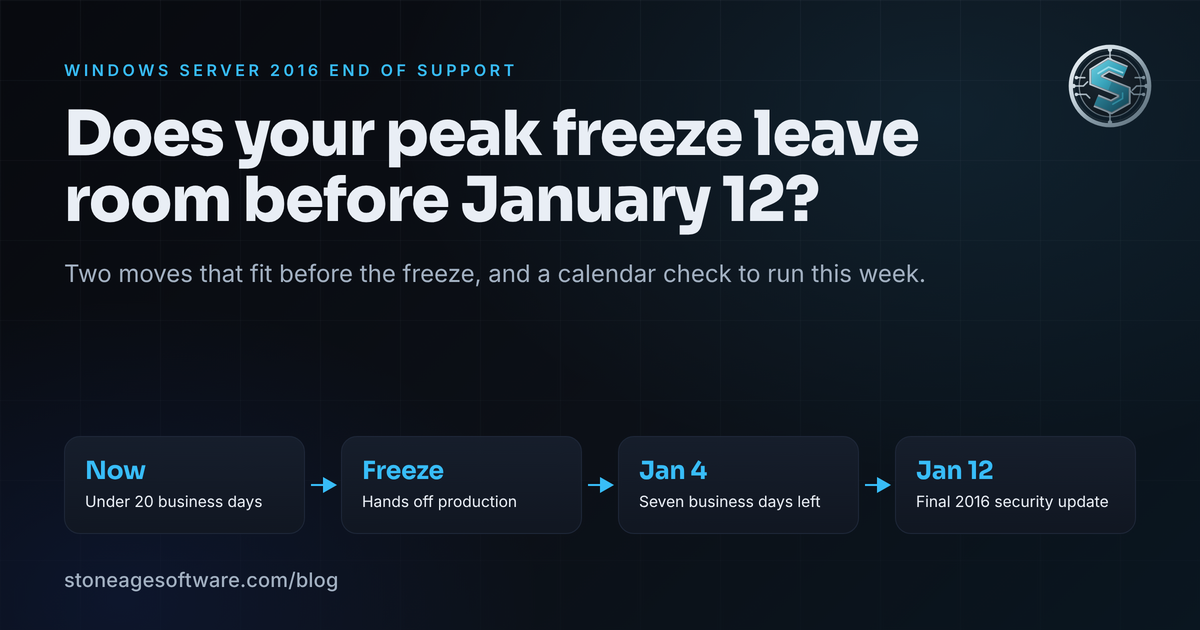
Count the days. January 12, 2027 is 76 days from today. Somewhere in the next two or three weeks, your building goes into its peak change freeze. Nobody touches a production server until the holiday returns are through the door. Then the freeze lifts, and you have seven business days before the last patch ships. That is the real shape of Windows Server 2016 end of support for a warehouse. The date is not the problem. The calendar around it is.
Microsoft put out a 90-day reminder on October 14 naming the date for all four editions. We wrote about the October 2026 end of Windows Server 2012 in an earlier post, and the inventory advice there still holds. This piece is about something else: how to fit the work around a season when the floor cannot absorb a change.
What actually changes on January 12, 2027
The Windows Server 2016 lifecycle page is plain. Extended support ends January 12, 2027 for Datacenter, Standard, Essentials and MultiPoint Premium. The January 2027 security update is the last one. After that, new holes stay open.
Still running Windows Server 2012 R2 too? Our Windows Server 2012 R2 and 2016 end-of-support guide covers both versions, one server at a time.
Three details from the reminder matter for a 3PL:
- Essentials features retire the same day. Remote Web Access and the rest of the Essentials toolset lose support. Small buildings that bought Essentials as a one-box server should note it.
- Extended Security Updates exist, but only for Standard and Datacenter. Essentials has no paid runway.
- The database layer may already be out. Many 2016 servers carry SQL Server 2016, which left extended support in July 2026. Check both layers.
Nothing stops on January 13. The WMS database still answers. Labels still print. The risk is the quiet kind, and quiet risk is the kind that waits until a customer questionnaire asks about it by name.
Why the calendar is the problem, not the date
Lay the deadline over a normal 3PL year and the gap shows up fast.
Before the freeze, you have a short run of normal weeks. For most buildings that is fewer than twenty business days from today. During the freeze, production is off limits. That is the correct call. A server swap during peak is how a bad week becomes a bad quarter. After the holidays, January 4 to January 12 is seven business days. That is enough time to notice a problem, and not enough time to fix one.
The seam here is structural. The lifecycle date was set years ago by a vendor calendar. The freeze was set by your customers' calendars. No system reconciles the two, so the work lands in the one window that cannot hold it. That is not a planning failure. It is two calendars that were never put on the same page.
So the question for the next three weeks is narrow. What can you do before the freeze that makes January survivable?
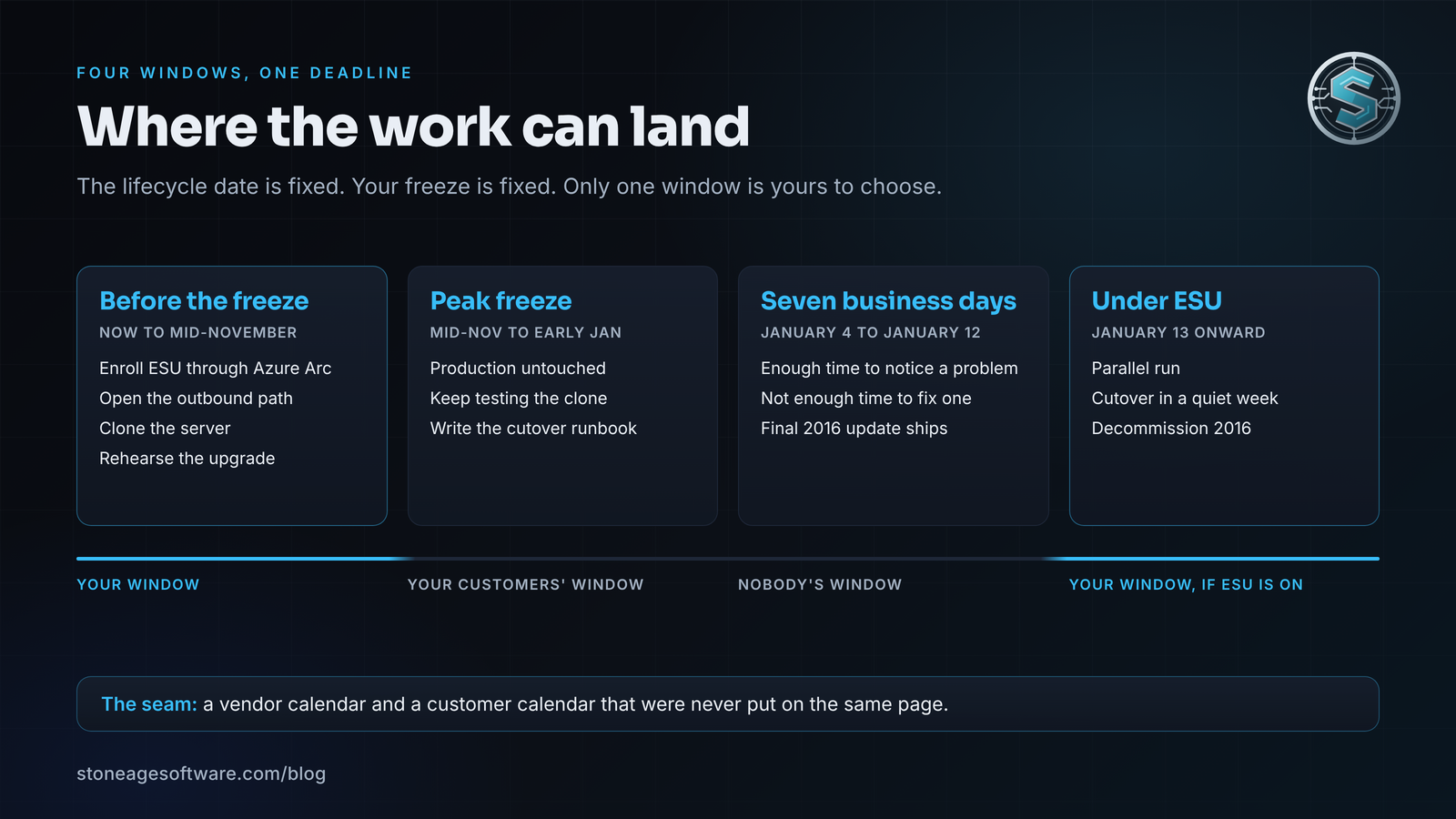
Two moves that fit before the freeze
Neither of these touches a live workload during peak. Both are reversible. Together they turn a cliff into a window.
Move one: enroll the server in Extended Security Updates through Azure Arc.
Microsoft's ESU guidance for Arc-enabled servers sets the terms. Enrollment for Windows Server 2016 opened in the Azure portal on August 3, 2026. Billing starts January 13, 2027. Coverage runs up to three years, through 2030, for Standard and Datacenter. The server needs the Azure Connected Machine agent at version 1.62 or later. Enrollment is keyless, and billing is a monthly subscription you can stop once the server is retired. Classic Volume Licensing keys in yearly increments remain an option too.
Two prerequisites trip warehouses in particular. First, you need Software Assurance through a volume program, or a server licensed through SPLA or a subscription. Find the paperwork now, not in January. Second, the agent has to reach Azure Arc. Microsoft allows a reduced set of endpoints when Arc is used only for ESU, through a public endpoint, a proxy or Private Link. A warehouse server on an isolated segment with no outbound path cannot enroll until someone opens one. That is a firewall change, and firewall changes belong before the freeze.
Buying ESU is not a decision to stay on 2016. It is a decision about when you leave. It moves the cutover from a seven-day scramble into a quiet week of your choosing.
Move two: clone the server and rehearse the upgrade somewhere safe.
Microsoft offers a free 180-day evaluation of Windows Server 2025, and the in-place upgrade path runs directly from 2012 R2 and later. Take a full image of the 2016 server, restore it to an isolated network, and run the upgrade there. Then point a spare scanner, a spare label printer and a test copy of the WMS at the result.
The rehearsal is not about whether Windows installs. It installs. The rehearsal is about the defaults that changed underneath your floor hardware.
What the rehearsal has to prove
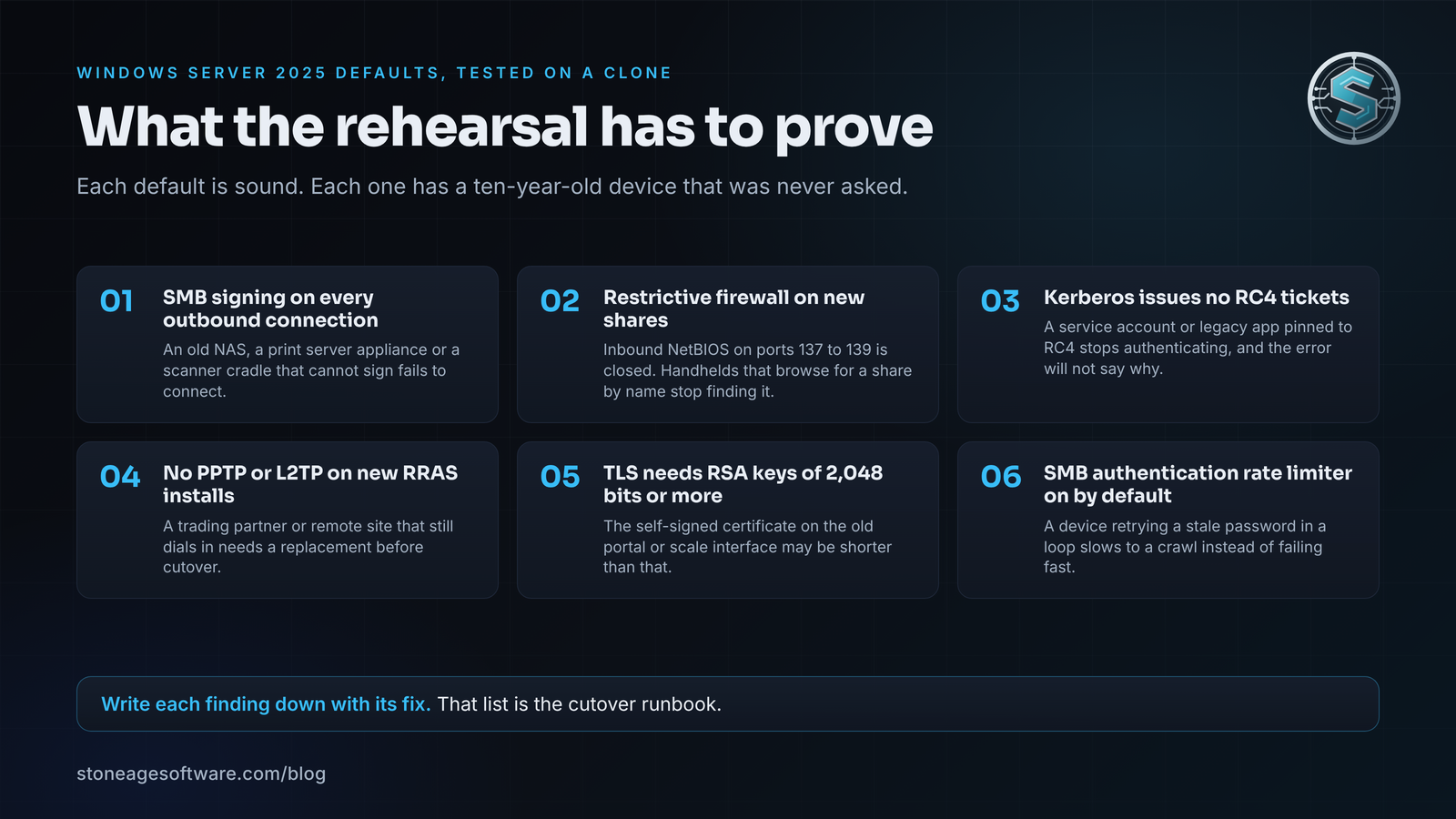
Microsoft's own list of what is new in Windows Server 2025 reads like a tour of a warehouse closet. Each item is a sound security default. Each one also has a ten-year-old device somewhere that was never asked about it.
- SMB signing is required by default for every outbound SMB connection. Before, that applied only to the SYSVOL and NETLOGON shares. An old NAS, a print server appliance or a scanner cradle that does not sign will simply fail to connect.
- New file shares use a restrictive firewall profile that no longer allows inbound NetBIOS on ports 137 to 139. Older handhelds that browse for a share by name stop finding it.
- Kerberos no longer issues tickets with RC4 encryption. A service account or a legacy application pinned to RC4 fails to authenticate, and the error message will not say why.
- New Routing and Remote Access installs do not accept PPTP or L2TP VPN connections by default. If a trading partner or a remote site still dials in that way, plan the replacement now.
- TLS server authentication requires RSA keys of 2,048 bits or more. The self-signed certificate on the old customer portal or scale interface may be shorter than that.
- The SMB authentication rate limiter is on by default. A device that retries a stale password in a loop slows to a crawl instead of failing fast.
None of these are reasons to stay on 2016. All of them are reasons to find out on a clone in November instead of on the dock in January. Write each finding down with the fix beside it. That list is your cutover runbook.
A Windows Server 2016 end of support plan for January and February
With ESU enrolled and the rehearsal done, the cutover becomes an ordinary migration. Our migrations practice runs it in four steps: assess, dry run, parallel run and cutover, decommission. The old server keeps serving until the new one has proven itself under real load.
That proof step is the part worth copying. In one of our release-engineering projects, a deploy to a live operations platform only completes if a new process is seen running within twenty seconds. If not, the job fails on purpose and the old version keeps serving. Apply the same rule to a server. The 2016 box is not powered down until the 2025 box has printed a label, picked an order and closed a wave.
One date needs to go on the ESU calendar too. Microsoft is rotating the certificates that sign Windows Update in 2027. BleepingComputer's October 9 coverage spells out the rule for Windows Server 2016. The July 2026 security update or later must be installed before May 17, 2027. Miss that, and the server loses access to Windows Update itself. Devices patched through WSUS are not affected. A server that is paying for ESU and sitting three months behind on patches gets nothing for the money. Check the patch level the week you enroll.
The whole engagement, rehearsal through decommission, is a fixed price, quoted up front. The runbook, the cutover scripts and the monitoring that watches the new server are handed over with it. 100% you own the code outright. That is what modernization without the meltdown looks like on a server nobody is allowed to turn off.
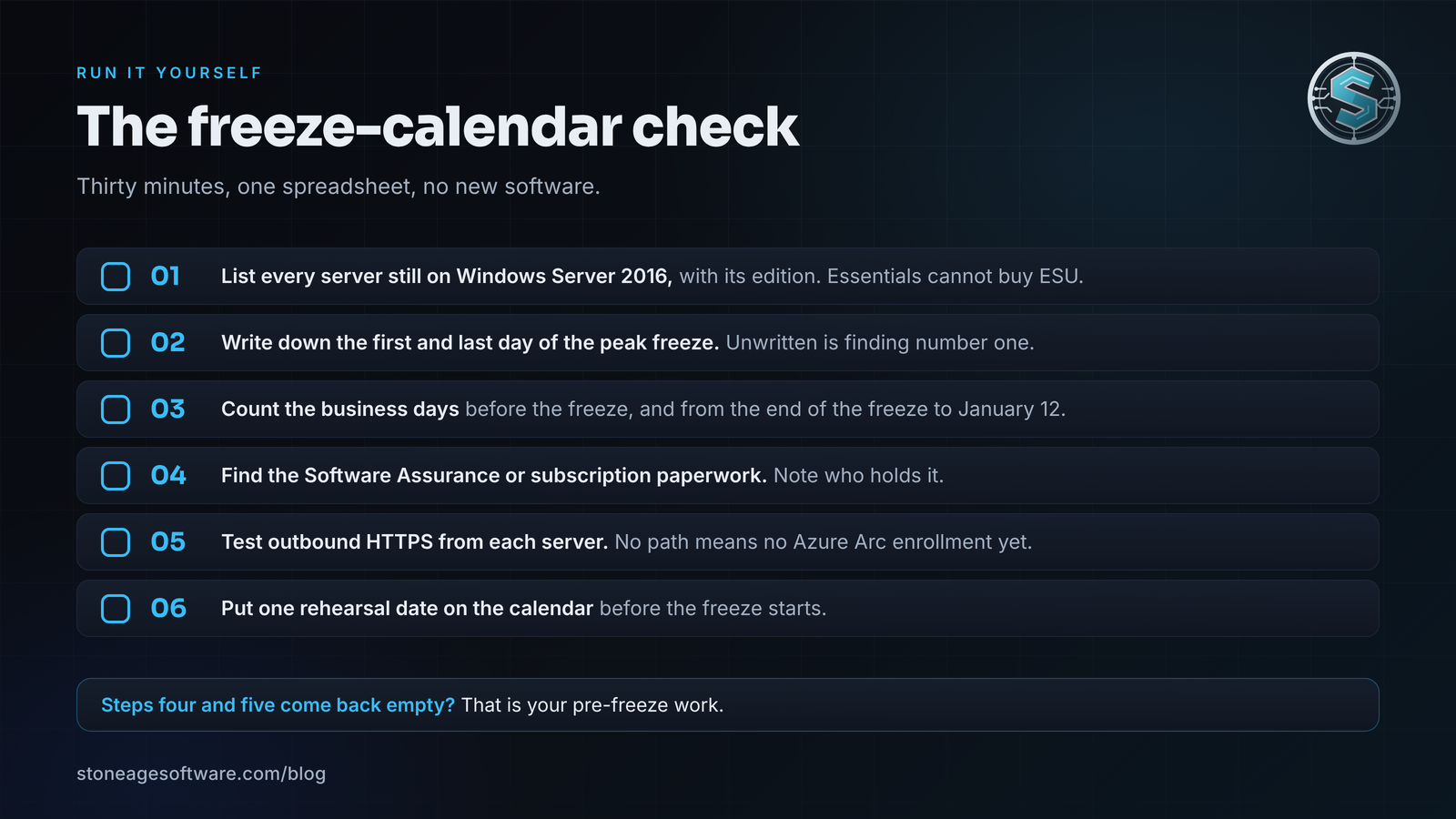
Run the freeze-calendar check this week
Thirty minutes, one spreadsheet, no new software.
- List every server still on Windows Server 2016, with its edition. Essentials cannot buy ESU, so it goes to the top of the list.
- Write down the first and last day of your peak freeze. If nobody has written it down yet, that is finding number one.
- Count the business days between today and the freeze. Then count the business days between the end of the freeze and January 12.
- Find the Software Assurance or subscription paperwork that makes each server ESU-eligible. Note who holds it.
- From each server, test whether it can reach an outbound HTTPS endpoint at all. If it cannot, the Arc enrollment needs a firewall change first.
- Put one rehearsal date on the calendar before the freeze starts.
If steps four and five come back empty, you have found your pre-freeze work. If they come back clean, enroll, clone and rehearse, and let January be boring.
If the server under the desk runs the WMS and the calendar says there is no good week to move it, that is the work we do. Our legacy modernization and migrations practice moves the system without stopping the business, with the old and new side by side until the numbers agree. We build, fix, and modernize the software your business runs on. Tell us what's broken. A sentence is plenty, and we'll ask the rest.