It is 4:00 PM. The daily inventory file has just come out of the WMS, every client in one sheet. Someone filters it to the first client, pastes the rows into that client's template, and attaches it to an email. Then the second client. Then the fortieth.
That is 3PL client reporting at a lot of well-run warehouses. On a good day, every file lands in the right inbox. On a bad day, one client's on-hand lands in another client's inbox. That is not a typo. It is a breach of trust.
Nobody is doing anything wrong here. The process asks a person to be the security layer, forty times before end of day.
Shippers notice. The 2027 Third-Party Logistics Study came out October 6. According to Material Handling & Logistics, 70 percent of shippers are satisfied with their 3PL's technology. Meanwhile, 94 percent of 3PLs believe their customers are satisfied. Gaps like that get built in moments like the 4:00 PM email.
The fix is not more hands at 4:00 PM. It is one Power BI semantic model that filters itself by who signs in. Here is how it works, and the leak test to run before any client sees it.
Why 3PL client reporting ends up in spreadsheets
A WMS is built to run the floor, and most run it well. Reporting is a different job. The built-in reports answer general questions. Client-facing views, where they exist, are built for the average client. Nobody has an average client.
And every client asks for something different:
- Apparel wants inventory aging in 30-day buckets.
- Food and beverage wants lot and expiry exposure.
- Electronics wants return status by RMA.
- Everyone wants open orders with tracking numbers.
So the export button becomes the integration. Each client gets a template. Each template carries its own filters and fixes. The know-how for all forty ends up in one person's routine.
That is the spreadsheet trap. It is a structural gap between the system that runs the floor and the clients who want to see inside it.
The same study names data quality and availability (61 percent) and legacy system integration (54 percent) as the top barriers to wider AI adoption. Client reporting runs into those same seams every afternoon.
One semantic model, filtered at sign-in
Stop building forty reports. Build one semantic model that holds every client's data, and let it filter itself.
The mechanism is row-level security, or RLS. In plain English, RLS is a filter that runs before anyone sees a number. It reads the sign-in name of whoever logged in, which usually looks like an email address. It looks up which client that sign-in belongs to. Then it hides every row that belongs to anyone else.
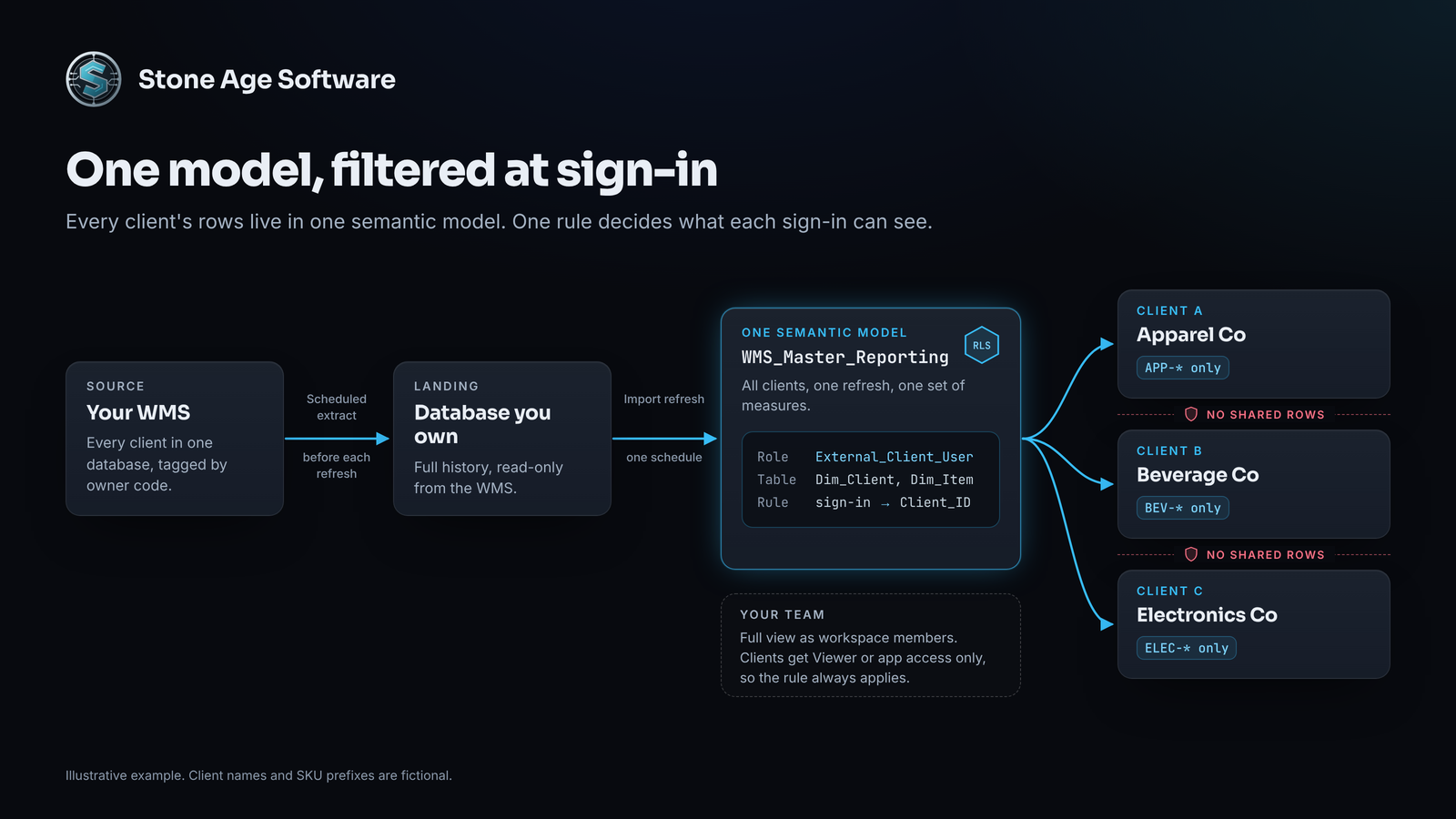
Every client opens the same report. Each one sees a different, smaller world. Your own team keeps the full view, as workspace members or through an unfiltered internal role.
That changes the maintenance math. One refresh serves every client. A measure gets fixed once, not forty times. Onboarding a new client becomes a data task, not a report build.
How row-level security works in practice
The build has three steps. None of them touch the floor. The WMS stays exactly as it is.
Step 1: Shape the data model
Land the WMS data where Power BI can reach it. That might be a SQL database, an API extract, or scheduled flat-file exports. A multi-client WMS already stamps an owner, storer, or client code on inventory and order rows. Keep that code on every fact table.
Then arrange the tables as a star schema. Fact_InventorySnapshot and Fact_ShipmentLines sit in the middle. Dim_Item, Dim_Location, and Dim_Date sit around them. Dim_Client is the gate. A small mapping table, User_Client_Security, holds one row per user per client. Give Dim_Item a Client_ID too, and key it by client plus SKU, since two clients can share a SKU code.
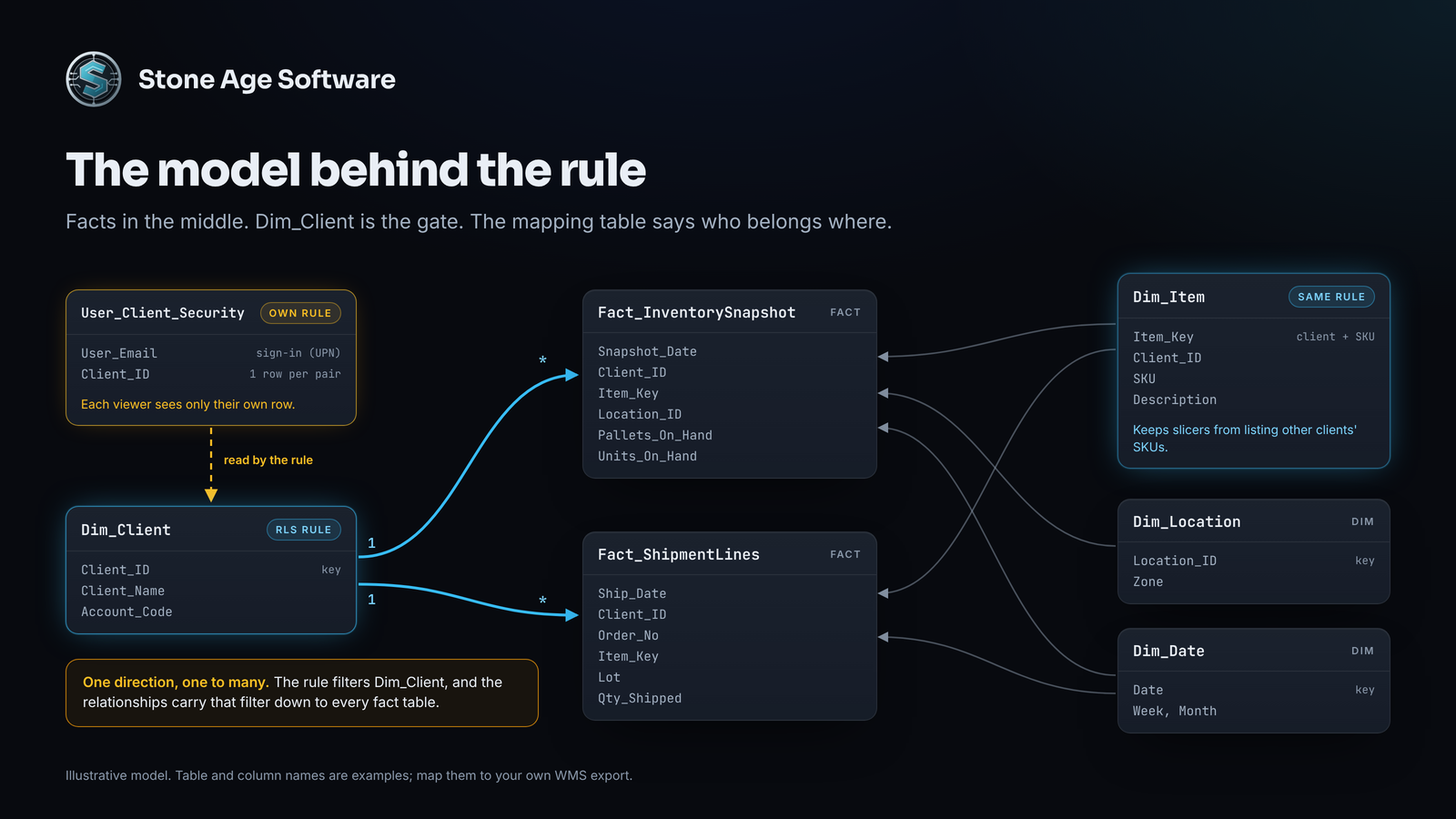
The mapping table is the quiet hero. Giving a new client contact access means adding a mapping row and a role member. Nobody builds a new report. We applied the same principle in a role-based access rebuild for a contract-logistics platform, where permissions moved out of code and into data.
Step 2: Write one rule in Power BI Desktop
In Power BI Desktop, open the Modeling tab and select Manage roles. Create a role called External_Client_User. Select Dim_Client, switch to the DAX editor, and enter this rule:
[Client_ID]
    IN CALCULATETABLE (
        VALUES ( User_Client_Security[Client_ID] ),
        User_Client_Security[User_Email] = USERPRINCIPALNAME ()
    )
Read it like this. Find the sign-in name in the mapping table. Keep only the clients listed beside it.
Four details matter:
- It handles shared contacts. Many examples use a single-key LOOKUPVALUE instead. That version errors when one planner covers two accounts.
- It fails closed. A sign-in missing from the mapping table sees nothing, not everything.
- It sits on dimensions, not facts. Microsoft's RLS guidance for Power BI Desktop recommends filtering dimension tables and letting relationships carry the filter to the facts. Relationships will not reach Dim_Item, though. Add the same rule to every client-owned dimension, such as items, lots, or ship-to addresses. Otherwise, a SKU slicer can still list every client's products.
- The list needs a lock too. Give User_Client_Security its own rule:
[User_Email] = USERPRINCIPALNAME(). Hiding a table does not secure it.
Then test before you publish. Select View as on the Modeling tab, pick the role, and enter a real client sign-in as Other user. The pallet card should fall from the full count to that client's count. Try an unmapped sign-in too.
Step 3: Publish and assign clients in the service
Publish the model to a workspace in the Power BI service. Open the semantic model's Security page. Add client users to External_Client_User by email.
Three points from Microsoft's row-level security documentation keep this honest:
- Clients get Viewer access only. RLS does not apply to workspace Admin, Member, or Contributor roles. A client added as a Member sees every client. Viewers can open every item in a workspace, so use a client-only workspace or an app.
- Add guests by email, not by group. Microsoft notes that security groups containing guest users might not work as expected.
- Check what a guest's sign-in returns. For guests, USERPRINCIPALNAME() can return a plain email or an #EXT# address. Store whatever your tenant actually returns.
External clients sign in as guest users in your tenant. Each needs a Pro license, theirs or yours, unless the workspace sits on capacity that allows free viewers. A Premium Per User workspace needs PPU for every viewer. Our look at Power BI usage-based billing covers where that line falls.
What changes on the floor and in the pitch
The first thing to go is the 4:00 PM email list. It simply retires.
- Self-service at 10 AM. A client checks its own stock before its morning meeting, without calling the warehouse.
- One definition per number. On-hand means the same thing in every client's view.
- Fewer places for a leak to start. Nobody picks an attachment by hand. The rule does the separating, and you test the rule.
- People back on exceptions. The hours that went into templates go to short ships, receiving holds, and calls that need judgment.
Be honest about freshness. Scheduled refresh runs up to eight times a day on Pro, and up to 48 on Premium Per User or Fabric capacity. Time one refresh ahead of the old 4:00 PM send. Clients get the same numbers without waiting for an email.
There is a sales angle too. In the same Material Handling & Logistics coverage, 74 percent of shippers report more partner consolidation, up from 50 percent. When a brand is trimming its list, a live, scoped login beats a sample spreadsheet. Your portal demo becomes part of the pitch.
Run this leak test before the first client signs in
Set aside one afternoon before any client gets a login:
- View as a real client. In Desktop, view as the role with a mapped client sign-in. The pallet total should drop to that client's number.
- Open the item slicer. Only that client's SKUs and lots should appear. A visual on the mapping table should show only their own row.
- Try an unmapped sign-in. Every fact visual and every client or SKU slicer should come back empty.
- Audit workspace roles. No client should hold Admin, Member, or Contributor.
- Sign in as a test guest. Microsoft notes that Test as role in the service evaluates dynamic rules with your own identity. Only a real guest sign-in proves what a client sees.
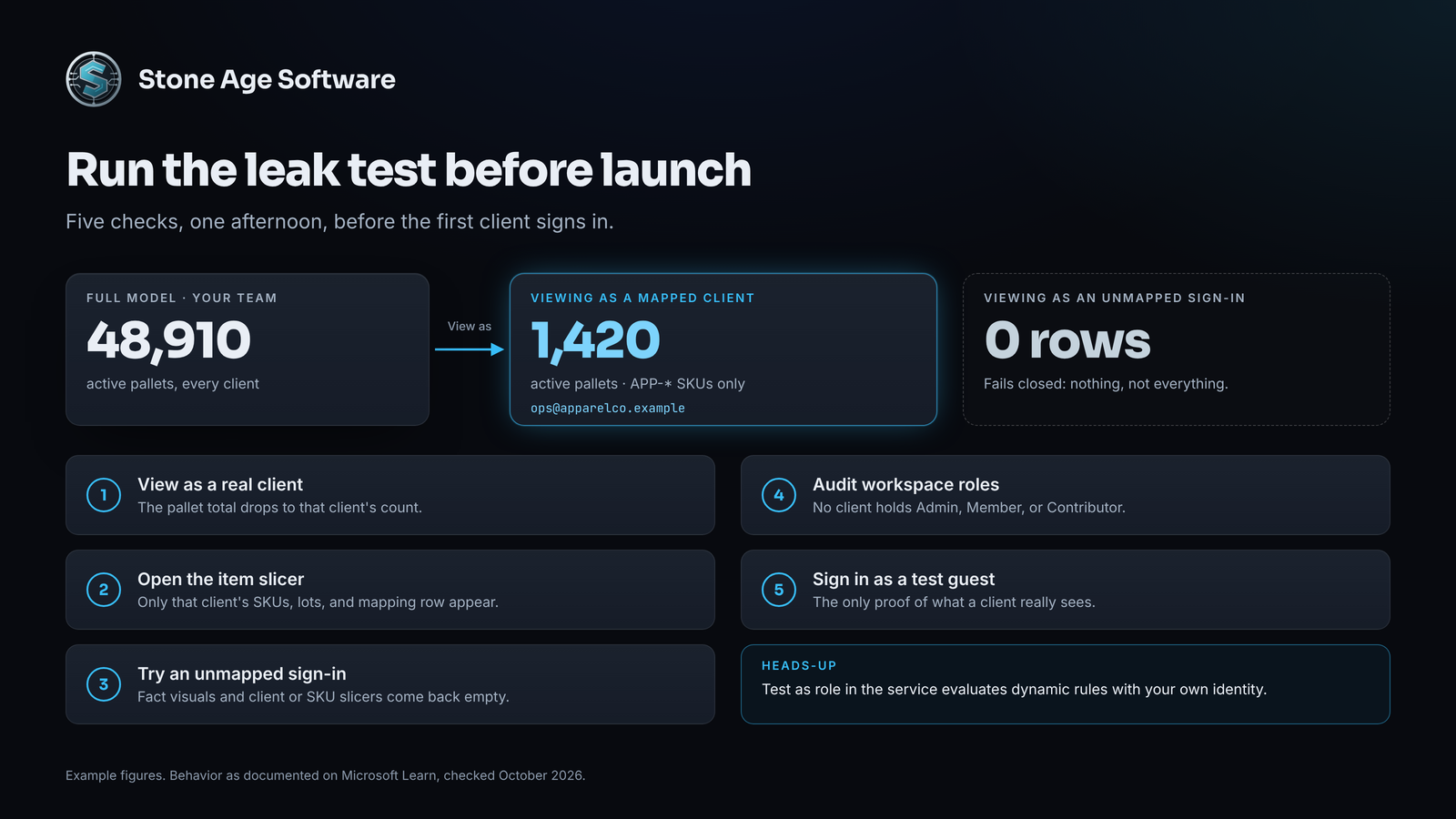
If a check fails, fix the model before launch. The cause is usually one missing rule or one wrong role.
Your operations team should spend 4:00 PM on exceptions, not attachments. If your clients still get their numbers by email, that is the reporting layer nobody sold you. Stone Age Software builds it beside the WMS you already run. That means a read-only extract, a database you own, and one model scoped by client. It is fixed price, quoted up front. See how the 3PL reporting layer works.