A vendor invoice lands in a shared inbox at 7:40 on a Tuesday. By 9:15 someone has opened it and keyed fourteen fields into the ERP. By Thursday a second person is calling the vendor about a quantity that was never on the page. That is the ordinary shape of document work. Ardent Partners' 2026 benchmark puts the average invoice at 11.6 days to process. Only 38.3 percent get through without anyone touching them.
AI document automation closes most of that gap, and the low-code version runs on tools many operations already pay for. Power Automate watches the inbox. AI Builder reads the document. Dataverse holds the result. Power BI shows what happened. None of that is the hard part. The hard part is the one document the model is not sure about. Where does it go, and who sees it before the ERP does? This article builds the pipeline end to end and keeps that question at the center.
What AI document automation does that OCR never did
Optical character recognition gives you characters. It will tell you that "4,850.00" appears near the bottom of page two. It will not tell you whether that is the amount due or the previous unpaid balance. A person made that call for twenty years, and the ERP never knew the difference.
Document processing models work at the field level. The prebuilt invoice model returns named fields such as InvoiceId, VendorName, PurchaseOrder, DueDate and AmountDue. It returns line items as a table with quantity, unit price and amount per row. Every value arrives with a confidence score between 0 and 1. The same family reads purchase orders, bills of lading, identity documents, and fixed-layout medical and legal forms. Microsoft's prebuilt invoice processing reference lists the fields, 36 language variants, and the file limits.
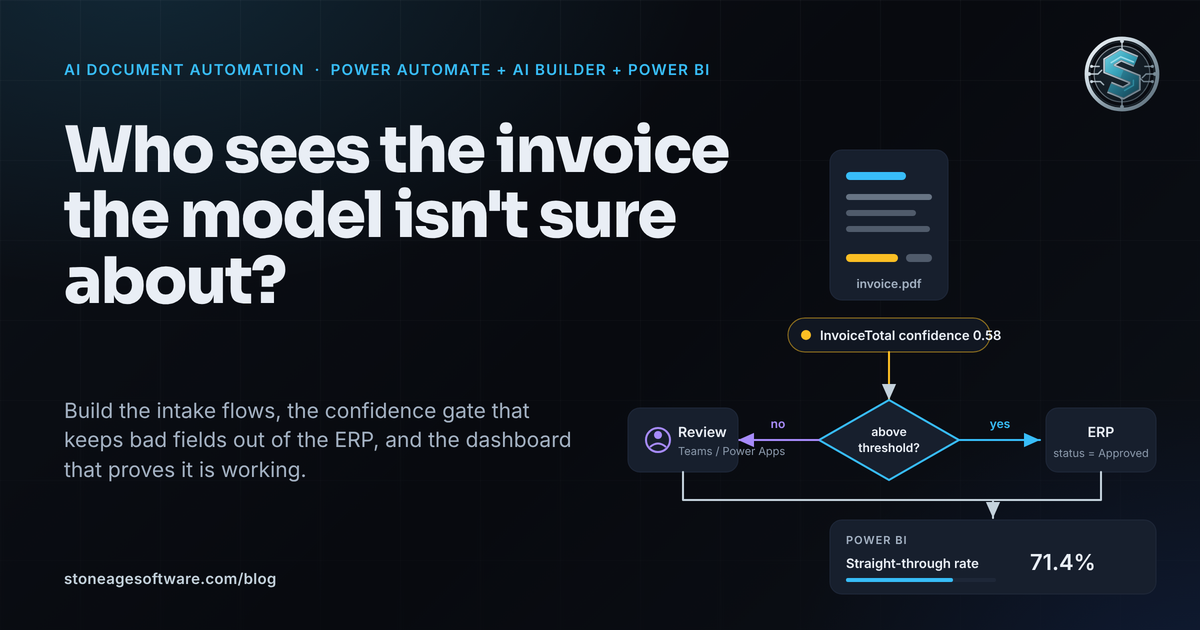
That confidence score is the whole difference. A field the model is sure about can move. A field it doubts waits for a person. Nobody reads every page to find the one that needs them.
Supply Chain Dive reported in April 2026 that UPS was clearing 90 percent of roughly 112,000 daily import packages through customs with no manual intervention. The other 10 percent go to people. That ratio, not the model, is the design target.
Building the pipeline in Power Automate and AI Builder
Here is the build, in the order that keeps you out of trouble.
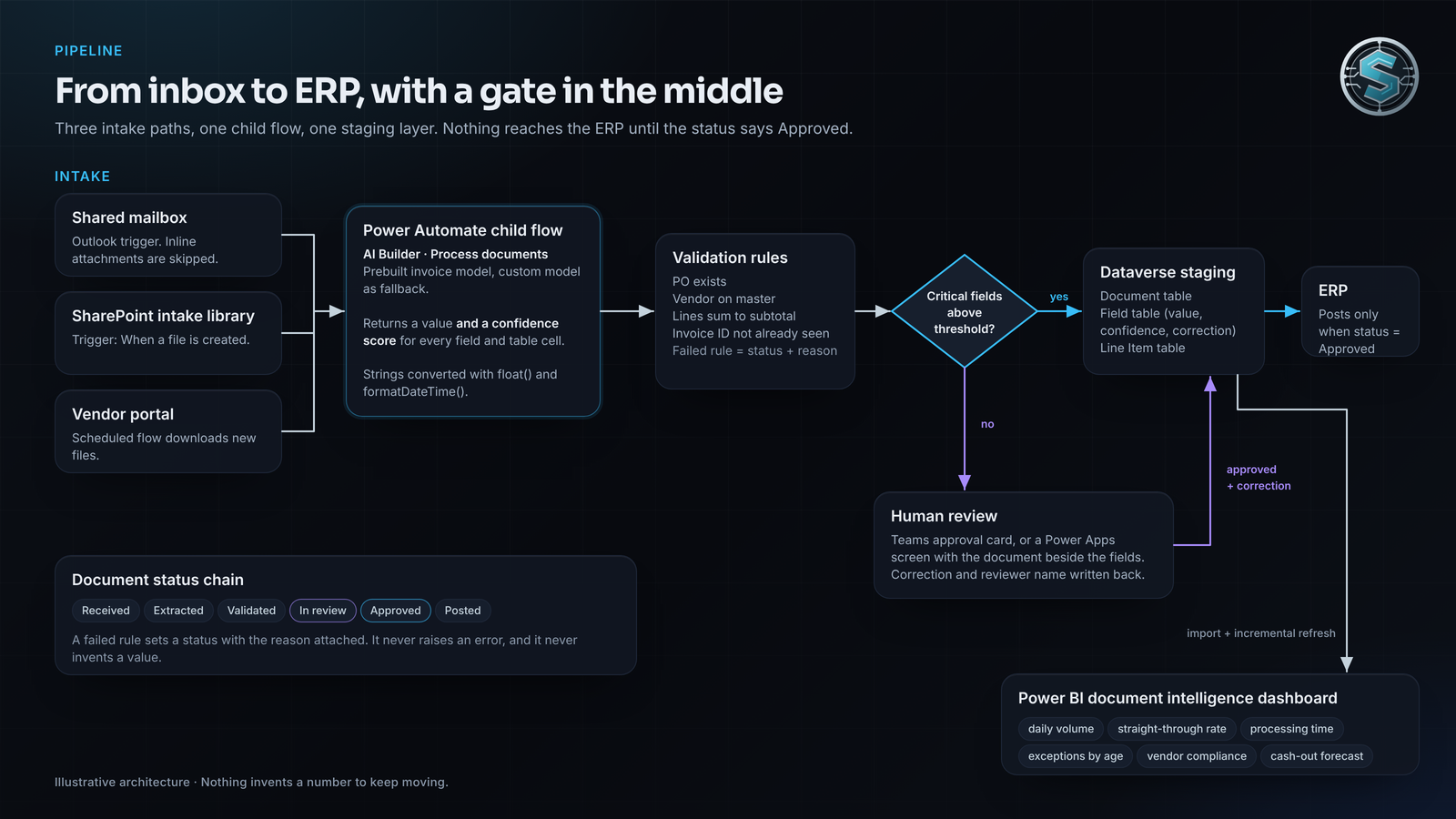
- Pick the model. Start with the prebuilt invoice model. It handles most vendor layouts with no training. For the layouts it misses, train a custom document processing model on a few samples per layout. Microsoft's guidance chains the two: call the custom model first and fall back to the prebuilt model when its score is low.
- Set the triggers. Use one flow per intake path. A shared mailbox uses the Outlook trigger "When a new email arrives," with a condition that skips inline attachments so signature images never reach the model. A SharePoint intake library uses "When a file is created." A vendor portal gets a scheduled flow that downloads new files. All three hand the file to one child flow, so the processing logic lives in one place.
- Call the extraction action. The action is "Process documents," which replaced "Extract information from documents" in May 2025. Microsoft's document processing flow guide shows the outputs: a value and a confidence score for every field and table cell. Values arrive as strings, so convert them with float() and formatDateTime() before they touch a typed column. Use the Pages parameter on long files so you only pay for the pages that hold the form.
- Map into Dataverse or SQL, never straight into the ERP. Create a Document table with source, received time, page count, status and a link to the stored file. Create a Field table with field name, value, confidence and a corrected-value column. Create a Line Item table. Every later section lives in that staging layer.
- Validate before anything moves. The purchase order must exist. The vendor must be on the master. Line amounts must sum to the subtotal. The invoice ID must not already be in the table. Each failed rule sets a status with a reason, not an error.
That is Power Automate invoice automation in its plainest form. The flows stay short. The tables do the remembering.
Exception handling: where the low-confidence invoice goes
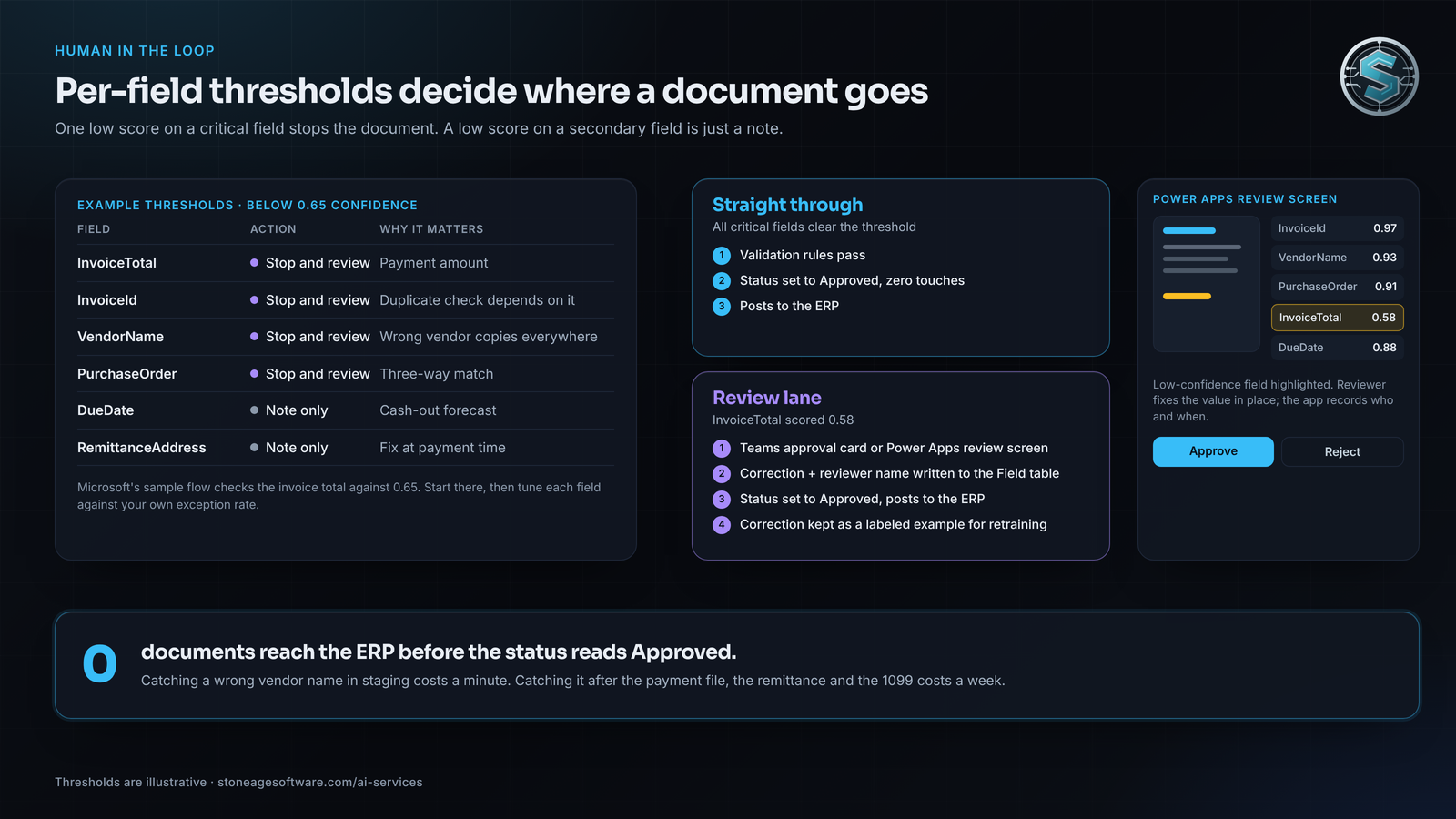
Set the threshold per field, not per document. A low score on a remittance address is a note. A low score on InvoiceTotal, InvoiceId, VendorName or PurchaseOrder is a stop. Microsoft's own example checks whether the invoice total scored under 0.65 before trusting it. Start there, then tune against your real exception rate.
When a critical field misses, the flow routes the document to a person. Two ways work well.
- Teams approvals. The "Start and wait for an approval" action posts a card with the extracted values and a link to the file. The reviewer approves, rejects, or types a correction. Nothing downstream fires until the response arrives.
- A Power Apps review screen. A canvas app over the staging tables shows the document image beside the extracted fields, with the low-confidence ones highlighted. The reviewer fixes the value in place. The app writes the correction and the reviewer's name back to the Field table.
The second approach is worth the extra afternoon. Every correction becomes a labeled example for retraining the custom model on the layouts that keep failing. The exception rate falls on its own.
The rule that protects the ERP is simple. Nothing posts until the document status is Approved, whether it got there straight through or through a person. A wrong vendor name that slips into the ERP gets copied into the payment file, the remittance and the 1099 before anyone notices. Catching it in staging costs a minute. Catching it downstream costs a week.
We built the same gate for a contract-logistics client whose transfer requests arrived as spreadsheets attached to email. The pipeline reads the attachment, checks every line, and builds the order. Where it cannot complete a group correctly, it stops and marks the sheet with the reason. Nothing invents a number to keep moving. The people who used to key them now work the lines the checks surface, which is the part that needed a person all along.
One date to put on the calendar: November 1, 2026
Before live invoices flow through this, check how the environment is funded. Microsoft's end of AI Builder credits notice sets November 1, 2026 as the end of life for both the capacity add-ons and the credits seeded into premium licenses. Credits already on a contract run to the end of its term. New and renewed premium licenses after that date will not include them. Copilot Credits take over.
The consumption order matters for anything that runs unattended. Features draw the older credits first, then Copilot Credits. If both run out, the action fails and the flow stops. Metering is per page and resets monthly. The capability rate table has the per-page rates. Put a daily check of remaining capacity on the dashboard below. An intake flow that quietly stops on the 24th of the month is the oldest failure in this category.
Closing the loop: the Power BI document intelligence dashboard
The staging tables from step four are a reporting source on their own. Connect Power BI to Dataverse in import mode with incremental refresh, and the pipeline becomes measurable the day it goes live. Two panels earn their place.
Operational metrics
- Daily volume by intake path. Email, SharePoint and portal, so a quiet mailbox stands out the morning it goes quiet.
- Straight-through processing rate. Documents approved with zero human touches, divided by all documents. Trend it weekly.
- Average processing time per document. Received time to posted time, split by straight-through and reviewed. The reviewed line is the true cost of an exception.
- Exceptions open by age and failing fields by count. The second one is your retraining backlog.
Business metrics
- Spend extracted by vendor and by week, built from the line-item table rather than from the ERP after the fact.
- Vendor compliance. The share of each vendor's invoices that carry a valid PO, match agreed terms, and use the remit-to address on file.
- Cash-out forecast. AmountDue summed by DueDate week. It exists the day the invoice arrives, not the day someone gets to it.
For the straight-through measure, one DAX pattern does the work: documents with zero touches divided by all documents, with DIVIDE() guarding the empty week. If you are deciding whether this lives in a workspace or ships as an app, our note on apps in Power BI covers the trade. If refresh volume climbs, read the usage-based billing piece before capacity becomes the surprise.
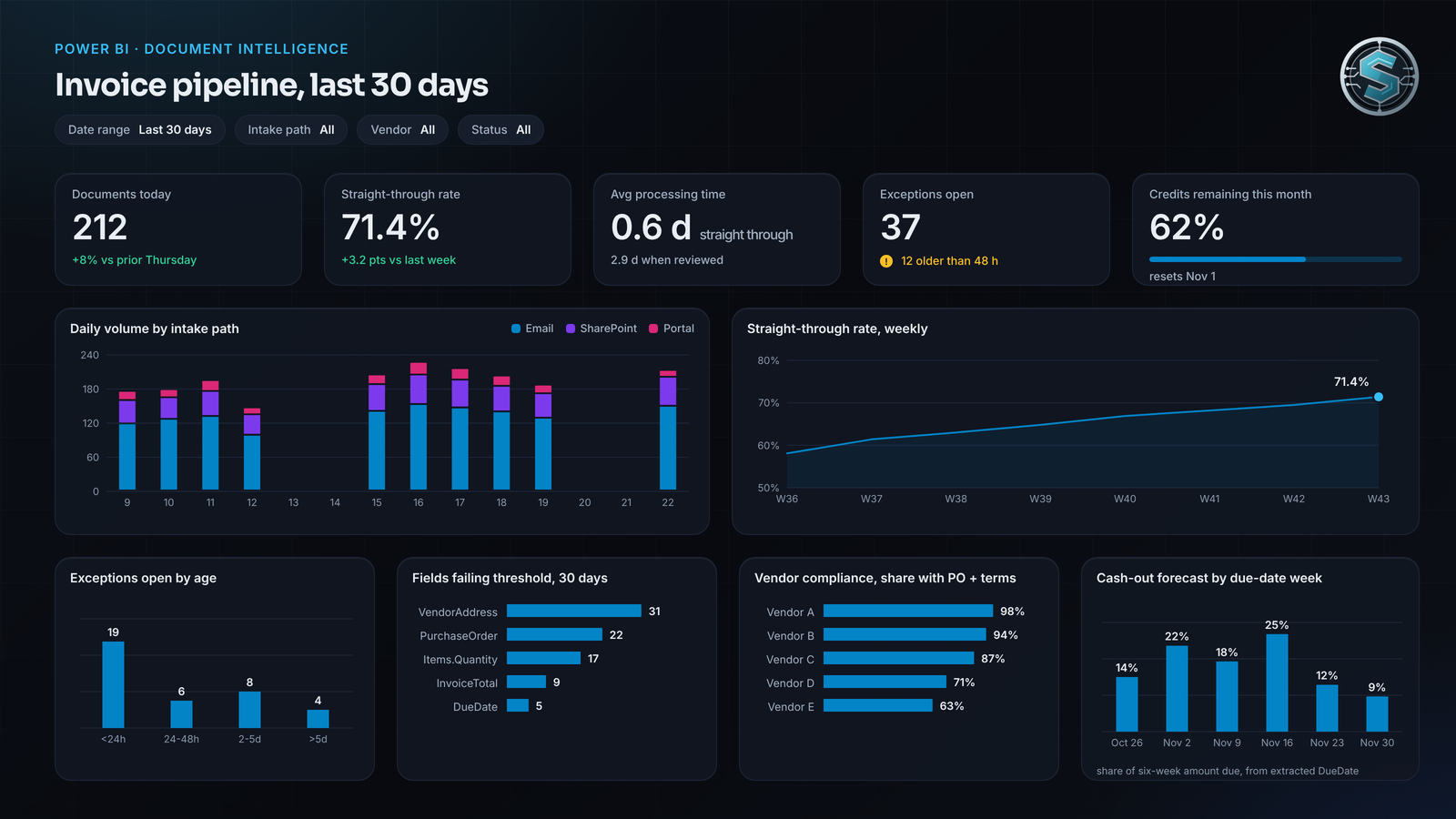
Power BI document analytics also answers the question finance asks in month two. Not "does it work," but "how much still reaches a person, and which vendors cause it."
The check you can run this week
Pull one week of documents that reached the ERP. For each one, answer three questions.
- Which file did it come from, and where is that file now?
- What was the lowest confidence score on a critical field?
- If that score was under your threshold, who approved it, and when?
If the third answer is "nobody, it posted anyway," the review queue is decorative. If the first answer takes more than a minute, the audit trail is missing. Either gap is a seam in the pipeline, not a fault in the people running it. Both close with the staging tables described above.
If you would rather have it built, measured and handed over with documentation your team can run, that is what our AI and automation practice does. Every engagement starts with a free automation assessment and is fixed price, quoted up front.